🧠 AI Quiz
Think you really understand Artificial Intelligence?
Test yourself and see how well you know the world of AI.
Answer AI-related questions, compete with other users, and prove that
you’re among the best when it comes to AI knowledge.
Reach the top of our leaderboard.


















Un AI my text

What is Un AI my text?
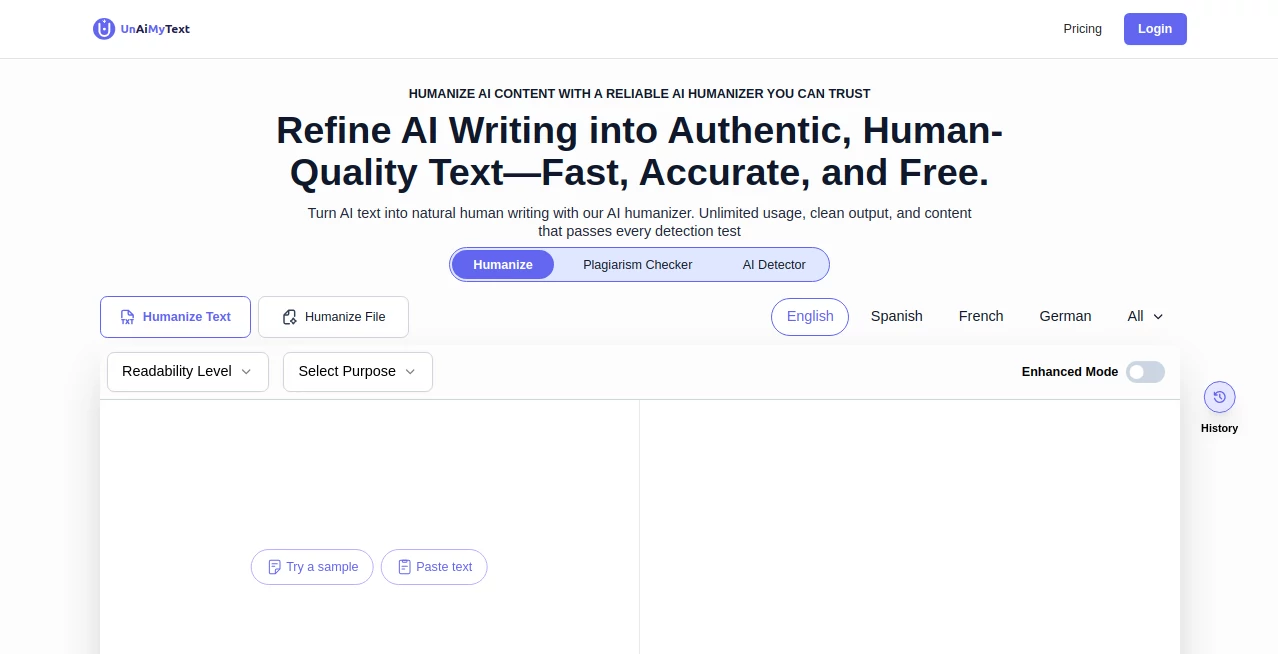
Most AI writing tools spit out text that feels... off. Too perfect, too robotic, too obviously generated. This one does something different: it writes in a way that reads like a real person sat down and typed it—imperfect phrasing, natural flow, little quirks that make it believable. I’ve used it to draft emails, blog posts, and even social captions, and the number of times someone replied “you nailed exactly how I talk” is honestly surprising. It’s not just about avoiding detection; it’s about sounding human because the output genuinely feels human.
Introduction
AI text has come a long way, but the last mile—making it indistinguishable from something a skilled human wrote—is still tricky. This platform quietly solves that. Feed it your topic, tone, length, and any specific voice notes (casual, professional, witty, empathetic, etc.), and it delivers copy that doesn’t scream “AI.” Writers, marketers, students, founders, creators—anyone who needs words that connect instead of repel—finds real value here. It’s become a daily go-to for people who want quality output fast without the telltale robotic polish that sets off alarms in readers (or detectors).
Key Features
User Interface
The workspace is calm and distraction-free. A generous prompt box on the left, live preview on the right, and a handful of sensible controls (tone sliders, length presets, voice presets, readability target). No overwhelming options, no forced templates. You type or paste your instructions, hit generate, and watch thoughtful paragraphs appear almost instantly. It’s the kind of interface that lets your ideas lead instead of fighting the tool.
Accuracy & Performance
It stays remarkably on-brief—follows tone instructions precisely, matches intended audience level, avoids repetition, and rarely drifts into generic filler. Output arrives in seconds for most lengths, and the first draft is usually 80–90% there. The model understands nuance: sarcasm, warmth, urgency, authority. When you ask for “write like a tired founder who just pulled an all-nighter,” it actually sounds like that person, not a caricature.
Capabilities
Long-form blog posts, short-form social captions, cold emails, product descriptions, video scripts, LinkedIn thought pieces, Reddit replies, dating-app bios, cover letters—pretty much any text that needs to feel personal and persuasive. Multiple tones and voices (professional, conversational, cheeky, empathetic, authoritative), length control, readability targeting (Flesch-Kincaid), and built-in humanization that adds natural variation and micro-imperfections. It also rewrites existing text to sound more natural or match a specific voice.
Security & Privacy
Your prompts and generated text are processed ephemerally—nothing is stored long-term or used for training unless you explicitly opt in. No account required for basic use, so your content isn’t tied to a profile. For sensitive copy (client work, personal messages, internal comms), that clean, low-retention approach matters a lot.
Use Cases
A SaaS founder writes LinkedIn posts that actually get comments instead of likes—because they sound like a real founder, not a corporate bot. A small e-commerce brand refreshes hundreds of product descriptions overnight; conversion rates quietly climb. A student drafts essays and cover letters that pass detectors and feel authentically theirs. A content creator generates weekly newsletter drafts that keep subscribers opening every time. Wherever authenticity wins attention, this tool quietly helps win it.
Pros and Cons
Pros:
- Output genuinely passes as human-written—detectors struggle, readers connect.
- Understands tone and voice with rare precision.
- Fast enough for real-time iteration (seconds per generation).
- Flexible for short captions to 2000+ word articles.
- Generous free tier—real value before paying a cent.
Cons:
- Very long-form pieces (3000+ words) sometimes need more manual guidance.
- Advanced voice cloning or brand-style training lives in higher tiers.
- Occasional need to re-prompt for ultra-specific niches.
Pricing Plans
Free tier offers meaningful daily generations—enough for testing, light use, or occasional projects. Paid plans unlock unlimited words, priority queue, advanced tone/voice presets, brand voice training, and API access. Pricing stays reasonable; many users say the monthly cost is less than one freelance writer session, but delivers consistent output every day.
How to Use UnaimyText
Go to the composer, paste or type your instructions (“Write a 300-word LinkedIn post about bootstrapping a SaaS, tone: candid + optimistic, like a founder who’s tired but hopeful”). Adjust length, tone sliders, readability target if desired. Hit generate. Read the result—tweak prompt wording or regenerate if needed. Copy, edit lightly if you want, paste wherever it’s going. For brand consistency, paid users can train a custom voice once and reuse it forever. Simple, fast, effective.
Comparison with Similar Tools
Many AI writers produce clean but robotic text that raises eyebrows. This one leans hard into human-like variation, micro-imperfections, and tone accuracy—qualities that make detectors hesitate and readers stay engaged. Where others feel like polished press releases, the output here feels like actual people talking. It trades some raw speed for authenticity, which is exactly the trade most serious users want.
Conclusion
Words are how we connect, persuade, explain, inspire. When they sound robotic or generic, that connection weakens. This tool quietly strengthens it—giving you text that feels real because it is crafted to feel real. Whether you’re writing to sell, to teach, to share, or just to be heard, it helps your voice cut through the noise without ever sounding like a machine. In a sea of AI content, that’s the difference that matters.
Frequently Asked Questions (FAQ)
How human does the text really sound?
Human enough that detectors often score it 90%+ human, and readers rarely suspect AI.
Can I train it on my own writing style?
Yes—paid plans let you upload samples and create a reusable custom voice.
What’s the longest piece it can write?
Up to ~4000 words in one go on higher plans; longer pieces work best in sections.
Will it pass AI detectors?
Most of the time—especially Originality.ai, GPTZero, Copyleaks. Not 100% guaranteed (no tool is), but consistently among the best.
Do I need an account to start?
No—generate freely without signing up; account unlocks saving, history, custom voices.
AI Content Generator , AI Rewriter , AI Copywriting , AI Writing Assistants .
These classifications represent its core capabilities and areas of application. For related tools, explore the linked categories above.
Un AI my text details
This tool is no longer available on submitaitools.org; find alternatives on Alternative to Un AI my text.
Pricing
- Free
Apps
- Web Tools
Categories

Un AI my text Alternatives Product
Husslix1.1

YooPrompt

Geoleaper

Flow Veo 3

Alai

Prompt Sloth

Quso AI

AISEOMate

UPDF AI