
🧠 AI Quiz
Think you really understand Artificial Intelligence?
Test yourself and see how well you know the world of AI.
Answer AI-related questions, compete with other users, and prove that
you’re among the best when it comes to AI knowledge.
Reach the top of our leaderboard.


















UniVideo
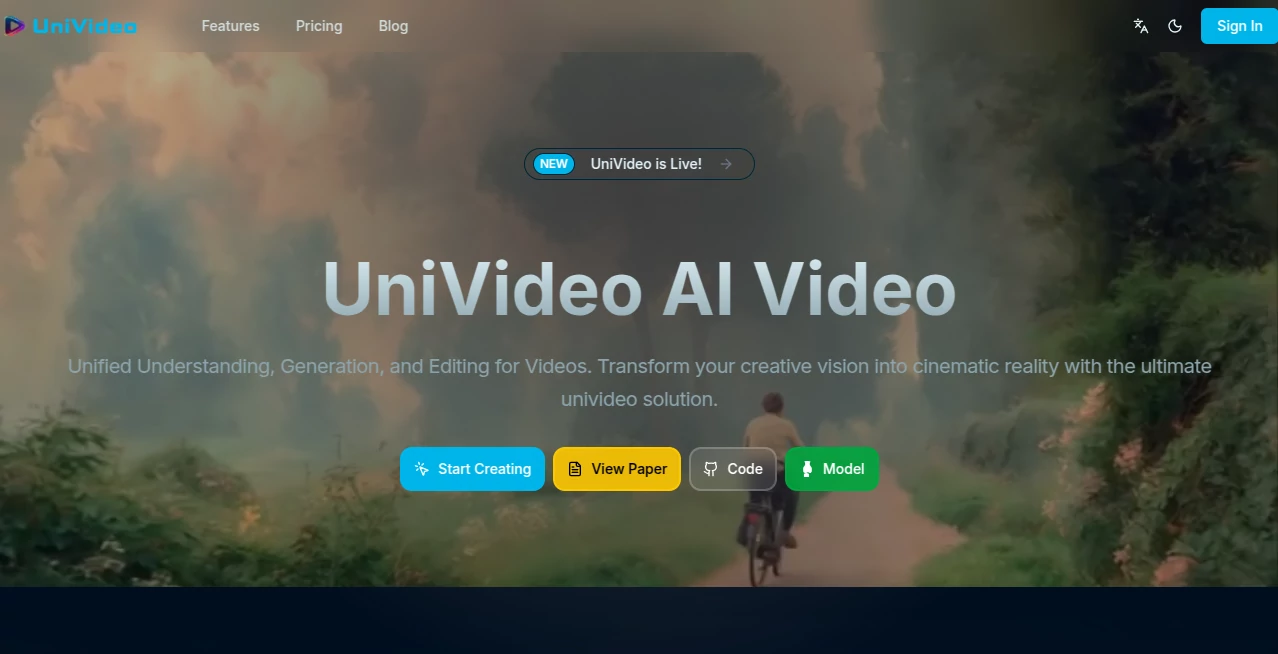
What is UniVideo?
There’s something almost unfair about how fast you can go from a half-formed thought to a finished video that looks like it came from a small production team. This tool has that rare ability to make you feel like you’ve cheated the system a little—type a line, drop in a reference image or clip if you want, and a few minutes later you’re watching something that moves, breathes, and tells a story with real polish. I’ve seen creators who used to spend weekends rendering loops now drop daily content that looks effortlessly cinematic, and the quiet confidence it gives them is hard to beat.
Introduction
Most video tools still demand you wrestle with timelines, keyframes, and effects. This one flips that entirely. It takes your words—or your words plus a photo, a short clip, or even just a vibe—and builds a coherent, multi-shot video with natural motion, consistent characters, and lighting that feels intentional. What started as an ambitious research effort has become a daily driver for people who need to communicate visually without the production tax. Marketers testing ad concepts, educators making quick explainers, musicians visualizing tracks, storytellers sketching scenes—everyone finds a piece of their workflow suddenly lighter. The best part? It doesn’t feel robotic; the results carry emotion and rhythm that make people pause and actually watch.
Key Features
User Interface
The screen is calm and focused. You get a generous prompt box, a handful of clear toggles for style and length, and upload fields that accept images, video clips, or audio without complaining. There’s no visual overload—just enough controls to guide you, never to confuse you. Previews appear fast enough that you can iterate without losing your train of thought. It’s the kind of design that disappears while you work, which is exactly what you want when inspiration is flowing.
Accuracy & Performance
Consistency across shots is where it really earns its stripes. Characters don’t morph unexpectedly, lighting stays coherent, and motion follows real physics instead of cartoonish jumps. Generations rarely feel like a lottery; even on the first try, the output usually lands close to what you pictured. It’s quick too—most clips are ready in under a minute, so you can keep the creative loop tight instead of waiting around. That speed-plus-quality combination is addictive once you experience it.
Capabilities
You can start from pure text, guide with a reference image, extend from an existing clip, or even animate static photos into subtle motion. Multi-shot storytelling comes naturally, with transitions that feel directed rather than stitched. Audio-reactive features sync movement to beats when you upload music, and the model handles everything from realistic scenes to stylized animation with surprising grace. It’s flexible enough for quick social posts and ambitious enough for narrative sequences that actually hold attention.
Security & Privacy
Your uploads and generated videos stay under your control. The system is designed with clear boundaries—no lingering copies, no unauthorized access, and enterprise-grade options for teams who need extra reassurance. When you’re working on sensitive ideas or branded content, that quiet confidence matters more than most people realize.
Use Cases
A small business owner sketches a product idea, uploads a photo, and creates a looping ad that performs better than anything they paid for before. A musician drops their latest track and watches the beat drive abstract visuals that become the official video. An educator turns a dense concept into a short, engaging explainer that students actually watch to the end. Storytellers prototype scenes for scripts, seeing pacing and mood before committing to full production. The range is wide because the tool trusts you to bring the vision.
Pros and Cons
Pros:
- Stunning motion and character consistency that rival far more expensive workflows.
- Fast enough to keep creative momentum alive—no staring at progress bars.
- Multiple input paths (text, image, video, audio) give you real creative control.
- Results feel cinematic rather than algorithmic.
Cons:
- Longer or very intricate scenes can still push generation time.
- Free tier is generous but naturally limited for heavy daily use.
Pricing Plans
The entry point is welcoming: a solid free allowance that lets you explore and create real work without opening your wallet. Paid tiers scale naturally—more credits, higher resolution, faster queues, watermark-free exports, and priority processing. Monthly plans are straightforward, yearly options save noticeably, and there’s no lock-in pressure. It feels built for creators at every stage, not just enterprises with big budgets.
How to Use UniVideo
Start simple: write a short scene description or paste a script snippet. Add a reference image if you have a specific look in mind, or upload a clip to extend. Choose length, style hints, and any audio you want synced. Hit generate and wait for the preview—usually just long enough to grab a coffee. Tweak the prompt if needed and regenerate, or download the finished clip. It’s forgiving for beginners and rewarding for people who know exactly what they want to say visually.
Comparison with Similar Tools
Plenty of video generators produce single shots or short loops, but very few handle true multi-shot storytelling with this level of coherence and cinematic intent. Where others feel experimental or inconsistent, the motion here is deliberate and the characters stay recognizable across cuts. It sits in a sweet spot—powerful enough for serious creators, approachable enough for anyone who wants to try.
Conclusion
Video creation used to be a privilege reserved for those with time, money, or technical patience. This tool quietly dismantles that gate, handing visual storytelling back to the people who have something worth saying. The results are beautiful, the process is humane, and the feeling of seeing your idea move is still as thrilling as the first time. If you’ve ever wanted to make something that looks and feels like it belongs on screen, this is the place where that dream starts to look real.
Frequently Asked Questions (FAQ)
How long can the videos be?
Most clips range from 5–15 seconds depending on complexity, perfect for social, ads, and storytelling snippets.
Do I need a reference image or clip?
Not at all—text-only works beautifully, but references add even more control and consistency.
Can I sync to my own music?
Yes—upload an audio track and the motion aligns to the beat naturally.
Is there a watermark on free videos?
Free tier includes a subtle watermark; paid removes it completely.
How cinematic are the results really?
Surprisingly so—lighting, camera language, and emotional pacing feel directed, not generated.
AI Animated Video , AI Image to Video , AI Video Generator , AI Text to Video .
These classifications represent its core capabilities and areas of application. For related tools, explore the linked categories above.
UniVideo details
Pricing
- Free
Apps
- Web Tools
Categories

UniVideo Alternatives Product
Whisper Thun…

Klyra AI

Kling O1

Motion Contr…

seedance 2

Veo4

Artifox

Sora by Open…

Sora AI Vide…
