
🧠 AI Quiz
Think you really understand Artificial Intelligence?
Test yourself and see how well you know the world of AI.
Answer AI-related questions, compete with other users, and prove that
you’re among the best when it comes to AI knowledge.
Reach the top of our leaderboard.

















Apprentice
Verified Blue CheckMark
Verified Blue CheckMark products are featured above free or unverified listings.
This badge indicates authenticity and builds trust, giving your product higher visibility across the platform.
Upgrade to get verified
Verified Blue CheckMark products are featured above free or unverified listings. This badge indicates authenticity and builds trust, giving your product higher visibility across the platform.
Upgrade to get verified
What is Apprentice?
Imagine wrapping up a long day in the studio, clients happy, deposits secured, and your schedule neatly lined up for tomorrow—all without the usual avalanche of DMs and scattered notes. That's the quiet revolution this platform brings to tattoo artists and shops, bundling everything from bookings to design brainstorming into one smooth hub. I've chatted with a few ink slingers who've made the switch, and they can't stop talking about reclaiming their evenings, focusing on the art instead of the admin grind.
Introduction
In the tattoo world, where creativity clashes with constant interruptions, this tool steps in like a reliable studio manager who never sleeps. It started as a fix for the everyday headaches—endless messaging for appointments, lost flash ideas, messy payment chases—and has grown into a trusted companion for solo artists and full shops alike. What hooks people is the way it respects the craft: clean organization for designs, smart automation for client flow, and even a clever AI boost for sketching concepts when inspiration lags. Artists share how it turned chaotic weeks into focused ones, letting them book more sessions and stress less about the backend. It's that rare find that feels built by people who get the ink life, making running the business almost as satisfying as the tattooing itself.
Key Features
User Interface
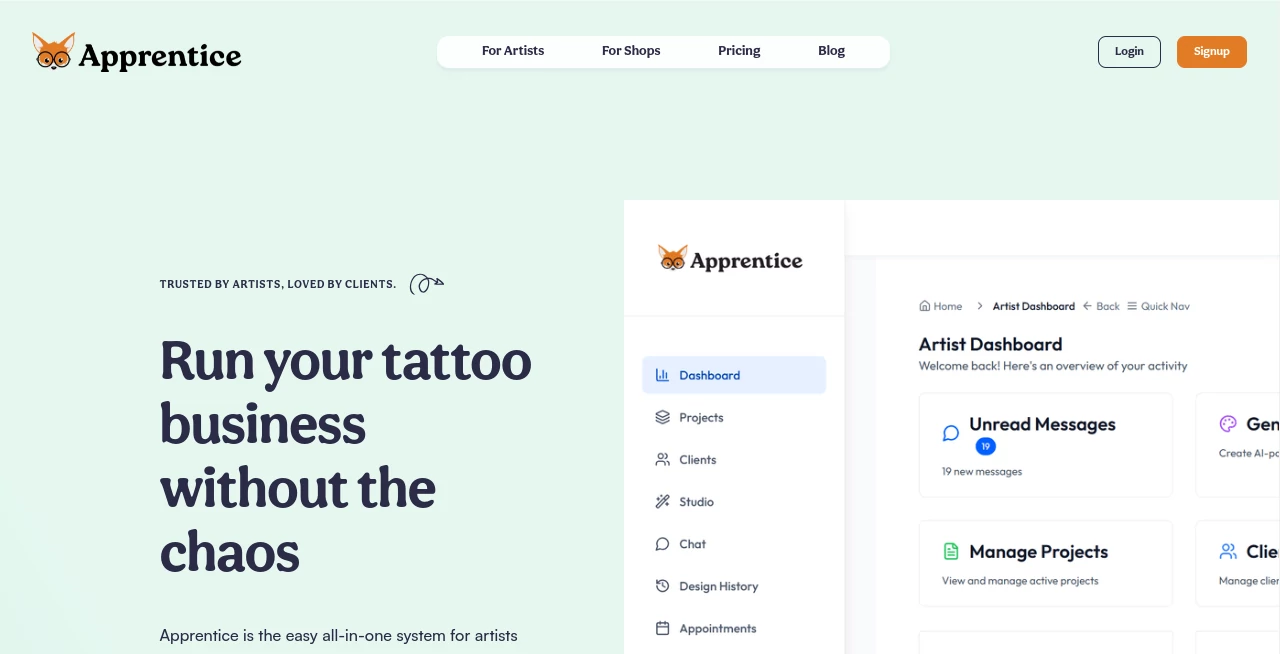
Everything lives in a single, uncluttered dashboard that feels like your personal studio wall—pinned notes, upcoming slots, and flash stacks all in view without overwhelming tabs. Custom themes let you splash your brand colors and logo across your public page, while galleries for portfolios and designs load quick and look sharp on any device. One artist I know raved about setting up her page in an afternoon, tweaking fonts till it matched her vibe perfectly, and watching clients book themselves without a single back-and-forth.
Accuracy & Performance
The booking engine runs like clockwork, syncing availabilities and rules so overlaps or double-books become ancient history, with deposits handled seamlessly upfront. Flash organization tags and searches flawlessly, pulling exactly what you need in seconds, and project tracking keeps multi-session details crisp across visits. It's reliable in the ways that matter most—no glitches during peak booking rushes, just steady performance that lets you trust it'll hold up when the studio's buzzing.
Capabilities
Beyond basics, it shines with unlimited flash uploads you can tag public or private, full project timelines with notes and references, and built-in AI that spins style ideas, concept variations, or ready stencils from simple prompts. Shops get extras like artist directories, walk-in waitlists, and unified client views. Payments track deposits and balances clearly, while analytics whisper insights on what's drawing crowds—it's a full toolkit that grows with you, from lone wolf to team setup.
Security & Privacy
Client info and designs stay tucked safely, with controls over visibility and access that put you in charge—share what you want, keep the rest locked. It's designed with the trust artists need, handling sensitive references or personal client histories discreetly, so you can build relationships without worrying about leaks or mix-ups.
Use Cases
A traveling guest artist sets up a quick page for pop-ups, drawing bookings from her portfolio without local ads. Shop owners juggle multiple chairs with a shared waitlist and flash library, cutting no-shows via auto-deposits. Solo creators lean on the AI to brainstorm variations for picky clients, saving sketch time for the needle. Even conventions use it for flash events, tagging designs for easy client picks—it's versatile enough to fit the wild variety of tattoo life.
Pros and Cons
Pros:
- Cuts the message madness, freeing hours for actual art.
- AI spark for designs that feels like a creative boost, not a crutch.
- Custom branding that makes your page feel uniquely yours.
- Scales smooth from one artist to full studio teams.
Cons:
- Learning the full flash tagging takes a session or two for max payoff.
- Heavy on features, so light users might not tap everything right away.
Pricing Plans
It keeps things straightforward, likely with tiers that fit solo setups or bigger shops, focusing on value without complicated layers. Many start with the basics and scale as bookings grow, appreciating the no-surprise approach that lets the tool pay for itself through saved time and more clients.
How to Use Apprentice
Kick off by claiming your page and splashing some brand touches—logo, colors, bio. Upload flash, tag for easy hunts, and set booking rules like deposit amounts or questions. Link it everywhere, watch self-bookings roll in, and use the dashboard to track projects or fire up AI for quick concepts. One friend set hers live before a convention, booked solid by day one, and spent the event tattooing instead of texting.
Comparison with Similar Tools
Generic schedulers handle dates but miss the ink-specific flow, like flash libraries or stencil preps, where this one weaves it all together seamlessly. Other artist-focused options often lack the AI nudge or shop-scale extras, feeling patchwork next to this integrated polish. It's the choice for those wanting a system that gets the tattoo rhythm, saving steps where others add them.
Conclusion
This platform quietly transforms the tattoo hustle from frantic to focused, giving artists the space to create while it handles the hustle behind the scenes. It's more than software—it's a partner that respects the craft, boosting bookings and ideas alike. If you're tired of chaos stealing your studio time, this is the shift worth making, turning good days into great ones, one organized appointment at a time.
Frequently Asked Questions (FAQ)
Can solo artists use it effectively?
Absolutely—personal pages with custom links make going independent a breeze.
How does the AI help with designs?
Prompt for styles or variations, get concepts and stencils to build on fast.
What about multi-artist shops?
Unified directories, waitlists, and shared flash keep everyone in sync.
Are payments integrated?
Deposits and tracking yes, clear records without the mess.
Unlimited flash storage?
Yep, upload and organize as much as your heart desires.
AI Tattoo Generator , AI Design Assistant , AI Project Management , AI Scheduling .
These classifications represent its core capabilities and areas of application. For related tools, explore the linked categories above.
Apprentice details
Pricing
- Free
Apps
- Web Tools
Categories

Apprentice Alternatives Product

onstyle
Ambigram Gen…
Alloy

Lime Social

Workik
Fuser Studio

Motion

Project Mela

Kaamfu
