🧠 AI Quiz
Think you really understand Artificial Intelligence?
Test yourself and see how well you know the world of AI.
Answer AI-related questions, compete with other users, and prove that
you’re among the best when it comes to AI knowledge.
Reach the top of our leaderboard.

















Veo4AI
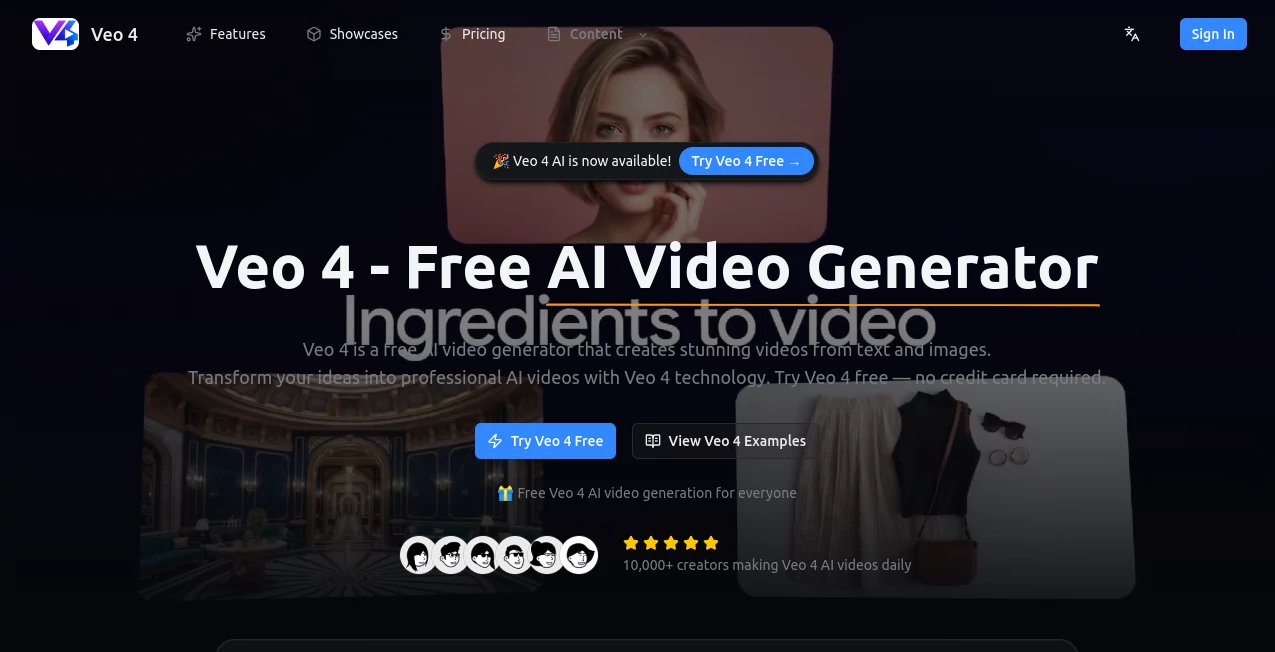
What is Veo4AI?
There’s something genuinely exciting about typing a sentence and watching a full scene come alive in seconds—smooth camera moves, natural lighting, even audio that actually fits the mood. This platform makes that feel almost too easy, and in the best possible way. I’ve seen creators go from a rough idea scribbled on a phone to a shareable clip that looks like it came from a small production team, all without touching editing software. It’s the kind of tool that quietly removes barriers and lets imagination take the lead.
Introduction
Video creation used to mean hours (or days) of shooting, editing, and polishing. This changes that completely. By turning text descriptions or uploaded images into ready-to-share clips with professional polish, it opens the door for anyone who wants to tell a story visually. No equipment, no crew, no steep learning curve—just your words and a bit of patience while it generates. The free entry point is generous enough to let you experiment seriously, and the quality jumps out even on the first try. People are already using it for everything from quick social posts to full marketing assets, and the speed keeps the creative flow alive instead of stalling it.
Key Features
User Interface
The layout is clean and focused: a big prompt box, simple dropdowns for style and resolution, and an upload area if you’re starting from an image. You don’t get lost in menus—everything you need is right in front of you. I appreciate how it shows a progress indicator that actually feels useful, and the final preview lets you replay and decide in one view. It’s built for momentum, not friction.
Accuracy & Performance
Prompts come back as coherent scenes with consistent lighting and motion that doesn’t feel robotic. The AI handles complex instructions surprisingly well—camera pans, character actions, even style shifts—and delivers HD output that looks sharp on any screen. Generation times stay reasonable even for detailed requests, so you’re not left waiting forever. The results often need little to no tweaking, which is rare and very welcome.
Capabilities
Text-to-video lets you describe anything from cinematic shots to animated sequences, while image-to-video brings static photos into motion with realistic dynamics. Multiple styles—realistic, cinematic, anime, artistic—give you room to match your vision. HD up to 4K resolution, fast processing, and even style transfer mean you can push creative boundaries without starting from scratch. It’s flexible enough for quick memes or more ambitious storytelling.
Security & Privacy
Your prompts and uploads are handled securely with no unnecessary retention. The platform is designed with responsible use in mind, and the lack of forced sign-up for initial tries adds to the trustworthy feel. When you do create an account, the process stays minimal and focused on protecting what you make.
Use Cases
A marketer sketches a campaign idea, types it out, and gets a polished ad clip to test with the team same day. A YouTuber turns script notes into teaser visuals that keep viewers hooked. An educator describes a historical moment and uses the generated video to make lessons more engaging. Social creators build consistent branded content fast, while filmmakers prototype sequences before committing to full shoots. It fits wherever visuals need to move quickly and convincingly.
Pros and Cons
Pros:
- Free access with meaningful daily limits lets you explore without pressure.
- High-quality output in HD (up to 4K on pro) that looks professional right away.
- Fast generation keeps ideas flowing instead of stalling.
- Multiple styles and input options make it versatile for different projects.
Cons:
- Free tier has daily caps, so heavy users will want the pro upgrade.
- Complex prompts sometimes need a second try for perfect alignment.
Pricing Plans
You can start completely free—no card needed—and still generate solid videos every day. When you’re ready for more, the pro plan removes limits, unlocks 4K resolution, and adds commercial rights so you can use everything professionally. It’s straightforward and fair: free for discovery, paid for unlimited creative freedom. The jump feels worth it once you see how much faster and cleaner the workflow becomes.
How to Use Veo 4
Visit the page, type your description into the prompt box—be as detailed as you like about scene, mood, camera movement, or style. Choose resolution and aspect ratio if you want to fine-tune. If starting from an image, upload it first. Hit generate, wait a short moment, then preview the result. Download the MP4 when it’s ready, or tweak the prompt and run again. It’s that simple, and the speed means you can iterate until it feels exactly right.
Comparison with Similar Tools
While other generators can produce decent clips, few combine free access, fast turnaround, and this level of style control without heavy restrictions. Many lock high resolution or commercial use behind steep paywalls, or deliver inconsistent motion. This one strikes a balance that feels generous and reliable, especially for creators who want professional-looking results without a big commitment upfront.
Conclusion
Video doesn’t have to be complicated or expensive anymore. This tool puts cinematic quality within reach for anyone with an idea and a few minutes. Whether you’re building content for social, testing concepts, or just playing with visuals, it delivers results that surprise and satisfy. The free entry point makes it easy to try, and the quality keeps you coming back. It’s one of those rare platforms that actually makes creating feel fun again.
Frequently Asked Questions (FAQ)
Do I need to sign up to start?
No credit card or account needed for the first generations—jump right in.
What’s the maximum resolution?
HD on free, up to 4K when you upgrade to pro.
Can I use the videos commercially?
Yes with the pro plan, which includes full commercial licensing.
How long are the generated videos?
Typically short clips perfect for social, ads, or teasers—fast and impactful.
What styles can I choose?
Realistic, cinematic, anime, artistic, and more—whatever fits your vision.
AI Animated Video , AI Image to Video , AI Text to Video , AI Video Generator .
These classifications represent its core capabilities and areas of application. For related tools, explore the linked categories above.
Veo4AI details
Pricing
- Free
Apps
- Web Tools
Categories

Veo4AI Alternatives Product

Omnigen Stud…

Fast Wan
JoyFlix AI

Sora2 AI Vid…

Veo 3.2

Seedance 2.0…

WonderShare …

Sora 2 AI

Seedance 2.0…