🧠 AI Quiz
Think you really understand Artificial Intelligence?
Test yourself and see how well you know the world of AI.
Answer AI-related questions, compete with other users, and prove that
you’re among the best when it comes to AI knowledge.
Reach the top of our leaderboard.


















Veo Prompt

What is Veo Prompt?
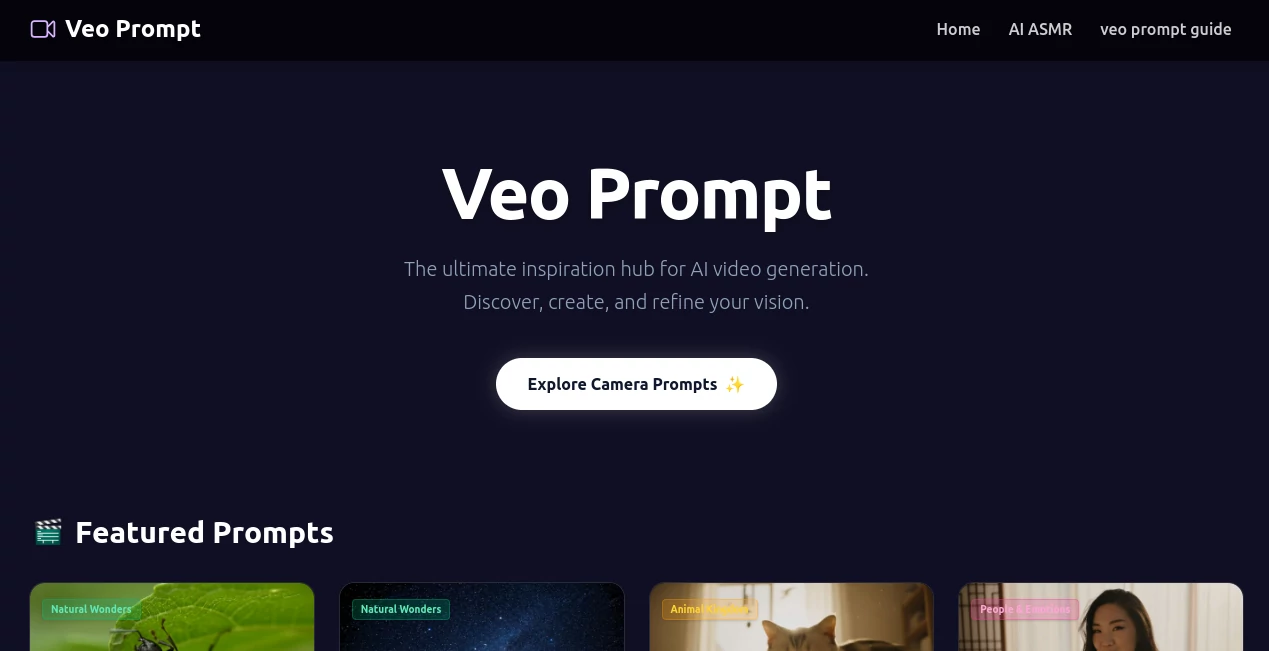
I still remember the first time I watched one of those ultra-realistic videos roll out from Veo 3 – the kind where every frame feels like a mini Hollywood scene. But getting those results consistently? That's where things got frustrating... until I stumbled on this little gem. It hands you ready-to-use, battle-tested prompts that cut through the guesswork and pull out the best the model has to offer. No more spending half your day tweaking words – just copy, paste, and watch the magic happen.
Introduction
When Google dropped Veo 3, it was like someone handed filmmakers a superpower... but only if they knew the secret incantations. This tool was born from that exact pain point: creators who wanted cinematic results without spending hours reverse-engineering the prompt structure. It's essentially a curated library of high-performing prompts, organized by style, mood, camera move, lighting, and more, all tailored for Veo 3's strengths. I’ve seen friends go from “my videos look generic” to posting clips that genuinely stop scrolls, all because they stopped guessing and started using these proven formulas. It’s not just a prompt generator – it’s like having a Veo 3 expert whispering in your ear.
Key Features
User Interface
The dashboard is dead simple: pick a category (cinematic, product shot, animation, etc.), choose your vibe, and it serves up the perfect prompt template. Everything is clickable – camera angles, lighting setups, mood descriptors – and you can mix and match in seconds. It feels like building a recipe rather than writing a script, and honestly, that’s what makes it addictive.
Accuracy & Performance
These aren’t random guesses; they’re prompts that have been refined across hundreds of generations. You’ll notice the model actually listens – skin tones stay consistent, lighting behaves, motion feels natural. I ran a side-by-side once with my own prompts vs. these curated ones, and the difference was night and day. The curated versions consistently delivered what I wanted on the first or second try.
Capabilities
From sweeping drone shots to intimate close-ups, from moody noir to vibrant cartoon, from product hero shots to character-driven narratives – there’s a prompt style for almost every need. It also covers advanced techniques like prompt weighting, negative prompts, aspect ratios, and motion direction. If you’re making ads, music videos, social reels, or even experimental art, this library has your back.
Security & Privacy
It’s a clean, no-frills web app – no sign-ups, no tracking cookies, no data collection. Your prompts stay in your browser. That simplicity and transparency are refreshing in a space where many tools quietly harvest everything you type.
Use Cases
A small agency I know used it to crank out high-end product videos for an e-commerce client in half the usual time. A musician friend turned his song lyrics into a full visualizer that actually matched the beat and mood. Another creator makes weekly short films that look like they came from a studio, all from a laptop. Whether you’re selling, storytelling, or just experimenting, it’s the shortcut that feels like cheating (in the best way).
Pros and Cons
Pros:
- Instant access to prompts that actually work with Veo 3 – no trial and error.
- Organized by real creative needs: lighting, camera, style, emotion.
- Completely free and no sign-up required.
- Regularly updated with new styles and techniques.
Cons:
- No built-in video generation – you still need access to Veo 3.
- Limited to Veo 3 only (though that’s the point).
Pricing Plans
It’s completely free. No tiers, no upsells, no hidden costs. Just a generous creator sharing what works, so you don’t have to spend hours figuring it out yourself.
How to Use VeoPrompt
Head to the site, pick a category that matches your vision (cinematic, product, animation, etc.), browse the styles, click the prompt you like, copy it, and paste it straight into Veo 3. Want to tweak? Just edit the variables like subject, lighting, or camera move. Takes seconds. I usually start with a base prompt, run a test, then refine with one of the variations – and I’m almost always happy with the second or third generation.
Comparison with Similar Tools
Most prompt libraries are either generic or overly complicated. This one is laser-focused on Veo 3 and nothing else, so the quality and relevance are unmatched for that model. Other tools might offer more models, but they rarely give you the depth of cinematic control that this does. If Veo 3 is your main engine, there’s really no better companion.
Conclusion
If you’re serious about getting the most out of Google Veo 3, this is the shortcut you didn’t know you needed. It takes the frustration out of prompt engineering and puts cinematic control right in your hands. Free, fast, focused, and genuinely useful – it’s one of those rare tools that feels like a gift to the community.
Frequently Asked Questions (FAQ)
Is it really free?
Yes – completely free, no sign-up, no limits.
Does it work with other video models?
No, it’s specifically optimized for Google Veo 3.
How often are new prompts added?
Regularly – the library grows as new techniques and styles emerge.
Can I suggest new prompt styles?
Absolutely – the creator is open to community input.
Do I need to know prompt engineering?
No – the prompts are ready-to-use, though you can always tweak them.
Prompt , AI Content Generator , AI Video Generator , AI Text to Video .
These classifications represent its core capabilities and areas of application. For related tools, explore the linked categories above.
Veo Prompt details
This tool is no longer available on submitaitools.org; find alternatives on Alternative to Veo Prompt.
Pricing
- Free
Apps
- Web Tools
Categories

Veo Prompt Alternatives Product

genie 4

Seedance 3.0
Noir Prompt

Nodu AI

Seedance 2

Seedance AI

soro2

Seedance 2.0

Artifox