
🧠 AI Quiz
Think you really understand Artificial Intelligence?
Test yourself and see how well you know the world of AI.
Answer AI-related questions, compete with other users, and prove that
you’re among the best when it comes to AI knowledge.
Reach the top of our leaderboard.


















Video2PPT

What is Video2PPT?
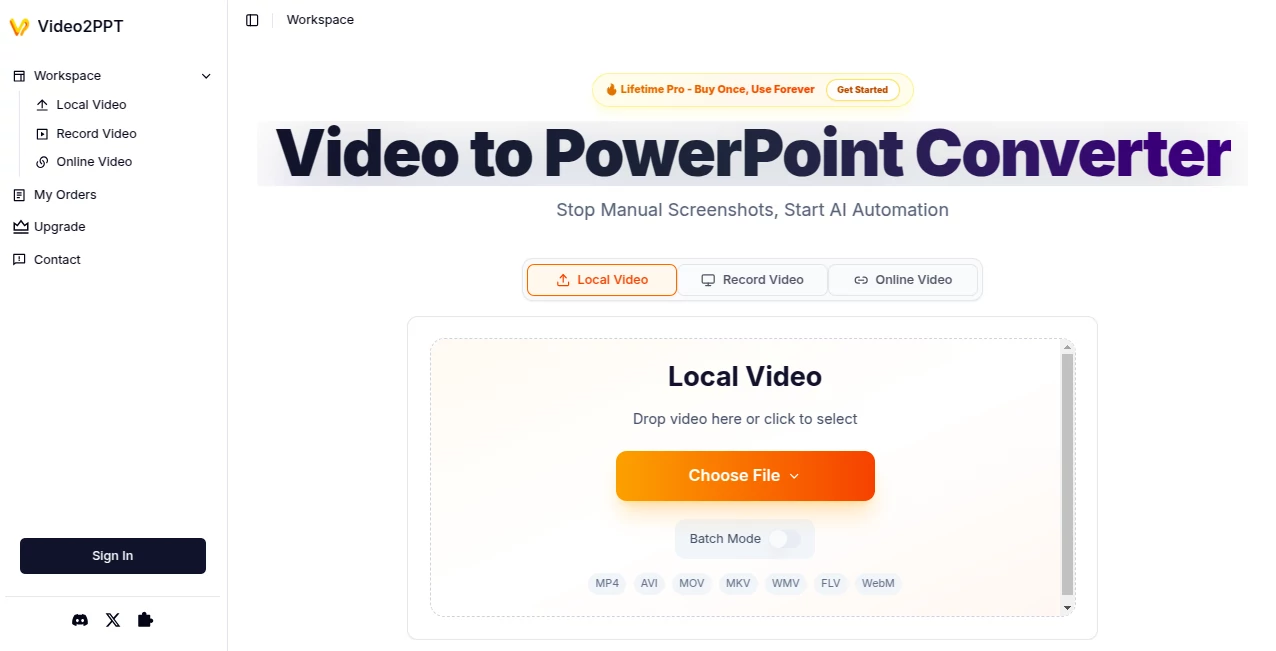
Video2PPT slips into the busy lives of presenters and educators like a well-timed shortcut, pulling standout moments from any clip and laying them out as ready-to-tweak decks. This handy service takes the slog out of recapping long talks or webinars, handing over clean, customizable files that save folks from endless screenshots or note-scribbling. Those who've given it a spin often share how it freed up afternoons once lost to manual makeovers, turning hours of footage into something sharp and shareable with barely a blink.
Introduction
Video2PPT came about from the quiet gripes of trainers and teachers who'd spent too many evenings piecing together highlights from recordings that felt more like chores than captures. A small team of workflow whizzes set it loose a while back, aiming to blend clever scanning with straightforward outputs, and it didn't take long for word to spread through conference halls and classroom chats. Users swap stories of wrapping up a full seminar summary in the time it once took to brew coffee, with the tool quietly building a following among those who juggle content like it's second nature. What keeps it clicking is that no-fuss reliability, evolving from a simple extractor into a go-to for anyone chasing polished recaps without the polish headache.
Key Features
User Interface
The setup greets you with a no-nonsense dashboard that lays out your options like a familiar toolbox—pick upload, link, or record, and it unfolds from there without extra clutter. A sidebar keeps tabs on your queue, with previews that pop up crisp and controls that respond like they're reading your mind. Even when juggling a batch, the flow stays smooth, feeling more like flipping through a notebook than navigating a maze.
Accuracy & Performance
It zeros in on the meaty bits with a keen eye, rarely missing a slide or fumbling a frame, even in dim-lit talks or fast-paced demos. Turnarounds surprise with their speed—a lengthy session might boil down in under a minute, keeping your pace unbroken no matter the device's hum. Folks who've tested it on real runs point to how it holds steady across shaky sources, delivering decks that look hand-picked without the hand cramps.
Capabilities
From snagging highlights off a quick clip to sifting through marathon meetings, it covers the spread with exports that slot right into your workflow—think full decks for pitches or stripped-down PDFs for quick shares. Batch handling lets you tackle a stack at once, while the record option captures live without a trace, opening doors for everything from webinar wrap-ups to impromptu idea dumps.
Security & Privacy
Everything stays put on your end, with no detours through distant servers, so those confidential chats or class notes never step out for a stroll. You call the shots on what lingers in your workspace, and the whole setup whispers rather than shouts about safeguards, letting you dive in without that nagging back-of-mind buzz.
Use Cases
Corporate trainers feed it session tapes to churn out training packs that hit inboxes ready to roll, cutting prep from days to dashes. Professors pull lecture gems for handout stacks, giving students something tangible without the transcription trek. Marketers mine webinar gold for client pitches, while consultants snag call takeaways for swift reports. Even healthcare hands use it to distill private sessions into secure summaries that stay close to the vest.
Pros and Cons
Pros:
- Shaves serious time off recap routines, from marathons to minutes.
- Hits the highlights hard, with outputs that tweak easy.
- Batch bliss for big loads, no one-by-one blues.
- Stays local for that worry-free whisper on sensitive stuff.
Cons:
- Free runs cap quick, nudging upgrades for steady streams.
- Device-dependent speeds might hum slower on older setups.
- Best on clear clips; fuzzy feeds could call for a clean-up first.
Pricing Plans
The open door swings wide with a no-cost entry that covers the basics—enough pulls and packs for light lifts, though it stamps a subtle mark and reins in the runs. A yearly pass at around fifty bucks unlocks fuller flows, ditching the tags and bumping limits for those who lean in often. The forever key, a one-shot at under a hundred, goes boundless with perks that stick, all backed by a week to test without the tie-down.
How to Use Video2PPT
Drop in with a quick sign-on, then choose your path—haul a file, paste a web spot, or fire up the capture. Let it sift the scenes, peek at the pull, and nudge any bits that need a shift. Hit export for your pick of formats, snag the file, and slot it into your next share or tweak. For stacks, line 'em up and let it roll through, building a bundle that beats the blank page every time.
Comparison with Similar Tools
Where some setups ship your stuff off-site for the scan, Video2PPT keeps it close, trading potential peeks for that private polish, though those might muster more muscle for massive merges. Against one-off pullers, it layers in the batch and blend options, skipping the slop but perhaps skimping on side edits. It fits sharp for folks fixed on fast, faithful fetches over flashy frills.
Conclusion
Video2PPT quietly reshapes the recap grind, handing over decks that distill the draw without the drawl. It bridges the gap from raw reel to refined recap, proving a smart sift can turn footage floods into focused finds. As content keeps cascading, this one's set to keep the current clear, nudging users toward outputs that land with less lift and more lift-off.
Frequently Asked Questions (FAQ)
What clips does it chew?
A range from common carriers to web wonders, as long as they're clear and current.
How's the hand-off to tweaks?
Slides land editable, ready for your spin in familiar spots like slides or sheets.
Any caps on the catch?
Free tiers trim the take, but boosts open the gates wide.
Stays put on my setup?
Yep, all the action unfolds local, no wandering required.
Batch for the big ones?
Handles heaps at once, turning tides of tapes into tidy troves.
AI Transcription , AI Video Editor , AI Text to Video , AI Presentation Generator .
These classifications represent its core capabilities and areas of application. For related tools, explore the linked categories above.
Video2PPT details
This tool is no longer available on submitaitools.org; find alternatives on Alternative to Video2PPT.
Pricing
- Free
Apps
- Web Tools
Categories

Video2PPT Alternatives Product

Veo 4 AI

Seedance 2.0

v04 ai

Kling 3.0 – …

GenPPT AI
remove bg vi…

Omnigen Stud…

Seedance 2.0…

Nano Banana …
