
🧠 AI Quiz
Think you really understand Artificial Intelligence?
Test yourself and see how well you know the world of AI.
Answer AI-related questions, compete with other users, and prove that
you’re among the best when it comes to AI knowledge.
Reach the top of our leaderboard.


















Video Any

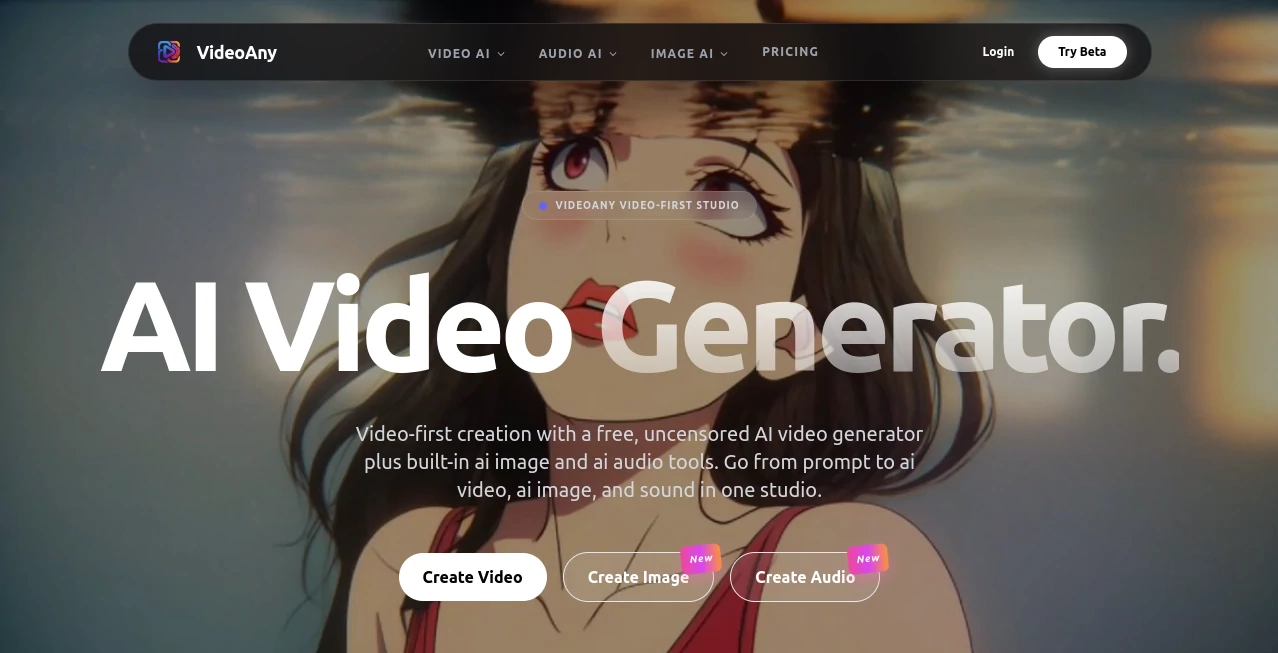
What is Video Any?
Picture sitting down with a wild idea for a short clip—maybe a moody cinematic scene or a quick product teaser—and watching it come to life in minutes, no edits, no watermarks if you go paid, and absolutely no restrictions on what you can dream up. That's the freedom this tool hands you, wrapping everything from text prompts to image references into fluid videos that feel surprisingly alive. I threw in a simple prompt about a lone wanderer in a neon city last week, added a moody track, and the result was something I’d proudly post anywhere—smooth motion, coherent style, and that extra spark that makes viewers pause.
Introduction
In a sea of AI video tools that either lock you down with heavy censorship or force you to wrestle with clunky workflows, this one stands apart by keeping things wide open and genuinely easy. It’s built as a one-stop studio where you can start with words, toss in images or audio, and end up with a complete video that’s ready to share. What really hooked me is how it focuses on the creator’s vision first—no heavy-handed filters, no forced limits on style or content. It’s become my go-to for quick experiments that turn into real posts, and the community around it is buzzing with examples of everything from artistic shorts to straight-up viral hooks. It feels like the tool finally caught up to what creators actually want: control, quality, and zero hassle.
Key Features
User Interface
The dashboard is refreshingly straightforward—you land on a clean workspace with a big prompt box, upload buttons for images or audio, and a few simple toggles for style and length. No buried menus or confusing steps; everything flows naturally from idea to output. I love how it shows progress clearly and lets you preview mid-generation if you want to tweak on the fly. It’s the kind of interface that disappears after you start using it—you just focus on creating.
Accuracy & Performance
When you describe a complex scene with multiple elements, it holds the thread together beautifully—characters stay consistent, lighting feels natural, and transitions don’t jar. Generation times are impressively quick for the quality, often under a minute for short clips, and the output holds up even on higher resolutions. I’ve tried prompts that would trip up other tools, but this one delivered coherent motion and detail every time, making it reliable for both casual and serious work.
Capabilities
You can start from text, feed in reference images, or layer your own audio for perfect sync—everything integrates seamlessly. It handles everything from hyper-realistic shots to stylized animation, and the uncensored approach means you’re free to explore any concept without artificial blocks. Batch processing and upscaling options round it out, so you can crank out multiple variations or polish for bigger screens. It’s a complete creative loop in one place.
Security & Privacy
Your uploads are encrypted in transit, and the platform follows standard privacy practices so your content stays yours. No unnecessary data retention or sharing—once you’re done, you control what happens next. It’s reassuring for anyone working on sensitive or commercial projects, knowing there’s no hidden tracking or overreach.
Use Cases
Content creators knock out Reels and TikToks that sync perfectly to music, grabbing attention in seconds. Small brands build product teasers with consistent looks across a series, saving thousands on shoots. Storytellers prototype short films or music videos, testing ideas before committing to full production. Even educators use it to animate concepts or illustrate lessons with custom visuals that engage students instantly.
Pros and Cons
Pros:
- Truly uncensored—create without artificial limits.
- Fast, high-quality output that rivals paid tools.
- All-in-one studio for video, images, and audio.
- Generous free tier with no forced watermarks on paid plans.
Cons:
- Free tier has daily limits that can feel tight for heavy users.
- Longer or more complex clips may need multiple generations.
Pricing Plans
You can jump in completely free with a solid daily allowance—enough to experiment and create real content without paying a cent. Paid plans unlock higher resolutions, faster queues, batch processing, and commercial rights, starting at a reasonable monthly rate. There’s no lock-in, and annual options cut the cost even more. It’s structured so you only upgrade when you’re hooked on the quality and need more power.
How to Use VideoAny
Head to the studio, type your scene description in the prompt box, upload any reference images or audio if you want, and choose your settings. Hit generate and watch it build—preview the result, tweak the prompt if needed, and download when it’s perfect. For a series, reuse images or audio to keep consistency across clips. It’s so straightforward that you can go from blank page to finished video in under 10 minutes.
Comparison with Similar Tools
While other generators lock down content or deliver inconsistent results, this one gives you full creative freedom and reliable coherence across scenes. It combines video, image, and audio tools in one place without the bloat, and the free tier is actually generous enough to use regularly. For anyone tired of watermarks or censorship, it’s the clear choice that puts real power back in your hands.
Conclusion
This platform quietly redefines what’s possible for solo creators and teams alike, blending speed, quality, and complete freedom into one intuitive package. It turns the daunting task of video production into something approachable and even fun, letting your ideas shine without technical roadblocks. Whether you’re building a brand, telling stories, or just experimenting, it’s the kind of tool that makes you wonder how you ever managed without it.
Frequently Asked Questions (FAQ)
Is it really uncensored?
Yes—no content filters or restrictions, so you have full creative control.
What video lengths can I create?
Short clips work best, but you can chain multiple generations for longer pieces.
Do paid videos have watermarks?
No—paid plans remove watermarks completely.
Can I use it for commercial projects?
Yes, paid plans include commercial rights for ads, social, and more.
How fast is generation?
Most clips finish in under a minute, depending on length and queue.
AI Animated Video , AI Image to Video , AI Video Generator , AI Text to Video .
These classifications represent its core capabilities and areas of application. For related tools, explore the linked categories above.
Video Any details
This tool is no longer available on submitaitools.org; find alternatives on Alternative to Video Any.
Pricing
- Free
Apps
- Web Tools
Categories

Video Any Alternatives Product

Aura AI

Seedance 2.0

Wan 2.7

Kling 3.0

Omnesuite AL…

JSON to Video

wan2-6.org
Kling 3.0

Seedance 3.0
