🧠 AI Quiz
Think you really understand Artificial Intelligence?
Test yourself and see how well you know the world of AI.
Answer AI-related questions, compete with other users, and prove that
you’re among the best when it comes to AI knowledge.
Reach the top of our leaderboard.


















VideoMakerAI - Text to Video

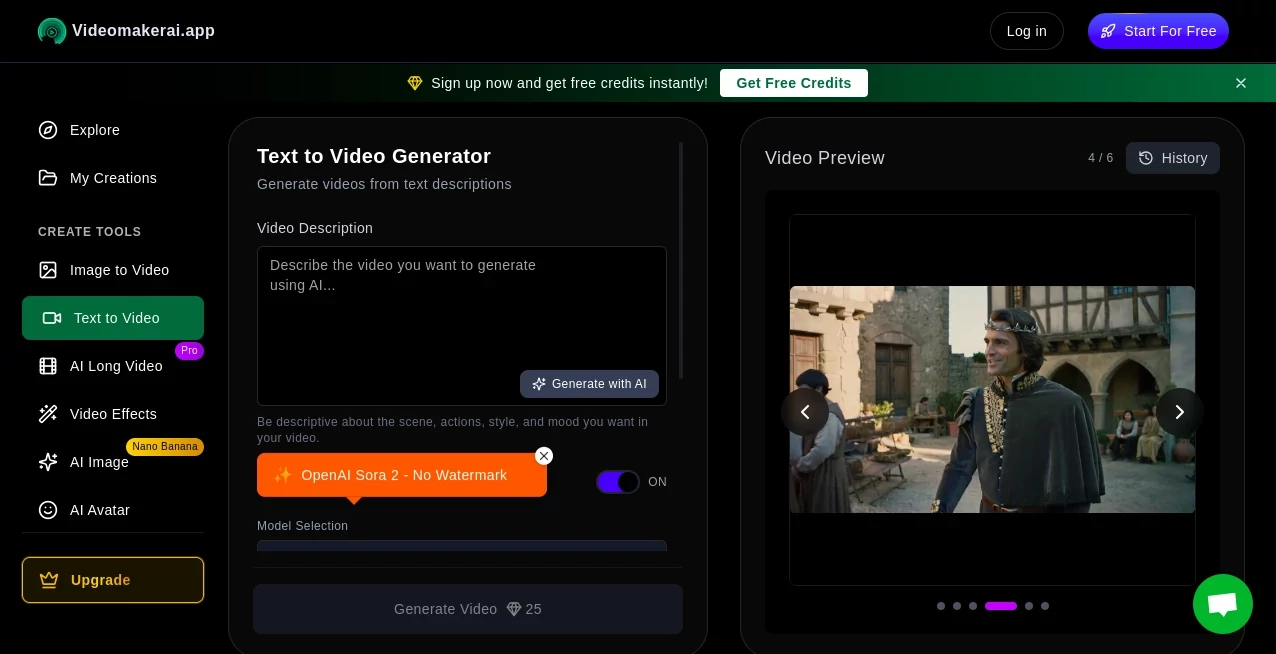
What is VideoMakerAI - Text to Video?
VideoMakerAI opens a door to a world where your written ideas spring to life on screen, crafting moving scenes from mere descriptions in a matter of moments. This handy service has folks buzzing about how it simplifies bringing stories or pitches to visual form, without needing cameras or crews. Many who've dipped into it come away with clips that look like they took days to shoot, yet popped out in minutes, making it a quiet game-changer for anyone with a tale to tell.
Introduction
VideoMakerAI took off a short while back, dreamed up by a team keen on easing the leap from page to playback for creators everywhere. It started as a way to help small outfits whip up quick visuals without the usual hassle, and soon word spread through shares of slick demos that hooked viewers right away. Users swap stories of late-night brainstorms turning into morning-ready reels, highlighting how it captures the essence of a script with a natural flow. Over time, it's woven itself into routines for everyone from solo storytellers to squad-based shops, proving that a bit of clever processing can turn fleeting thoughts into footage that lingers.
Key Features
User Interface
The main hub greets you with a wide-open text field that invites your full description, complete with a handy ticker for length so you stay on track. Style picks line up in a neat row, and a preview window hums to life as things take shape, letting you spot tweaks on the fly. Batch slots sit ready for multiple ideas at once, and the whole setup flows smooth across screens, feeling more like jotting notes than juggling tools.
Accuracy & Performance
It grasps the heart of your words with a keen eye, lining up actions and atmospheres just as you pictured, often nailing the mood without extra nudges. Clips come together briskly, wrapping a short scene in a handful of minutes even on busier days, with a bar that keeps you looped in. Those who've run it through real paces praise how it holds steady on details, turning dense descriptions into seamless sequences that play back crisp and true.
Capabilities
From lifelike walkthroughs to whimsical cartoons, it spans a spread of looks to match your vision, layering in paces and palettes that fit the flow. Handle a string of prompts at once for bulk builds, or stretch scenes longer by breaking them into bites, all while supporting tongues from English to everyday chats in other lands. Outputs shine in sharp clarity, ready for screens big or small, opening doors to everything from quick clips to fuller tales.
Security & Privacy
Your drafts get a swift pass through secure channels, cleared out once the clip's in hand, keeping things tidy and under your watch. It gives you the reins on what stays or shares, with no lingering looks unless you lend the key. That straightforward safeguard lets creators pour in personal bits without a pause, knowing their sparks remain just theirs till they're set to shine.
Use Cases
Content folks spin lesson outlines into lively walkthroughs that keep eyes glued, easing the shift from notes to narratives. Marketers mock up spot pitches that pull crowds, testing hooks without hauling gear. Teachers transform dry outlines into engaging reels that bring topics to the table, while pros craft training bits that stick without scripting sweat. Even personal projects bloom, like turning trip logs into memory montages that play back with heart.
Pros and Cons
Pros:
- Grabs your gist and runs with it, matching visions without endless edits.
- Quick turns keep the momentum high, from idea to done in a dash.
- Versatile vibes suit any scene, from fun flings to pro polishes.
- Batch magic handles heaps, perfect for steady streams.
Cons:
- Shorter bursts shine best; epics need a slice-and-dice approach.
- Peak times might nudge waits a touch longer than a whisper.
- Abstract airs can wander, calling for clearer cues to land right.
Pricing Plans
New faces snag a starter pack of credits right off, good for dipping into short scenes without a dime. From there, upgrades open longer runs and bulk perks, with options that fit light dips or heavy hauls. The setup stays approachable, letting you scale as your clips grow, all while keeping commercial paths clear with a quick rights check.
How to Use VideoMakerAI
Sign in to claim your welcome boosts, then fill the prompt spot with vivid details on what's happening, how it feels, and the look you crave. Tap a style that suits, toss in extras if you're batching, and give it the go—watch the bar climb as your scene takes shape. Peek at the preview, nudge if needed, then pull down your pick in a clear cut ready for the world. Swing back to string pieces for bigger builds, turning singles into sagas step by step.
Comparison with Similar Tools
Where some setups stick to stiff scripts, VideoMakerAI flows with flexible feels, though those might edge on raw runtime for endless edits. Against bulkier benches, it lightens the lift for quick quips, skipping the sprawl but perhaps pinching on plugin plays. It hits home for hasty hits that hum with heart, outpacing the ponderous with poise and punch.
Conclusion
VideoMakerAI bridges the blank between brainwave and broadcast, handing creators a shortcut that packs pro polish without the plod. It turns the timid tale into a triumph on tape, proving that words can wander into wonders with the right whisper. As screens keep calling for fresh frames, this gem keeps the gate ajar, inviting all to craft clips that captivate and connect.
Frequently Asked Questions (FAQ)
What makes a prompt pop?
Pack in scenes, moods, and moves— the richer the rundown, the realer the reel.
How long till it's live?
A quick scene slots in minutes, with a peek to tweak along the way.
Works in my tongue?
Grasps a globe of chats, from common calls to corner dialects.
Safe for shop use?
Yours to yoke for yields, with a nod to the rules for right runs.
Stretch beyond shorts?
Slice and stitch for sagas, building bites into bigger broadcasts.
AI Creative Writing , AI Animated Video , AI Text to Video , AI Video Generator .
These classifications represent its core capabilities and areas of application. For related tools, explore the linked categories above.
VideoMakerAI - Text to Video details
This tool is no longer available on submitaitools.org; find alternatives on Alternative to VideoMakerAI - Text to Video.
Pricing
- Free
Apps
- Web Tools
Categories

VideoMakerAI - Text to Video Alternatives Product

Gemini AI vi…

Veo

Sora 2 AI

Seedance 2.0

seedream vid…

Sora by Open…

Free Sora Ge…

Perchance AI…

CinemaDrop