
🧠 AI Quiz
Think you really understand Artificial Intelligence?
Test yourself and see how well you know the world of AI.
Answer AI-related questions, compete with other users, and prove that
you’re among the best when it comes to AI knowledge.
Reach the top of our leaderboard.


















VideoText
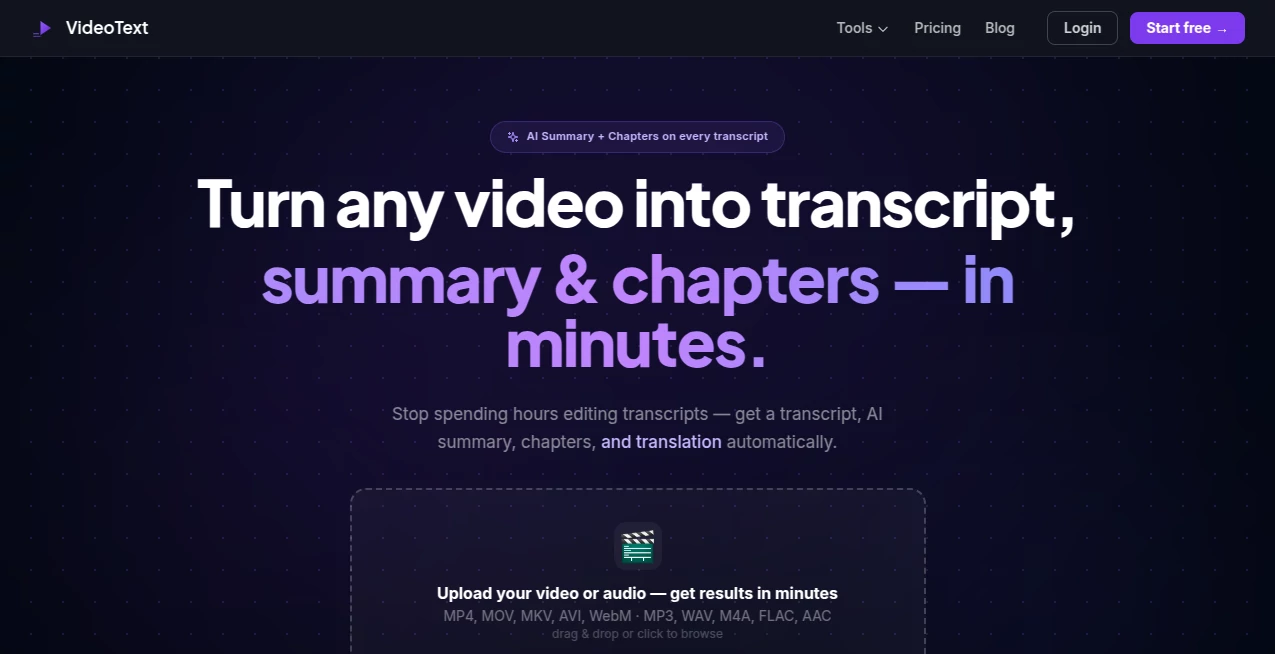
What is VideoText?
Long videos used to mean hours of tedious listening and typing just to get a usable transcript. This tool quietly eliminates that grind. You upload a video or paste a link, and it returns a clean, accurate transcript along with properly timed subtitles, a smart summary, and ready-to-use chapters. I’ve seen content creators go from dreading the post-production transcription step to finishing it in minutes, then moving straight to editing or publishing. The accuracy is impressive even on casual vlogs or technical talks, and the extra outputs like summaries make it feel like you have a helpful assistant who actually understands the content.
Introduction
Whether you’re a YouTuber, podcaster, educator, researcher, or business professional, turning spoken words into usable text is essential—but doing it manually is exhausting. VideoText makes this process feel almost effortless. It handles uploads from your computer or direct links (including YouTube), delivers highly accurate transcripts in dozens of languages, generates professional subtitles, creates concise summaries, and even breaks content into logical chapters. The result isn’t just raw text; it’s publish-ready material you can use immediately for blogs, social clips, SEO, or internal notes. For anyone who works with video regularly, it quickly becomes one of those tools you wonder how you ever lived without.
Key Features
User Interface
The design is refreshingly straightforward. A big upload area and link paste box greet you on the homepage—no complicated menus or hidden settings. Once processing starts, you see clear progress and can jump to different sections (transcript, subtitles, summary, chapters) easily. Everything stays in one clean workspace, so you’re never lost switching between tabs. It’s built for speed and clarity, which means you spend less time figuring out the tool and more time using the output.
Accuracy & Performance
The transcription quality stands out even on challenging audio—accents, background noise, technical terms, or fast speech. Timestamps are precise, speaker identification works well in interviews, and the output reads naturally rather than robotic. Processing time is reasonable for most videos, and the results are reliable enough that you rarely need heavy manual correction. That consistency builds trust fast, especially when deadlines are tight.
Capabilities
It supports video and audio uploads plus direct links, generates timed subtitles in SRT and VTT formats, creates smart AI summaries, auto-generates chapters with timestamps, offers translation to many languages, and includes editing tools to refine the transcript. You can export everything cleanly for further use. It’s particularly strong at turning long-form content into multiple usable formats in one go—transcript for notes, subtitles for video, summary for social posts, chapters for better navigation.
Security & Privacy
Your videos are processed securely and deleted after the job is done. There’s no unnecessary long-term storage of your content, which matters when working with client videos, private recordings, or sensitive material. The platform keeps things professional and respectful of user data.
Use Cases
YouTubers transcribe long videos quickly and generate subtitles plus chapter markers for better viewer retention. Podcasters turn episodes into blog posts and show notes with minimal effort. Educators create accessible transcripts and summaries for students. Researchers convert interview recordings into searchable text for analysis. Businesses repurpose meeting recordings into actionable summaries and action items. Wherever spoken content needs to become written content fast, this tool delivers real efficiency.
Pros and Cons
Pros:
- High transcription accuracy even on imperfect audio.
- Multiple useful outputs (transcript, subtitles, summary, chapters) from one upload.
- Fast and straightforward workflow that saves hours.
- Supports many languages and formats.
- Clean, professional results ready for immediate use.
Cons:
- Very long or extremely noisy videos may need some manual review.
- Free tier has usage limits for heavy daily work.
- Advanced customization (custom voices, heavy editing) has room to grow.
Pricing Plans
It offers a generous free tier with several video processings per month—enough to test thoroughly or handle light needs. Paid plans remove limits, unlock faster processing, higher usage, and priority features. The pricing feels fair for the significant time it saves, especially for creators and teams who work with video content regularly.
How to Use VideoText
Go to the main page and either upload your video/audio file or paste a link (YouTube and other platforms work well). Wait for processing (usually quick), then explore the transcript, edit any small inaccuracies if needed, generate subtitles, summary, and chapters. Export whatever you need—text file, SRT subtitles, or the full package. For repeated use, the workflow stays consistent and gets faster as you become familiar with it.
Comparison with Similar Tools
Many transcription services focus only on raw text and leave you to handle subtitles and summaries separately. This one combines everything into one smooth experience with better organization and usability. While some enterprise tools are more powerful for massive scale, VideoText wins for most individual creators and small teams by being faster, simpler, and more complete for everyday video-to-content needs.
Conclusion
Video content is everywhere, but turning that content into usable text shouldn’t be a bottleneck. This tool makes the entire process feel smooth and productive instead of painful. It respects your time, delivers reliable results, and gives you multiple valuable outputs from a single upload. For anyone who creates, analyzes, or repurposes video, it’s one of those practical tools that quietly improves your workflow and output quality. Give it a try with your next video—you’ll likely wonder why you waited so long.
Frequently Asked Questions (FAQ)
How accurate is the transcription?
Very high on clear audio; it handles accents and moderate background noise well, though very noisy files may need light editing.
Can I upload from YouTube?
Yes—simply paste the link and it handles the rest.
Does it generate subtitles?
Yes—accurate timed subtitles in SRT and VTT formats ready to use.
Is there a limit on video length?
Free tier has reasonable limits; paid plans support longer and more frequent videos.
Can I edit the transcript?
Absolutely—the built-in editor lets you make corrections easily before exporting.
AI Transcriber , AI Documents Assistant , AI Transcription .
These classifications represent its core capabilities and areas of application. For related tools, explore the linked categories above.
VideoText details
Pricing
- Free
Apps
- Web Tools
Categories

VideoText Alternatives Product

Presenti AI
AI OCR

EasyVC

Transpocket

TO MD

Klyra AI

Fill PDF fro…

Image to URL…

TuCanChat
