🧠 AI Quiz
Think you really understand Artificial Intelligence?
Test yourself and see how well you know the world of AI.
Answer AI-related questions, compete with other users, and prove that
you’re among the best when it comes to AI knowledge.
Reach the top of our leaderboard.


















Video Upscaler
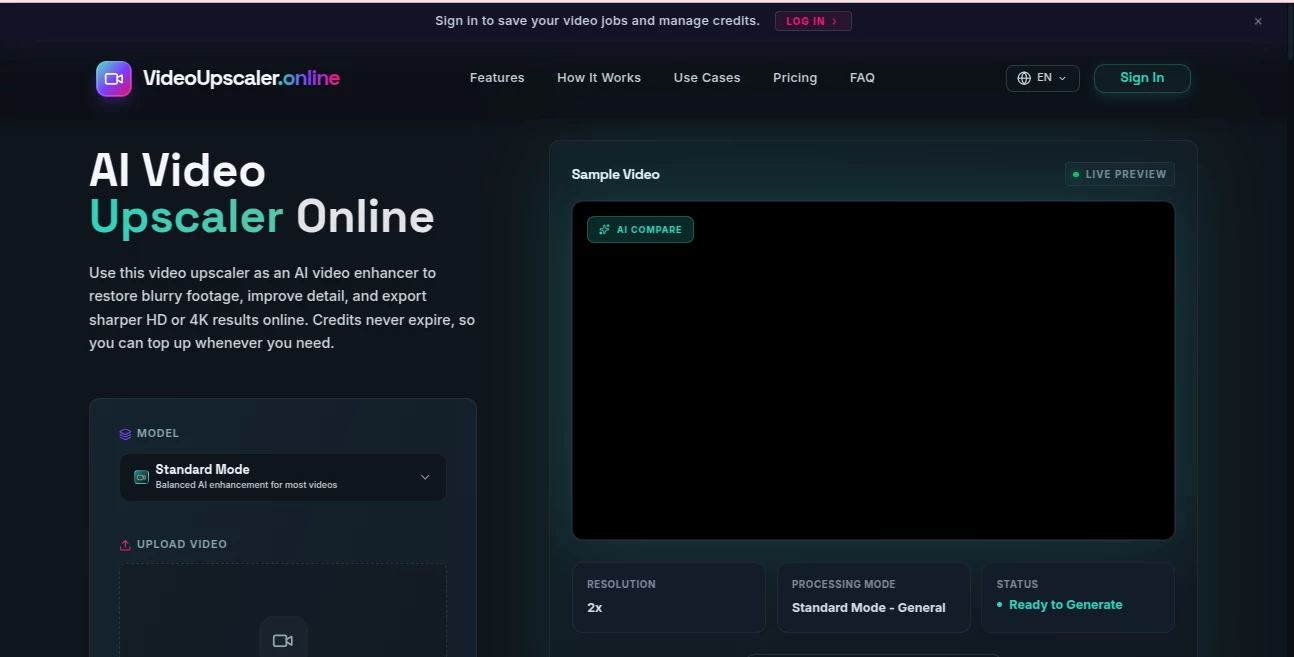
What is Video Upscaler?
There's nothing more disappointing than digging up an old family video or an important recording only to find it blurry, pixelated, or low-resolution. This tool changes that frustration into relief. You upload the clip, choose the enhancement level, and it brings back clarity, detail, and sharpness that often makes the video look better than you remembered. I've seen people restore decades-old home movies and suddenly feel like they're reliving the moment in high definition. It's not magic, but it feels pretty close when a shaky, compressed phone video turns into something crisp and watchable.
Introduction
Most of us have videos trapped in low quality—old camcorder footage, compressed social media clips, or recordings from older phones. Traditional upscaling often adds noise or artifacts that make things worse. This online AI video upscaler takes a smarter approach. It analyzes the content intelligently, restores lost details, reduces blur and noise, and delivers cleaner HD or 4K results without destroying the original feel. It's especially valuable for anyone who wants to preserve memories, improve content for social media, or prepare videos for professional use. The best part? You don't need technical skills or expensive software—just upload and enhance.
Key Features
User Interface
The design is wonderfully straightforward. A large upload area welcomes your video files, clear mode options (Standard for balanced enhancement, plus specialized modes) sit nearby, and progress is easy to follow. No complicated settings or overwhelming menus. You see a before-and-after comparison once processing finishes, making it simple to judge the improvement. The whole experience feels designed for regular people rather than video professionals, which is exactly why it works so well for everyday users.
Accuracy & Performance
It handles real-world video problems effectively—motion blur, compression artifacts, low lighting, and low resolution—without introducing the weird distortions common in lesser tools. Faces stay natural, textures regain detail, and colors look balanced rather than oversaturated. Processing speed is impressive for an online tool, and results hold up well even on challenging footage. Many users notice their videos look noticeably cleaner and more vibrant after just one pass.
Capabilities
Upscaling to HD and 4K, noise reduction, deblurring, detail recovery, and color enhancement all in one go. It supports common video formats and works on everything from short clips to longer recordings. The AI is tuned to preserve the original character of the video while making it sharper and more enjoyable to watch. Whether you're enhancing old home videos, improving drone footage, or preparing content for platforms that favor higher resolution, it delivers practical, usable results.
Security & Privacy
Your videos are processed securely and not stored longer than necessary. The platform focuses on delivering the enhanced file without unnecessary data retention. For personal memories or sensitive recordings, this respectful approach provides important peace of mind.
Use Cases
Families restore precious old camcorder tapes or phone videos of grandparents and childhood moments. Content creators clean up footage for YouTube or social media to meet platform quality standards. Real estate agents enhance property tour videos to make listings more appealing. Event videographers improve client deliverables quickly. Even businesses use it to sharpen training or promotional videos without reshooting. Wherever video quality holds back the story or the message, this tool helps unlock its full potential.
Pros and Cons
Pros:
- Noticeable improvement in clarity and detail on most videos.
- Simple, fast workflow that doesn't require technical knowledge.
- Good balance between enhancement and natural look.
- Works well on a wide variety of video types and ages.
- Credits never expire, so you can work at your own pace.
Cons:
- Extremely damaged or very low-quality footage may have limits.
- Longer videos consume more credits.
- Free tier has usage restrictions for heavier needs.
Pricing Plans
It offers a free option to test the quality on shorter clips. Paid credit packs provide more flexibility for regular use, with credits that never expire so you can top up whenever needed. The system is transparent and scales nicely—light users stay comfortable on smaller packs, while heavier users benefit from larger bundles. Many people find the value excellent compared to the time and cost of reshooting or hiring professional restoration services.
How to Use Video Upscaler
Upload your video file through the main area. Choose the enhancement mode that best matches your needs (Standard usually works well for most footage). Preview the sample if available, then start the full enhancement. Once complete, compare before and after, and download the improved version. For best results, start with the clearest source video possible, though the tool performs impressively even on challenging material. The process is quick enough that you can often enhance several clips in one session.
Comparison with Similar Tools
Many video enhancers are either too weak to make a real difference or too aggressive and create unnatural artifacts. This one finds a sweet spot—noticeable improvement while keeping the video looking authentic. Unlike desktop software that requires installation and powerful hardware, it works directly in your browser. Compared to other online options, the combination of quality, speed, and ease makes it a strong choice for both casual users and those who need reliable results regularly.
Conclusion
Old or low-quality videos don’t have to stay disappointing. This tool gives them new life without complicated processes or unrealistic expectations. It respects the original content while making it clearer, sharper, and more enjoyable to watch. Whether you're preserving family memories, improving your content, or preparing professional videos, it delivers meaningful upgrades with minimal effort. In a world where video is everywhere, having the ability to quickly enhance quality is genuinely valuable—and this platform makes it accessible to everyone.
Frequently Asked Questions (FAQ)
How much improvement can I expect?
Most videos see noticeable sharpening, better detail, and reduced noise, especially in HD and 4K outputs.
What video formats are supported?
Common formats like MP4 work best, but it handles a good range of popular files.
Is there a file size or length limit?
Limits exist on the free tier; paid credits allow for longer and higher-resolution videos.
Do my videos get stored?
Processing is temporary, with files removed after enhancement in standard use.
Can I use it for professional projects?
Yes—many users successfully enhance content for business, social media, and client work.
Photo & Image Editor , AI Video Generator , AI Video Enhancer .
These classifications represent its core capabilities and areas of application. For related tools, explore the linked categories above.
Video Upscaler details
Pricing
- Free
Apps
- Web Tools
Categories

Video Upscaler Alternatives Product

Seedance 2.0

Image Text E…

Seedance

Seedance 2.0…

GrokImagineAI

Kling 5.0

Mimo AI

Sora by Open…

gemini video