
🧠 AI Quiz
Think you really understand Artificial Intelligence?
Test yourself and see how well you know the world of AI.
Answer AI-related questions, compete with other users, and prove that
you’re among the best when it comes to AI knowledge.
Reach the top of our leaderboard.

















VIDFORGE.AI

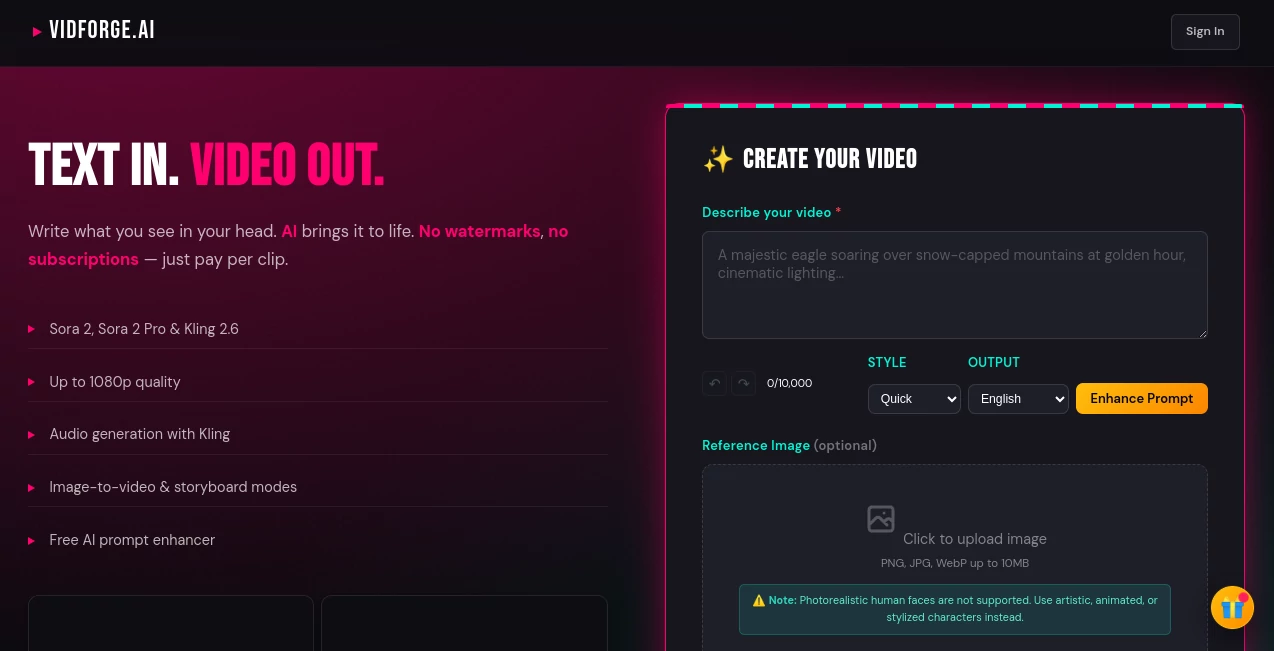
What is VIDFORGE.AI?
Ever stared at a blank screen, your mind buzzing with a scene so vivid it begs to move, only to hit the wall of endless editing software? That's where this gem shines, pulling those mental movies straight into reality with a few keystrokes. I've watched friends, buried in content creation, light up when they discovered this—suddenly, their wild ideas weren't trapped on paper anymore. It's the kind of tool that feels like it reads your thoughts, handing you polished clips that look like they took a team all day, but really? Just minutes from your imagination.
Introduction
Picture this: you're a storyteller at heart, maybe sketching out a quirky ad for your side hustle or dreaming up an animated short that captures that family vacation vibe. Tools like this one cut through the noise, letting you describe the action—say, a flock of birds swirling over a misty lake at dawn—and boom, it's alive on screen, complete with subtle audio hums that pull you right in. What hooks me every time is how it democratizes that Hollywood polish; no more begging for budgets or wrangling freelancers. Just pure, unfiltered creation that rewards the bold dreamer in all of us, turning "what if" into "watch this" with effortless grace.
Key Features
User Interface
The dashboard hits you with that rare simplicity— a clean prompt box that practically invites your wildest ramble, paired with an optional enhancer that polishes your words like a sharp editor on coffee. Drag in an image if you want to build from a still, and everything flows without a single confusing menu. It's forgiving too; even if your description's a hot mess, it guides you gently, making the whole process feel like chatting with a patient collaborator who gets your vision without the eye-rolls.
Accuracy & Performance
When it nails a prompt—like turning "a lone cyclist pedaling through golden fields under a stormy sky" into fluid motion with spot-on lighting—it leaves you grinning, because the details pop just right, no awkward glitches or off-kilter proportions. Speeds are a dream; clips render in moments, hitting that sweet 1080p clarity that looks pro on any device. I've pushed it with rambling ideas from my notebook, and nine times out of ten, the output mirrors the magic in my head, saving hours that used to vanish in tweaks.
Capabilities
This powerhouse taps into cutting-edge models that handle everything from text-born tales to image-sparked sequences, even layering in audio that syncs like it was scored by hand. Storyboard mode lets you chain scenes for longer narratives, while the image-to-video flip breathes life into static shots—think a family photo morphing into a playful montage. It's versatile enough for stylized whims, like ethereal animations or bold graphic bursts, always delivering that watermark-free finish that screams ownership.
Security & Privacy
In a sea of tools that plaster your work with ugly marks or hoard your uploads, this one stands out by keeping things clean and yours—no watermarks to scrub, no creepy data grabs. Your prompts and files stay locked down, processed quick and forgotten, so you can pour out personal stories without that nagging "what if someone sees?" vibe. It's the quiet confidence booster that lets creativity run free, knowing your sparks of genius remain just that—yours.
Use Cases
Content creators whip up eye-catching social reels from a single sentence, watching engagement soar as those quick-hit videos land just right. Small business owners mock up product demos that feel cinematic, turning a static shot of their handmade jewelry into a swirling showcase that sells itself. Aspiring filmmakers storyboard shorts in a snap, layering audio for that immersive punch without touching a timeline. Even educators craft animated explainers that make dry topics dance, pulling students in with visuals that stick long after the bell.
Pros and Cons
Pros:
- Blazing-fast renders that keep your momentum alive, no staring at progress bars.
- Stylized outputs that wow, especially for creative, non-realistic vibes.
- Pay-as-you-go freedom—no creepy subscriptions tying you down.
- Built-in enhancer that turns rough ideas into gold, saving rewrite headaches.
Cons:
- Shines brightest on artistic styles; super-real humans might need extra nudges.
- Credit buys upfront can feel like a leap for first-timers, though the value hits hard.
Pricing Plans
Forget the endless monthly drain—this setup's all about grabbing what you need, when you need it, with credits that stretch further than you'd think. Snag a pack via Apple Pay or Google Pay for seamless starts, and watch those investments pay off in clips that punch above their weight. It's refreshingly straightforward: no tiers to tangle over, just pure value that scales with your spark, making high-quality video feel like an everyday indulgence rather than a splurge.
How to Use VidForge.ai
Start by jotting your vision into the prompt spot—get vivid, like "a fox darting through autumn leaves with wind-whipped fur." Hit the enhancer if it needs a shine, then upload a starter image for that extra layer if you're feeling it. Click generate, snag your credits if it's go-time, and sit back as the magic unfolds. Download the crisp file, tweak in your editor if the mood strikes, and share the wonder—it's that loop of inspiration that keeps pulling you back for more.
Comparison with Similar Tools
While some platforms lock you into rigid subscriptions or drown you in watermarked teasers, this one flips the script with no-strings credits and clean, pro-ready outputs that beg to be shared. Others might boast broader realism, but they often lag on speed or stylize clunkily—here, the focus on artistic flair delivers that wow factor faster, without the bloat. It's the nimble choice for creators who crave quality without the corporate cage, edging out the giants in pure, joyful usability.
Conclusion
This isn't just a video maker; it's the spark that turns quiet "maybes" into magnetic must-sees, empowering you to chase those head-full scenes without apology or apology-worthy results. In a crowded field, it rises as the heartfelt hero, blending brains with beauty to make creation feel less like labor and more like liberation. If you've ever let an idea flicker out for lack of easy tools, dive in—your next masterpiece is waiting, just a prompt away.
Frequently Asked Questions (FAQ)
Can I start without buying credits?
Absolutely—test the waters with free enhancements and previews to see the shine before you commit.
What styles does it handle best?
It thrives on stylized magic, from dreamy animations to bold graphics—perfect for anything but straight-up photoreal faces.
How long are the clips?
Snappy and sweet, usually up to a few seconds, ideal for hooks that grab and hold.
Does audio come included?
Yes, with certain modes—it adds that immersive layer, syncing sounds to your scene seamlessly.
What file sizes work for uploads?
Keep 'em under 10MB for PNGs, JPGs, or WebPs—plenty for sparking vivid videos.
AI Animated Video , AI Image to Video , AI Text to Video , AI Video Generator .
These classifications represent its core capabilities and areas of application. For related tools, explore the linked categories above.
VIDFORGE.AI details
This tool is no longer available on submitaitools.org; find alternatives on Alternative to VIDFORGE.AI.
Pricing
- Free
Apps
- Web Tools
Categories

VIDFORGE.AI Alternatives Product

RunwayAI
Whisper Thun…
Seedance 2.0

Seedance 2.0

wan2-6.org
AI Best

AI Baby Dance

seedance2

seedance 3.0
