
🧠 AI Quiz
Think you really understand Artificial Intelligence?
Test yourself and see how well you know the world of AI.
Answer AI-related questions, compete with other users, and prove that
you’re among the best when it comes to AI knowledge.
Reach the top of our leaderboard.

















Vidguru

What is Vidguru?
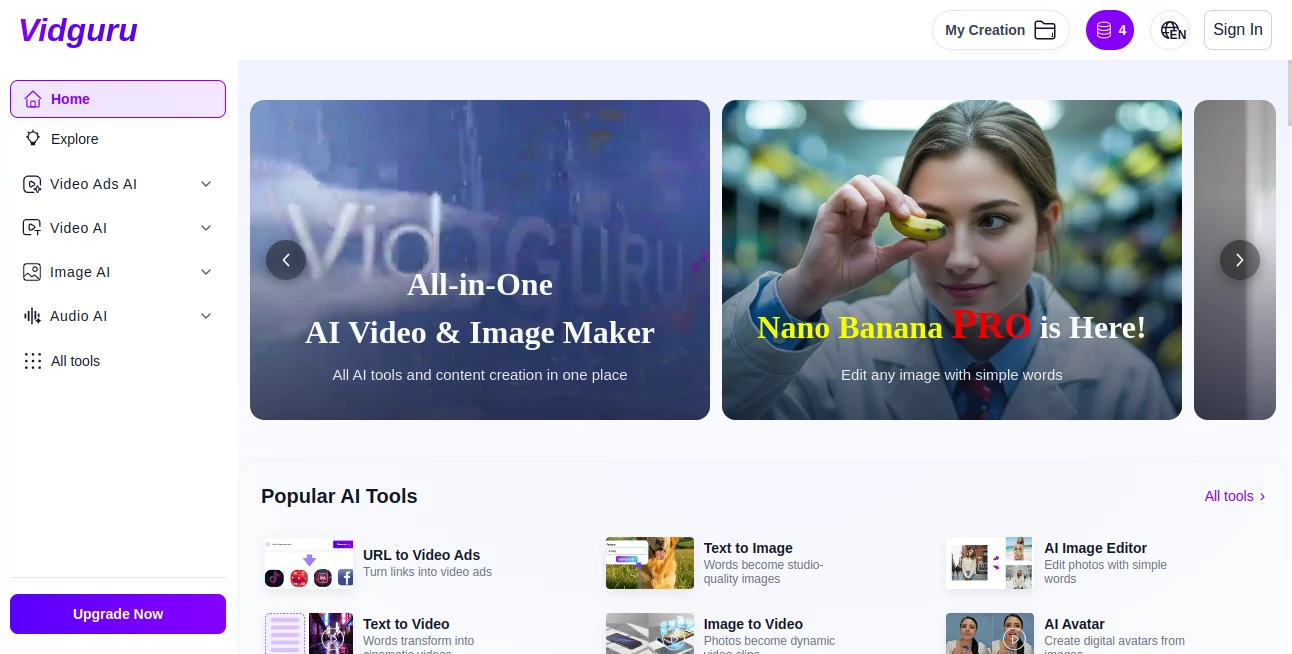
VidGuru gathers the best of creative tech under one roof, letting users spin up videos, pictures, and sound clips from simple ideas without juggling a bunch of apps. It's like having a full studio in your pocket, where a quick description turns into something ready to share. Folks who've switched over often talk about how it cuts the chaos, turning scattered tools into a smooth ride that keeps the focus on the fun of making stuff that clicks with an audience.
Introduction
VidGuru came together a while back when a team of creators got tired of hopping between apps for every little project, each with its own quirks and bills piling up. They set out to build a spot where everything flows together, and it didn't take long for word to spread among small teams and solo makers who were knee-deep in content crunches. Users started sharing wins like slashing their monthly tabs from over two hundred bucks to a single fee, or whipping up weekly videos that used to eat days. It's grown into that reliable go-to for anyone chasing polished pieces without the hassle, proving that one smart setup can handle the heavy lifting across visuals and sounds alike.
Key Features
User Interface
The dashboard feels welcoming right from the jump, with a clean layout that puts your options up front—no digging through layers or confusing icons. You just pick what you need, like a video clip or a sound bite, type in a few notes about what you're after, and it rolls from there. Even if you're not the tech type, the steps line up like a friendly chat, with previews popping up quick to show where things are headed, keeping the whole thing light and straightforward.
Accuracy & Performance
When you lay out a scene, it captures the details spot-on, from smooth movements to lighting that looks just right, often shaving off hours of tweaks that used to drag things down. Outputs come back fast and steady, holding up sharp on any screen, with users noting how the results blend so well that they pass for pro work without the extra polish time. It's that kind of reliability that turns a rough afternoon idea into something shareable by evening, without the usual hiccups.
Capabilities
From building full stories with multiple shots and matching sounds to crafting lifelike stand-ins for faces or voices in different tongues, it covers a wide spread of making needs all in one flow. You can start with a quick link or a sketchy description and end up with high-clear clips or detailed visuals, even layering in effects that tie everything together seamlessly. The range lets you mix and match, like turning a static shot into a moving tale or dubbing lines that feel natural, opening up ways to tell your story without starting from zero each time.
Security & Privacy
Your projects stay tucked away during the build, with no extra eyes on the drafts unless you choose to loop someone in. It handles the behind-the-scenes stuff with standard locks, clearing out temps once you're done, so you can toss in personal touches without a second thought. Creators lean on that quiet setup, knowing their early ideas remain just theirs until they're ready to push them out into the world.
Use Cases
Marketing crews swap out a stack of apps for quick ad spots from product links, saving cash and keeping the workflow tight for client turns. Podcasters add custom voices in multiple languages to boost listener pull, or small shop owners craft social clips that highlight their goods without calling in outside help. Even teams running regular posts find it handy for storytelling series, where one tool handles the visuals, sounds, and edits to keep things consistent and fresh.
Pros and Cons
Pros:
- Bundles everything into one easy spot, ditching the app overload.
- Speeds up the whole process, often cutting time by a big chunk.
- Scales well for solos or groups, without extra learning curves.
Cons:
- Best with clear starting points; fuzzy ones might need a redo.
- Full range shines on paid access, teasing with basics upfront.
- Peak hours can slow the spin a touch for heavy users.
Pricing Plans
It starts with a free peek that lets you try the basics without a dime, good for seeing if it fits your flow. From there, a single monthly pass unlocks the full kit—videos, pictures, sounds, and more—for a fraction of what scattered apps would run, often under what one used to cost alone. Options likely flex for lighter or heavier use, with yearly picks trimming the tab, making it easy to stick around without feeling locked in.
How to Use VidGuru
Log in to the main board, then choose your focus—say, a short clip—and jot down what you envision, like a sunny scene with a voiceover. Pick from the ready models if you want a certain vibe, let it build, and tweak the preview till it lands right. Grab the final in your go-to format, share it out, or loop back to layer on more for the next piece in your set.
Comparison with Similar Tools
Unlike standalone apps that nail one thing but leave gaps elsewhere, VidGuru ties it all together for a smoother ride, though those might dive deeper in a single corner. Against pricier bundles, it keeps the cost low while matching the output quality, skipping the extra steps but perhaps missing niche tweaks for the ultra-picky. It stands out for folks wanting a full-circle fix without the fuss.
Conclusion
VidGuru wraps up the scramble of content tools into a neat package that lets ideas take flight without the drag. It empowers makers to chase bigger stories with less sweat, turning everyday creators into ones who deliver day in and day out. As the push for fresh visuals keeps ramping, this hub looks set to stay a steady hand, blending smarts with simplicity for outputs that resonate.
Frequently Asked Questions (FAQ)
What's the easiest way to start a project?
Just describe it in plain words—the system picks up the rest and runs.
Can it handle different languages?
Yes, voices and clips work across a dozen tongues for wider reach.
How quick are the results?
Most builds wrap in minutes, ready for a look or a share right away.
Is there a limit on free tries?
A handful to test, then it nudges toward the full pass for unlimited.
What if I need to tweak after?
Jump back in with notes on changes—it refines without starting over.
AI Image to Video , AI Text to Video , AI Video Generator , AI Voice Cloning .
These classifications represent its core capabilities and areas of application. For related tools, explore the linked categories above.
Vidguru details
This tool is no longer available on submitaitools.org; find alternatives on Alternative to Vidguru.
Pricing
- Free
Apps
- Web Tools
Categories

Vidguru Alternatives Product

ai seedance …

JSON to Video
Render of Dr…

Sora 2 Video…

Qwen3 TTS

seedance 2

Kling O1

Kling 3.0 – …

kling 3 AI
