🧠 AI Quiz
Think you really understand Artificial Intelligence?
Test yourself and see how well you know the world of AI.
Answer AI-related questions, compete with other users, and prove that
you’re among the best when it comes to AI knowledge.
Reach the top of our leaderboard.


















ViewMax Studio
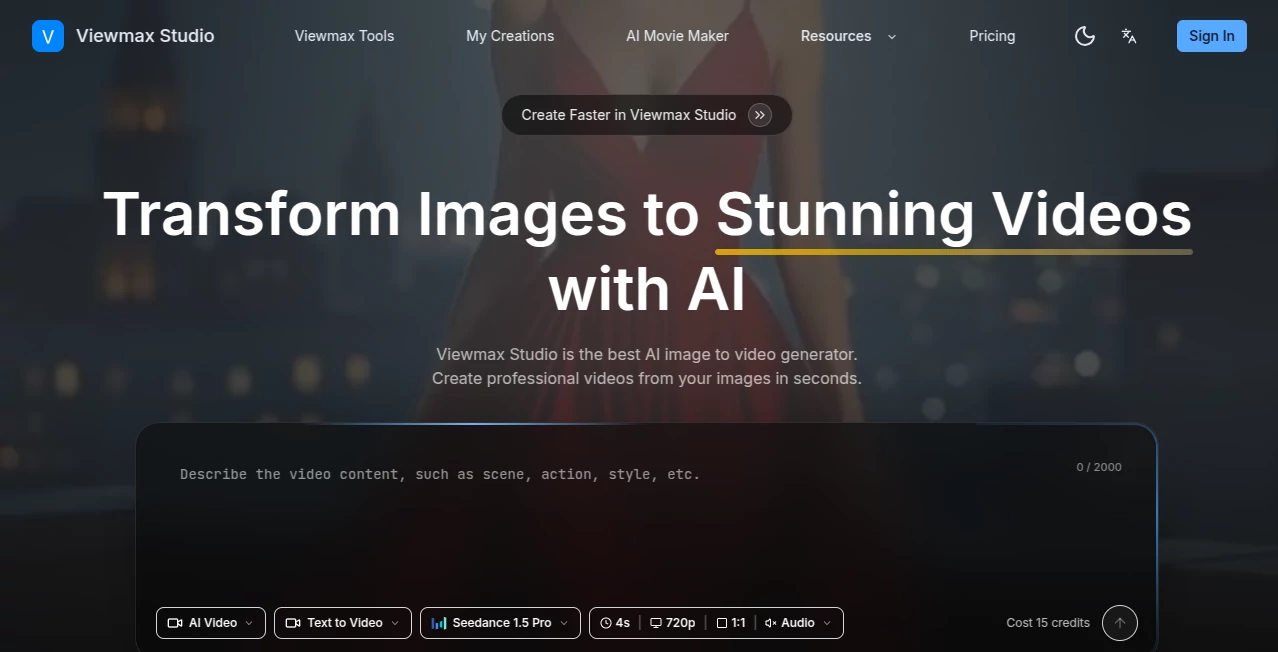
What is ViewMax Studio?
There’s a special kind of satisfaction when you take a simple idea or a single image and turn it into a polished, engaging video that actually stops the scroll. This platform makes that happen faster and more enjoyably than most creators expect. It bundles together everything you need—video generation, scripting, voiceovers, watermark removal, and more—into one smooth workspace. I’ve watched friends go from staring at a blank timeline to posting a complete, professional-looking short in under an hour, and the results often look like they spent days editing. It’s the kind of tool that quietly removes the biggest friction points in content creation and lets the creativity flow.
Introduction
Creating viral-worthy videos used to mean juggling multiple apps, wrestling with timelines, hiring voice talent, or dealing with annoying watermarks. Viewmax brings all the essential pieces together in one place so you can focus on the story instead of the tech. Whether you start with text, an image, or an existing clip, it helps you generate, enhance, and finalize content that feels intentional and ready for platforms like TikTok, Instagram, or YouTube. It’s especially loved by solo creators and small teams who need to move fast without sacrificing quality. The difference is noticeable the first time you use it: things just work, and the output feels like something you’d actually be proud to post.
Key Features
User Interface
The workspace is clean and intuitive, designed by people who clearly spend a lot of time making content themselves. You can jump between tools—video generator, script writer, voiceover, watermark remover—without losing your flow. Previews are quick, edits are straightforward, and everything feels connected rather than scattered across tabs. It’s the rare all-in-one tool that doesn’t feel overwhelming, even when you’re using several features in one project.
Accuracy & Performance
The AI video generation respects your input—characters stay consistent, motion looks natural, and the overall quality holds up well for social media and marketing use. Voiceovers sound human rather than robotic, scripts come out coherent and on-brand, and watermark removal is impressively clean. Processing times are practical, letting you iterate quickly instead of waiting around. The results consistently feel production-ready rather than “good enough for AI.”
Capabilities
You get a full suite: text-to-video and image-to-video generation, AI script writing, natural-sounding voiceovers, intelligent watermark and caption removal, plus tools to enhance and repurpose existing clips. It supports multiple styles and formats, making it easy to create vertical shorts, horizontal videos, or anything in between. The combination of these features in one place means you can go from raw idea to finished, shareable video without switching apps or losing quality along the way.
Security & Privacy
Your projects and uploaded content are handled with care. The platform focuses on delivering the output you need without unnecessary data collection or long-term storage of sensitive material. For creators working with client work or original ideas, that respectful approach builds trust and encourages bolder experimentation.
Use Cases
A fitness coach turns workout photos into dynamic demo videos with voiceover narration in minutes. A small brand creates product explainers from static images, adding scripts and clean audio for social campaigns. Content creators repurpose long videos by removing watermarks, adding new voiceovers, and generating fresh clips for multiple platforms. Educators build engaging lesson visuals quickly without needing design skills. The common thread is speed with quality—getting professional-looking results without the usual production headaches.
Pros and Cons
Pros:
- All-in-one workflow that actually saves time instead of adding complexity.
- Strong video quality with good consistency and natural motion.
- Useful extras like script writing and voiceovers that feel integrated.
- Clean watermark removal that preserves video quality.
- Approachable enough for beginners yet powerful for regular creators.
Cons:
- Longer or very complex videos may still benefit from manual polishing.
- Some advanced features require paid access.
- Learning to write effective prompts takes a short practice period.
Pricing Plans
It offers a free tier generous enough to test the full workflow and create several videos. Paid plans unlock higher limits, faster processing, more features, and commercial usage rights. The pricing feels balanced for the time and creative freedom it provides—many users say it quickly pays for itself by speeding up their content pipeline.
How to Use Viewmax
Start in the video generator: type your concept or upload an image, add any style or duration preferences, and generate. Use the script tool to create or refine narration, then add voiceover for natural audio. If you have existing clips with watermarks, run them through the remover for clean results. Review everything in the workspace, make small edits, and export ready-to-post videos. The flow is logical and fast enough that you can create multiple pieces in one focused session.
Comparison with Similar Tools
Many AI video tools focus on generation alone and leave you to handle scripting, audio, and cleanup separately. This one brings everything together in a cohesive experience, reducing the need to switch between different platforms. The combination of quality generation and practical supporting tools makes it especially strong for creators who need to produce consistently without a big team or complicated setup.
Conclusion
Making videos that actually perform doesn’t have to be slow, expensive, or frustrating. This platform removes many of the biggest obstacles and lets you focus on the fun part—creating content people want to watch. Whether you’re building a personal brand, growing a business, or just sharing ideas, it gives you professional results with far less effort. For anyone serious about video but short on time, it’s one of those tools that quickly becomes part of the daily workflow. The difference it makes is simple but powerful: more ideas turned into finished videos, more consistently.
Frequently Asked Questions (FAQ)
How good is the video quality?
It produces clean, natural-looking clips suitable for social media and marketing—definitely above average for AI video tools.
Can I use my own images or clips?
Yes—image-to-video and tools for enhancing existing footage work very well.
Is there voiceover support?
Yes, with natural-sounding options that match your script.
Do I need video editing experience?
Not at all—the tools are designed to be approachable for beginners while still useful for experienced creators.
Are there usage limits?
Free tier has daily allowances; paid plans remove most restrictions for heavier use.
AI Animated Video , AI Image to Video , AI Video Generator , AI Text to Video .
These classifications represent its core capabilities and areas of application. For related tools, explore the linked categories above.
ViewMax Studio details
Pricing
- Free
Apps
- Web Tools
Categories

ViewMax Studio Alternatives Product

gemini video

seedream 5
Seedance 2.0…

Aura AI

Seedance 3.0

Seedream 6.0

Vidmix
Seedance 2.0…

Seedance 2.0…