
🧠 AI Quiz
Think you really understand Artificial Intelligence?
Test yourself and see how well you know the world of AI.
Answer AI-related questions, compete with other users, and prove that
you’re among the best when it comes to AI knowledge.
Reach the top of our leaderboard.


















Visual Field Test
Verified Blue CheckMark
Verified Blue CheckMark products are featured above free or unverified listings.
This badge indicates authenticity and builds trust, giving your product higher visibility across the platform.
Upgrade to get verified
Verified Blue CheckMark products are featured above free or unverified listings. This badge indicates authenticity and builds trust, giving your product higher visibility across the platform.
Upgrade to get verified
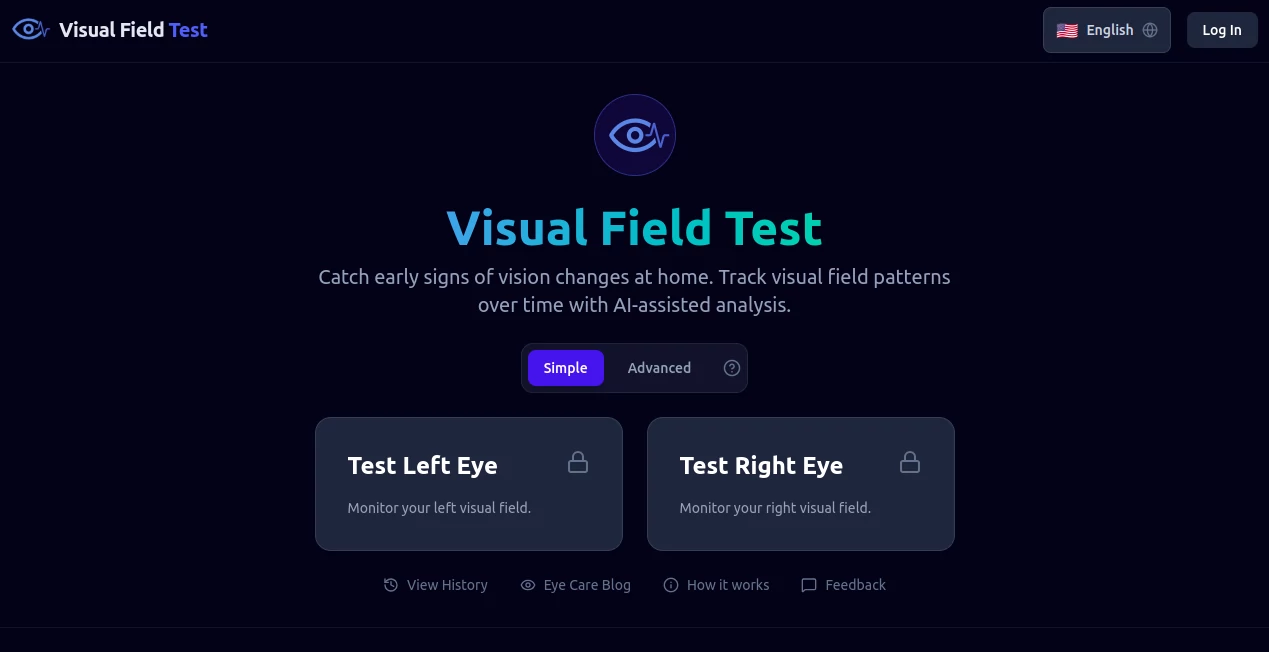
What is Visual Field Test?
VisualFieldTest offers a straightforward way to peek into your eye health from the comfort of home, using simple patterns to uncover hidden weak spots in your vision. This handy resource steps in where daily routines might miss subtle shifts, giving users a quick heads-up on areas that could use a closer look from a pro. Many who've given it a try mention feeling more in tune with their sight after just a few minutes, turning what could be an overlooked issue into an early alert worth heeding.
Introduction
VisualFieldTest came about as a bridge between everyday awareness and expert care, sparked by folks who noticed how easy it is for vision glitches to slip under the radar until they're hard to ignore. It rolled out quietly, aiming to hand over a basic tool for self-checks that doesn't demand fancy gear or clinic waits. Over time, word has spread among those keeping tabs on their wellness, with shares of how a routine scan caught something small that led to bigger peace of mind. At its heart, it's about empowering people to stay proactive without the overwhelm, making eye tune-ups as routine as brushing teeth—simple, quick, and quietly reassuring.
Key Features
User Interface
The setup greets you with a clean screen that guides without overwhelming, starting with a calibration nudge to match your setup, then easing into the main grid that responds to your gaze. Dots and prompts appear one at a time, with clear cues on where to fix your focus, and progress ticks along at the bottom like a friendly nudge. It's built to work on most devices, feeling steady even on a laptop in dim light, so you can pause and pick up without losing your place.
Accuracy & Performance
It draws on tried patterns to map out responses reliably, catching inconsistencies that align with what specialists might spot in a full session, though always with a nod to its homebound limits. Runs wrap up in under ten minutes, smooth and snag-free, delivering a snapshot that holds steady across tries if you keep conditions consistent. Users often note how it flags the same fuzzy edges each time, building trust in the results without overpromising the precision.
Capabilities
Beyond the basics, it sketches a rough map of your field, highlighting zones that might warrant a deeper dive, complete with tips on what to watch next. It adapts to left or right eye checks, and even lets you log multiple sessions to spot changes over weeks, turning one-off peeks into a personal trend tracker. The output includes plain-language breakdowns, so you walk away knowing not just the what, but a gentle why behind the findings.
Security & Privacy
Your sessions stay local where possible, with no need to share details unless you choose to save reports, keeping things under your roof. It skips the usual data grabs, focusing on the task at hand without backend baggage, so you can test in peace. That straightforward approach earns nods from those wary of wellness apps that overreach, letting you focus on the insight rather than the input safeguards.
Use Cases
Drivers run quick checks before long hauls, ensuring peripheral pops don't sneak up on the road. Office workers weave it into lunch breaks, keeping tabs on screen-strain spots that build up unnoticed. Seniors share results with family chats, sparking timely talks with docs without the rush. Even kids' guardians use it for baseline peeks during growth spurts, catching shifts early in a way that's more game than grind.
Pros and Cons
Pros:
- Fits right into daily rhythms, no appointments or add-ons needed.
- Highlights potential hiccups without health scare tactics.
- Tracks trends over time for a fuller picture of patterns.
- Works across devices, keeping consistency on the go.
Cons:
- Not a doc stand-in—flags for follow-ups, not final calls.
- Needs steady setup, like good light, to shine true.
- Lacks depth for complex cases that crave clinic gear.
Pricing Plans
It opens wide with no entry fee, letting you dive into full checks right away, a nod to keeping wellness within reach. Occasional upsells might nudge for premium reports or history hoards, but the core stays free, making it a low-barrier pick for regular runs. That open-door vibe keeps users coming back, without the nickel-and-dime that turns tools into chores.
How to Use VisualFieldTest
Launch the page and follow the warm-up to set your screen distance, then pick an eye to start, covering the other snug. Stare at the center mark as dots flicker in from the sides, tapping or clicking when you catch them, and let it roll through the grid. Wrap with a review of the map, noting any dim areas, and jot it down or share if it sparks a doc visit. Repeat monthly to watch for wobbles, building your own eye diary over time.
Comparison with Similar Tools
Where clinic machines demand a drive and dollars, VisualFieldTest brings the basics home, trading pro polish for pocket ease, though those might map finer for fee-based follow-throughs. Against app armies that add gamified gloss, it keeps the kernel clean, skipping the sparkle but perhaps missing motivational modes. It suits self-starters seeking straightforward scans, edging out the extras with its no-nonsense nod to real needs.
Conclusion
VisualFieldTest quietly champions clearer sight by putting the power of preliminary peeks in your hands, fostering habits that catch concerns before they cloud the view. It reminds us that small, steady steps can safeguard something as vital as our windows to the world. As awareness grows around subtle health signals, this tool stands ready to light the way, one dot at a time.
Frequently Asked Questions (FAQ)
Is this a replacement for eye doctor visits?
No, it's a helpful heads-up—always chat with a pro for the full story.
How often should I run a check?
Monthly for baselines, or anytime you notice fuzzy fringes.
What if results show odd spots?
Flag it for a follow-up exam to dig deeper safely.
Does it work on phones?
Best on desktops for precision, but mobile holds up for quick peeks.
Any tips for better runs?
Dim the room, sit steady, and rest eyes between sides.
AI Fitness , AI Mental Health , AI Healthcare .
These classifications represent its core capabilities and areas of application. For related tools, explore the linked categories above.
Visual Field Test details
Pricing
- Free
Apps
- Web Tools
Categories

Visual Field Test Alternatives Product

HealCycle

Alter
core level

YouCam AI & …

Hands Off

Quso AI

ZenMako

Romantic AI

Ultralytics
