🧠 AI Quiz
Think you really understand Artificial Intelligence?
Test yourself and see how well you know the world of AI.
Answer AI-related questions, compete with other users, and prove that
you’re among the best when it comes to AI knowledge.
Reach the top of our leaderboard.


















Voe Ai

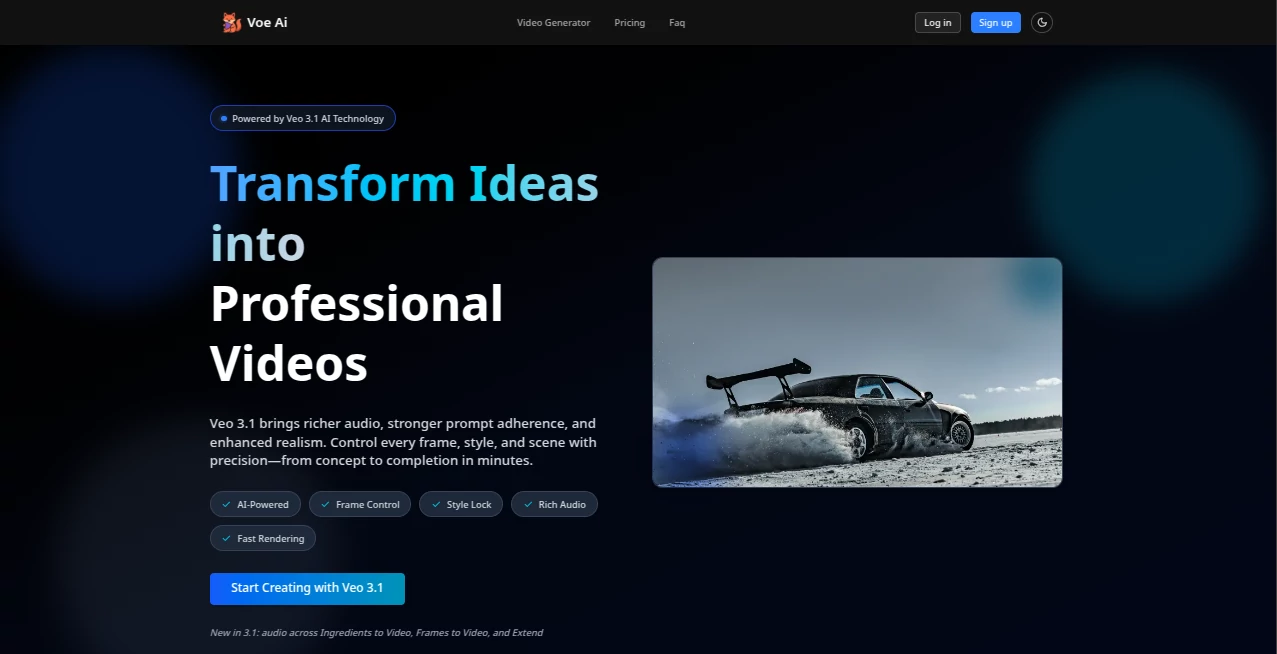
What is Voe Ai?
There's something almost magical about describing a scene in plain words and watching it come alive as a sharp, cinematic video—complete with natural audio that feels like it belongs there. This platform makes that happen so smoothly it's hard not to smile every time. Whether you're a creator who's tired of endless editing loops or a marketer needing quick, on-brand clips, it cuts through the noise and delivers results that look and sound like they came from a pro team.
Introduction
What drew me in was the promise of ditching heavy software and complicated timelines. You just type a brief or upload a few reference shots, guide the style if you want, and minutes later you've got a finished video with synced sound—ambient noise, dialogue, everything in place. It's built around Veo 3.1's strengths: richer audio, better prompt following, and textures that feel real. I've seen friends go from "I need a quick ad" to sharing something that looks like it took days, all without touching a single timeline. It's the kind of tool that quietly changes how you think about video creation—less frustration, more flow.
Key Features
User Interface
The whole experience is built around a clean three-step flow: describe what you want, direct with prompts or images, then watch it render. No cluttered panels or buried menus—just a straightforward workspace where everything makes sense on the first look. I remember trying it for a simple product shot; the upload area and preview pane felt intuitive, like the platform knew exactly what I needed next. It's designed to keep you focused on the story, not the tech.
Accuracy & Performance
This is where it really stands out—the way it sticks to your prompt without wandering off, nailing details like lighting, motion, and character consistency across shots. Audio sync is spot-on, with layers that complement the visuals instead of fighting them. Generations are fast, often just a few minutes, and the quality holds up even when you push for longer clips or trickier scenes. In my tests, it handled complex descriptions better than I expected, saving me from the usual "close enough" compromises.
Capabilities
You can start from text, guide with multiple reference images for locked-in styles and characters, or extend shots seamlessly for longer narratives. Features like insert/remove let you tweak elements mid-process while keeping lighting and shadows consistent. The audio integration feels seamless—dialogue, ambient sounds, even spatial positioning that makes everything immersive. It's built for real creative control, whether you're crafting ads, short stories, or branded content that needs to look and sound polished.
Security & Privacy
Everything processes privately, with watermarks optional and data handled responsibly—SOC 2, GDPR, and ISO 27001 compliance keep it trustworthy. Your prompts and references stay yours; no lingering copies or unexpected sharing. It's reassuring for commercial work or sensitive ideas, letting you create without second-guessing who's seeing what.
Use Cases
Small teams use it to whip up on-brand ads in hours instead of days, testing variations with A/B previews. Content creators turn blog ideas into engaging shorts that boost shares and views. Marketers craft localized versions quickly, swapping elements without reshooting. Even filmmakers prototype scenes, extending shots to see how narratives flow before committing to full production. It's versatile enough to fit whatever you're building, from quick social posts to polished campaigns.
Pros and Cons
Pros:
- Audio sync feels natural and professional—saves tons of post-production time.
- Precise control over every frame and style without a steep learning curve.
- Fast rendering that lets you iterate quickly and stay creative.
- Watermark-free by default on paid plans, perfect for client work.
Cons:
- Credit system means planning heavier projects carefully.
- Shorter clips (4-8 seconds base) work best for most use cases.
Pricing Plans
It starts accessible with a Starter plan around $9.9/month for solid credit allowances and commercial use. Pro steps up for more volume and priority, while Studio handles high-frequency needs. Yearly options cut costs, and you can cancel anytime—it's designed to grow with you without locking you in. The value feels fair, especially when you see how much time and money it saves compared to traditional production.
How to Use Voe Ai
Begin by writing your brief or script in the prompt area, add reference images if you want to lock in characters or styles, then hit generate. Preview the result, tweak with natural language edits if needed, and export. For longer pieces, use extend to continue seamlessly. I tried it with a simple product demo: described the scene, uploaded a few shots, and had a clean video with voiceover in under ten minutes—ready to post.
Comparison with Similar Tools
While others might offer basic text-to-video, this one stands out with its audio integration and precise frame control—things that usually require extra software or hours of work. It feels more cinematic and creator-friendly, delivering results that look and sound ready to use, not just "good enough." For anyone tired of juggling tools, it's a clear step up in quality and ease.
Conclusion
This platform quietly raises the bar for video creation, making professional results feel within reach for everyone. It's the kind of tool that turns "I wish I could" into "look what I made"—fast, reliable, and genuinely fun to use. If you're creating content that needs to stand out, this is worth a serious look. The difference it makes in speed and polish is hard to overstate.
Frequently Asked Questions (FAQ)
How long are the videos?
Base clips run 4-8 seconds, but you can extend for longer narratives up to 60+ seconds.
Does it generate audio automatically?
Yes—multi-layer audio with dialogue, ambient sounds, and spatial positioning syncs naturally.
Can I use reference images?
Absolutely—upload multiple to lock characters, objects, or styles for consistency.
Is there a watermark on free videos?
Free tier includes one, but paid plans remove it for clean, commercial-ready output.
What aspect ratios are supported?
16:9, 9:16, 1:1, and 4:5—auto-adjusts or lets you choose.
AI Animated Video , AI Image to Video , AI Video Generator , AI Text to Video .
These classifications represent its core capabilities and areas of application. For related tools, explore the linked categories above.
Voe Ai details
This tool is no longer available on submitaitools.org; find alternatives on Alternative to Voe Ai.
Pricing
- Free
Apps
- Web Tools
Categories

Voe Ai Alternatives Product

KOOX AI

Klyra AI
Veo4AI

seedance 2

Runway Gen-4…

Seedance 2.0
Seedance 2.0…

Kling 3.0

Free Sora Ge…