🧠 AI Quiz
Think you really understand Artificial Intelligence?
Test yourself and see how well you know the world of AI.
Answer AI-related questions, compete with other users, and prove that
you’re among the best when it comes to AI knowledge.
Reach the top of our leaderboard.


















AI Voice Cleaner
Polish Your Audio in Seconds

What is AI Voice Cleaner?
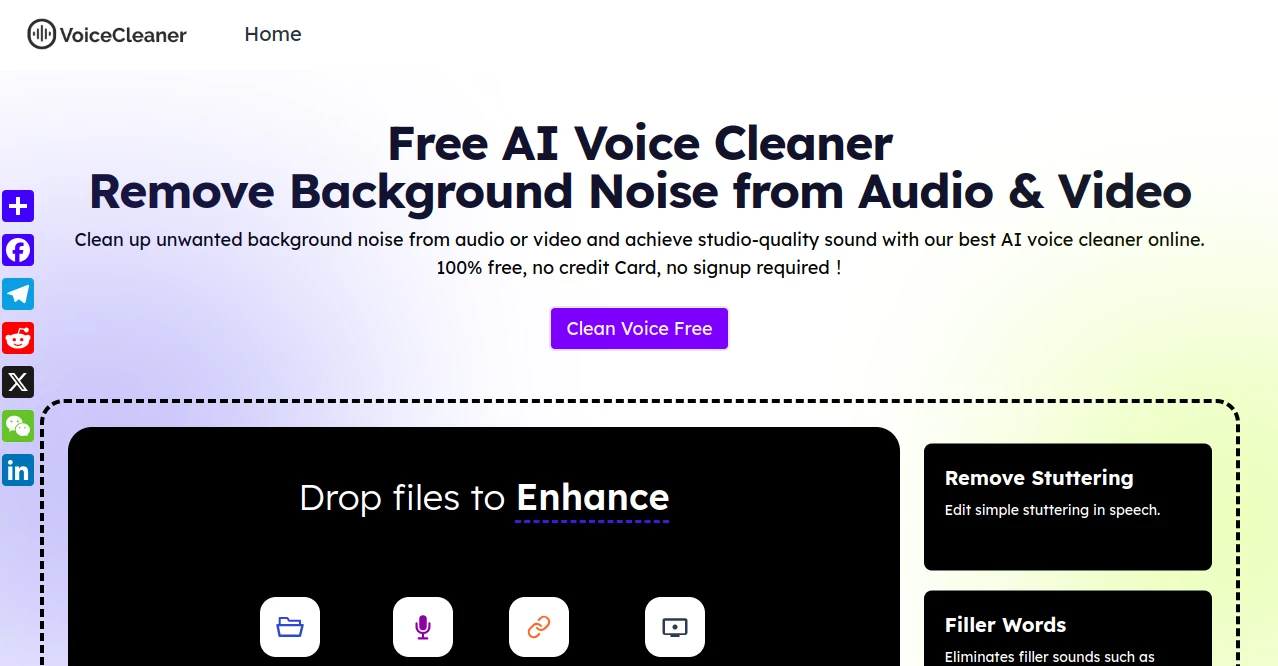
Voicecleaner slips into your workflow like a quiet fix for those rough recordings that hold back your message. It takes clips riddled with distractions and hands back versions where the words cut through clear and steady, all without you lifting a finger beyond the upload. Creators from quiet home setups to bustling field ops lean on it when time's short and quality can't wait, turning 'good enough' into something that grabs ears right away.
Introduction
Voicecleaner showed up a few years ago amid the boom in remote chats and solo content pushes, born from folks tired of sifting through static-laced files just to salvage a decent take. It caught on quick with podcasters and videographers who needed a no-hassle way to tidy up without diving into pro suites. Users swap stories of how it rescued hours of footage from a windy day or a creaky room, letting them focus on the story instead of the scrub. What keeps it buzzing is that straightforward promise—no accounts, no fees, just drop in and done—making it a pocket ace for anyone chasing crisp sound on the fly.
Key Features
User Interface
You meet a bare-bones landing that zeros in on the task: drag a file or hit record, pick your noise bugaboo from a short list, and tap go. The preview spins up right there, no extra windows or buried menus, with a slider or two if you fancy a nudge. It plays nice on phones during a commute or laptops in a cafe, feeling less like software and more like a quick chat with a sound whiz who gets it done.
Accuracy & Performance
It sniffs out the unwanted rumble or echo with a sharp ear, peeling it away clean without mangling the voice's natural bend or breath. Clips process in a flash, even meatier ones, spitting back results that hold up on speakers big or small. Folks test it on tough nuts like street-side talks and swear it nails the balance, leaving the main thread bright while the fuzz fades to nothing.
Capabilities
From stripping wind from outdoor rants to muting fan whirs in home setups, it tackles a spread of everyday gremlins across audio bites or full video rolls. You can capture fresh takes right in the tool or pull from links, then export to whatever fits your next step—be it a quick share or a deeper edit. It shines at lifting buried voices too, making old tapes or phone memos playable again without the haze.
Security & Privacy
Files hit the server encrypted, get worked over quick, then vanish after a day—no lingering copies or sneaky shares. You stay in the loop on what's happening, with no strings tying your uploads to profiles or pitches. It's the kind of setup that lets you toss in sensitive clips, like a client call or personal note, and walk away knowing they've faded clean.
Use Cases
A podcaster feeds in a rainy-window episode, emerging with dialogue that flows like it was tracked in a booth. Field reporters zap traffic din from interviews, turning chaotic grabs into polished reports. Musicians tidy garage jams, highlighting riffs over chair creaks for demo drops. Even students buff lecture notes from dorm buzz, making study aids that actually stick without the drone pulling focus.
Pros and Cons
Pros:
- Dives straight into work with zero setup or sign-up walls.
- Handles video alongside sound, broadening the fix kit.
- Free ride all the way, no creeping costs or caps.
- Quick turnaround keeps your pace from stumbling.
Cons:
- Stuck on web, so spotty nets can snag the flow.
- Less wiggle for deep custom dials if you're picky.
- Short shelf life on uploads might irk hoarders.
Pricing Plans
Everything runs free, from first try to daily grinds, with no tiers or teases locking away the good bits. You roll in without a card swipe or email trap, grabbing unlimited cleans as long as the browser holds. It's built that way to lower bars for tinkerers and pros alike, proving you don't need to pony up for solid sound tweaks.
How to Use Voicecleaner
Land on the page, drag your clip or start a fresh record right there. Pick the pesky sound from the dropdown—like a low hum or sharp click—and tag the vibe, say a casual chat or tight track. Smack enhance and give it a beat to chew, then ear the preview for thumbs up. Snag the cleaned file in mp3 or whatever suits, and you're back to rolling.
Comparison with Similar Tools
Where some cleaners demand downloads or hourly hunts for presets, Voicecleaner keeps it web-simple, though those might offer fancier filters for studio heads. Against paid polishes, it holds its own on basics without the bill, but lacks the archive depth of full suites. It carves space for on-the-spot saviors, edging quick fixes over layered labs.
Conclusion
Voicecleaner quiets the chaos that muddies great captures, handing back audio that lets your voice lead the charge. It strips away the barriers to clean sound, proving that pro-level tweaks can sneak into anyone's toolkit without the fuss. As more folks chase that edge in recordings, this little engine chugs on, making every word count a touch louder and clearer.
Frequently Asked Questions (FAQ)
Does it work on videos too?
Yep, pulls the audio clean while leaving the visuals untouched.
What noises does it chase best?
Hums from gear, echoes off walls, or wind in the wild—most common culprits.
Can I record straight in?
Sure, screencast mode grabs live takes for instant spruce-up.
How long till files get zapped?
Auto-delete after twenty-four hours, keeping things light.
Need fancy gear to run it?
Nah, any modern browser on phone or pad does the trick.
AI Noise Cancellation , AI Audio Enhancer , AI Speech to Text , AI Voice & Audio Editing .
These classifications represent its core capabilities and areas of application. For related tools, explore the linked categories above.
AI Voice Cleaner details
This tool is no longer available on submitaitools.org; find alternatives on Alternative to AI Voice Cleaner.
Pricing
- Free
Apps
- Web Tools
Categories

AI Voice Cleaner Alternatives Product

AudioScribe

AI Describe …

Sonicker

SAM Audio

Transcribe A…

TyTyAi

ModelsLab
MemoTune

Lyrics to So…