
🧠 AI Quiz
Think you really understand Artificial Intelligence?
Test yourself and see how well you know the world of AI.
Answer AI-related questions, compete with other users, and prove that
you’re among the best when it comes to AI knowledge.
Reach the top of our leaderboard.


















Voiceslab

What is Voiceslab?
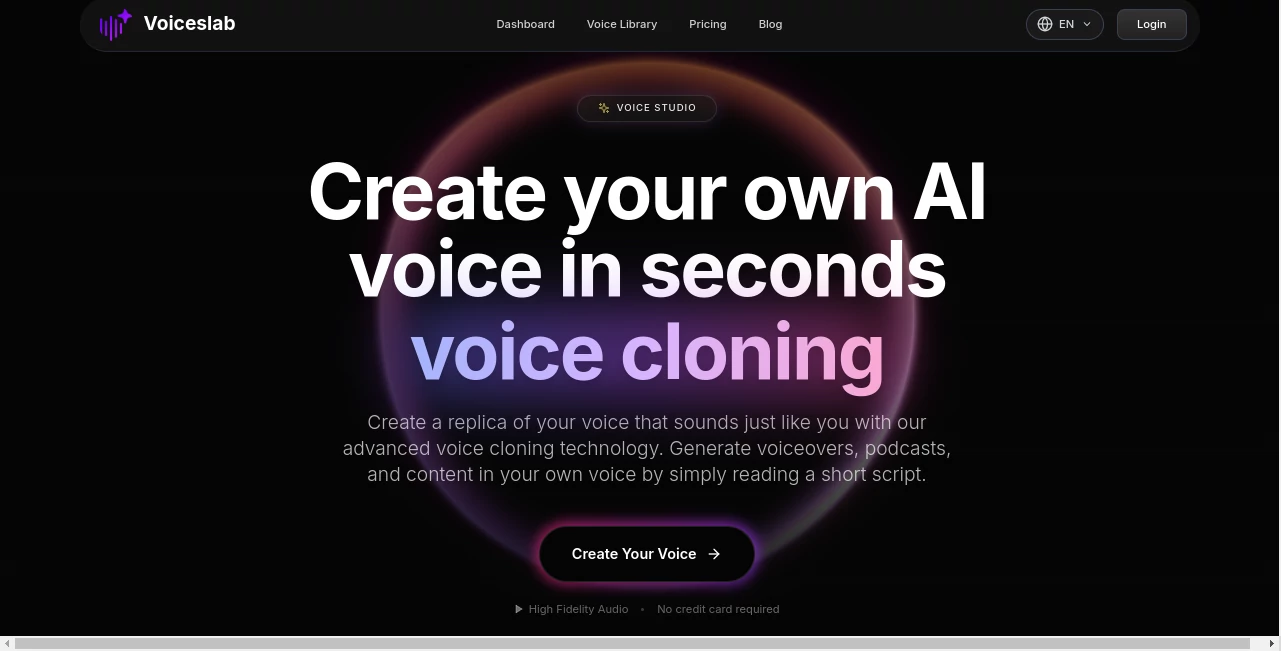
There's something almost magical about hearing your own words spoken back in a voice that sounds exactly like you, but without lifting a finger for the recording. This platform nails that experience, letting you clone your voice from just a short clip and turn any script into natural-sounding audio that captures your quirks and cadence perfectly. I tried it with a casual ramble about my weekend, and the output had me grinning—every pause, laugh, and inflection was there, like a digital twin stepping in to narrate my stories.
Introduction
In an era where content demands personality but time is always short, this tool steps up as a game-changer for anyone needing voiceovers that feel authentic. Upload a snippet of clear speech—10 to 60 seconds is plenty—and it analyzes the nuances, from breath patterns to emotional undertones, building a clone ready for action. Free to start, with no card required, it opens the door wide for podcasters, marketers, and creators who want professional polish without studio sessions. Testimonials pour in from folks who've ditched endless re-records for podcasts or crafted multilingual ads that sound native, all while keeping their unique style intact. It's the kind of straightforward innovation that makes you rethink how easy audio creation can be.
Key Features
User Interface
Everything unfolds in a clean, no-fuss layout—upload or record your sample right there, name your clone, pick a language, and watch it process. Head to the text-to-speech spot, select your creation, paste up to 2,000 characters, and generate. Tips pop up gently for best results, like speaking naturally without noise, making the whole thing feel welcoming even if you're new to this. It's intuitive enough that my first clone was ready before my tea cooled.
Accuracy & Performance
The clones come out startlingly lifelike, holding onto accents, emotions, and rhythms that make them indistinguishable from the real thing in blind tests. Processing happens in seconds, delivering high-fidelity audio that shines across devices. Users highlight how it captures subtle details—like a slight rasp or enthusiastic lift—that cheaper options flatten out, ensuring every generation feels personal and polished.
Capabilities
Support spans eight languages with spot-on accents, letting one clone handle multilingual scripts while staying true to your style. From short bursts to longer narrations, it preserves expressiveness and depth, ideal for layering over videos or standalone tracks. The direct recording option skips uploads for quick tries, and the focus on natural flow means outputs ready for prime time without extra edits.
Security & Privacy
With end-to-end encryption guarding your samples and clones, everything stays under your control—enterprise-level safeguards that treat your voice like the unique asset it is. No lingering data beyond what you need, and a clear policy that puts privacy first. It's reassuring for pros handling sensitive content, knowing their digital identity won't wander.
Use Cases
Podcasters narrate episodes in their voice even on travel days, keeping consistency without mic setups. Marketers whip up ad variations that sound like the brand founder speaking directly. Companies roll out training videos in the CEO's tone for that familiar touch across teams. Language learners practice with personalized scripts in target tongues, or creators dub videos globally while retaining their signature sound—it's versatile enough to fit wherever a personal voice adds that extra connection.
Pros and Cons
Pros:
- Incredibly lifelike clones that capture your essence in seconds.
- Generous free start with real quality, no card barriers.
- Multi-language magic that sounds native every time.
- Fast and fuss-free, perfect for tight deadlines.
Cons:
- Free tier limits characters and clones, nudging upgrades for heavy use.
- Best with clean samples—background chatter can muddy the magic.
Pricing Plans
Dive in free for one clone and 500 characters to feel the potential firsthand. Basic and Pro tiers unlock multiples, bigger limits, and extras—tailored for growing needs without overkill. No surprises, just clear steps up when you're ready to lean in more.
How to Use VoicesLab
Record or upload a clear 10-60 second bit—chat naturally about anything. Name it, choose your language, and let it build the clone. Switch to text-to-speech, pick your new voice, drop in your script, and generate. Listen, tweak the text if needed, download, and you're set. I cloned mine for a video intro; one short read-through, and it handled the rest flawlessly.
Comparison with Similar Tools
Where some demand longer samples or deliver robotic tones, this one thrives on brevity and nails the human touch with emotional depth others skim over. It's quicker to start, more private by design, and multilingual without losing your accent—standing out for creators who want authenticity over automation alone.
Conclusion
This platform hands you a digital echo that's as unique as you are, opening doors to audio projects that feel deeply personal without the grind. It's a quiet powerhouse for turning ideas into spoken reality, blending ease with excellence in a way that sticks. Give your voice a twin; you'll wonder how you managed without it.
Frequently Asked Questions (FAQ)
How much audio do I need?
Just 10-60 seconds of clear, natural speech—short and sweet works wonders.
What languages are covered?
Eight major ones, with accents and nuances that ring true.
Is my voice data safe?
End-to-end encrypted, fully under your control—no worries there.
Free tier limitations?
One clone, 500 characters—plenty to test the quality.
Best tips for great clones?
Speak relaxed, no background noise, and vary your tone a bit.
AI Text to Speech , AI Voice Cloning , AI Speech Synthesis , AI Voice Assistants .
These classifications represent its core capabilities and areas of application. For related tools, explore the linked categories above.
Voiceslab details
This tool is no longer available on submitaitools.org; find alternatives on Alternative to Voiceslab.
Pricing
- Free
Apps
- Web Tools
Categories

Voiceslab Alternatives Product

Chatterbox T…
Sonicker

Maestra
Read PDF Alo…

VoiceAILabs
Qwen3 TTS

Free Voice C…

VideoDubber

ElevenLabs
