🧠 AI Quiz
Think you really understand Artificial Intelligence?
Test yourself and see how well you know the world of AI.
Answer AI-related questions, compete with other users, and prove that
you’re among the best when it comes to AI knowledge.
Reach the top of our leaderboard.

















Voice To Instrument Generator
What is Voice To Instrument Generator?
Hum a melody into your phone, pick a guitar, and suddenly your voice becomes a warm acoustic strum. Or beatbox a rhythm and watch it turn into crisp drums or a funky bassline. This tool makes that kind of magic feel almost ordinary. You sing, hum, or beatbox a short clip, choose from dozens of instruments, and get back a clean, musical track that actually sounds like the real thing. I tried it with a simple hummed tune I’ve been carrying in my head for weeks, and the result on piano felt so natural I almost forgot it started as my off-key voice. It’s the kind of creative shortcut that makes music feel accessible again, even if you never learned an instrument properly.
Introduction
Making music shouldn’t require years of practice or expensive gear just to hear an idea out loud. This platform removes those barriers by letting your voice become the instrument. Whether you’re a singer turning a vocal line into strings, a beatboxer creating full drum patterns, or someone who can barely carry a tune but has melodies in their head, it translates your input into realistic instrument sounds with impressive accuracy. The results keep the timing, expression, and energy of your original performance while giving it the tone and timbre of a professional instrument. For hobbyists, songwriters, producers, and even teachers demonstrating concepts, it’s become a joyful way to bring ideas to life quickly and share them without frustration.
Key Features
User Interface
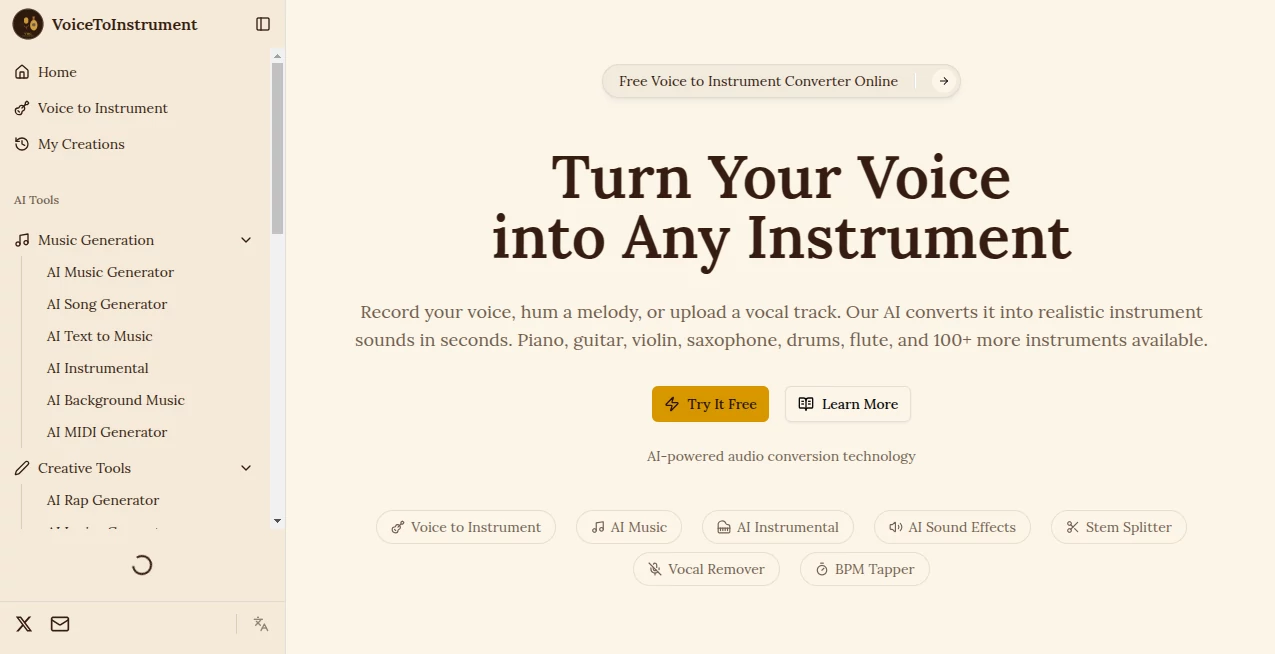
The setup is wonderfully straightforward. You record directly in the browser or upload a short audio clip, then browse a clear grid of instrument options—piano, guitar, violin, saxophone, drums, and many more. A simple “Convert” button starts the process, and the preview plays almost immediately so you can hear the transformation right away. No complicated menus or hidden settings—just enough controls to pick your sound and adjust a few basics like intensity or length. It feels inviting even on the first try, which is rare for music tools.
Accuracy & Performance
It captures the essence of your performance remarkably well—pitch, rhythm, and dynamics translate without losing the human feel. A hummed melody becomes a believable piano line with natural phrasing; a beatboxed rhythm turns into tight, groovy drums. Processing is fast, usually just a few seconds, and the output sounds polished and studio-like rather than artificial. Even with imperfect recordings (a bit of background noise or slight pitch wobble), the results stay musical and usable, which makes the tool forgiving and fun to experiment with.
Capabilities
You can convert singing, humming, beatboxing, or spoken melodies into over 100 different instruments and sounds. It handles melodic lines, rhythmic patterns, and even layered ideas reasonably well. Outputs are high-quality audio files ready for download and use in your DAW, social posts, or demos. The variety lets you try the same idea on piano one minute and saxophone the next, helping you discover what fits your song best. It’s especially useful for quick prototyping when you want to hear how a vocal idea would sound as a lead instrument or backing track.
Security & Privacy
Your audio clips are processed for the conversion and not stored long-term on the servers. No account is forced for basic use, so you can experiment privately without creating a profile. That light-touch approach feels respectful, especially when you’re recording personal melodies or rough ideas you’re not ready to share yet.
Use Cases
A songwriter hums a chorus idea while walking the dog, converts it to guitar on the spot, and has a rough demo ready before getting home. A music teacher records a simple melody to demonstrate how it would sound on different instruments for students. A beatboxer turns rhythmic patterns into full drum tracks for practice or sharing online. A producer experiments with vocal hooks turned into synths or strings to test arrangements quickly. It fits anywhere you want to hear an idea as an instrument without needing to play it yourself or hire a musician.
Pros and Cons
Pros:
- Transforms your voice into surprisingly realistic instrument sounds with good musicality.
- Extremely fast and easy—no steep learning curve or complex setup.
- Wide variety of instruments and sounds to experiment with.
- Great for quick idea prototyping and inspiration on the go.
- Free access lets you try it without commitment.
Cons:
- Best results come from clear, monophonic input (complex layered vocals can be trickier).
- Very long or highly expressive performances may need shorter clips for optimal conversion.
- Advanced editing or multi-track features are limited compared to full DAWs.
Pricing Plans
The free version gives you a generous number of conversions per day, enough to play, test ideas, and create short pieces. Paid plans remove daily limits, unlock higher quality outputs, faster processing, and additional instrument options. Pricing stays reasonable for the creative freedom it provides—many users find even the basic paid tier pays for itself in time saved and inspiration gained.
How to Use Voice to Instrument
Record a short clip directly in the browser (hum, sing, or beatbox your idea) or upload an existing audio file. Choose the instrument or sound you want from the library. Hit convert and listen to the preview. If you like the direction, download the result. Want a different flavor? Try the same input on another instrument or tweak your recording slightly and regenerate. The whole process is quick enough that you can explore several variations in one short session.
Comparison with Similar Tools
Some voice-to-MIDI tools give you notes but lack realistic timbre. Others focus on effects or filters that don’t sound like actual instruments. This one stands out by delivering convincing, musical instrument sounds while keeping the timing and feel of your original performance. It’s simpler and more immediate than full music production suites, yet more expressive than basic converters. For quick creative translation from voice to instrument, it hits a sweet spot many alternatives miss.
Conclusion
Music lives in ideas, not just polished productions. This tool helps those ideas escape your head and become audible without the usual barriers of skill, gear, or time. It turns humming in the shower or beatboxing on a walk into something you can actually use, share, or build upon. Whether you’re a complete beginner with melodies in your mind or an experienced musician looking for fast inspiration, it brings joy back to the early stages of creation. Sometimes the best creative tools are the ones that simply help you hear what you’re imagining—and this one does that beautifully.
Frequently Asked Questions (FAQ)
How clear does my recording need to be?
Clearer is better, but it handles everyday recordings surprisingly well. Monophonic lines (one note at a time) give the cleanest results.
Can I use the generated audio commercially?
Check the terms on paid plans; most users find the output suitable for personal projects and many commercial uses.
What instruments are available?
Dozens, including piano, guitar, violin, saxophone, drums, bass, synths, and more—new ones are added regularly.
Is there a length limit?
Short clips work best (usually 10–30 seconds); longer ideas can be broken into sections.
Do I need an account?
No account is required to start experimenting; sign-up is optional for saving favorites or higher limits.
AI Voice Changer , AI Text to Music , AI Music Generator , AI Voice & Audio Editing .
These classifications represent its core capabilities and areas of application. For related tools, explore the linked categories above.
Voice To Instrument Generator details
Pricing
- Free
Apps
- Web Tools
Categories

Voice To Instrument Generator Alternatives Product

HypeClip
lyria 3
TyTyAi

FluentDictat…

Custom Gift …
AssiPilot
Lyria.run
AI Song Maker

AI Prank Call