
🧠 AI Quiz
Think you really understand Artificial Intelligence?
Test yourself and see how well you know the world of AI.
Answer AI-related questions, compete with other users, and prove that
you’re among the best when it comes to AI knowledge.
Reach the top of our leaderboard.


















Waldium
The Autonomous Blog Platform for Developer Tools

What is Waldium?
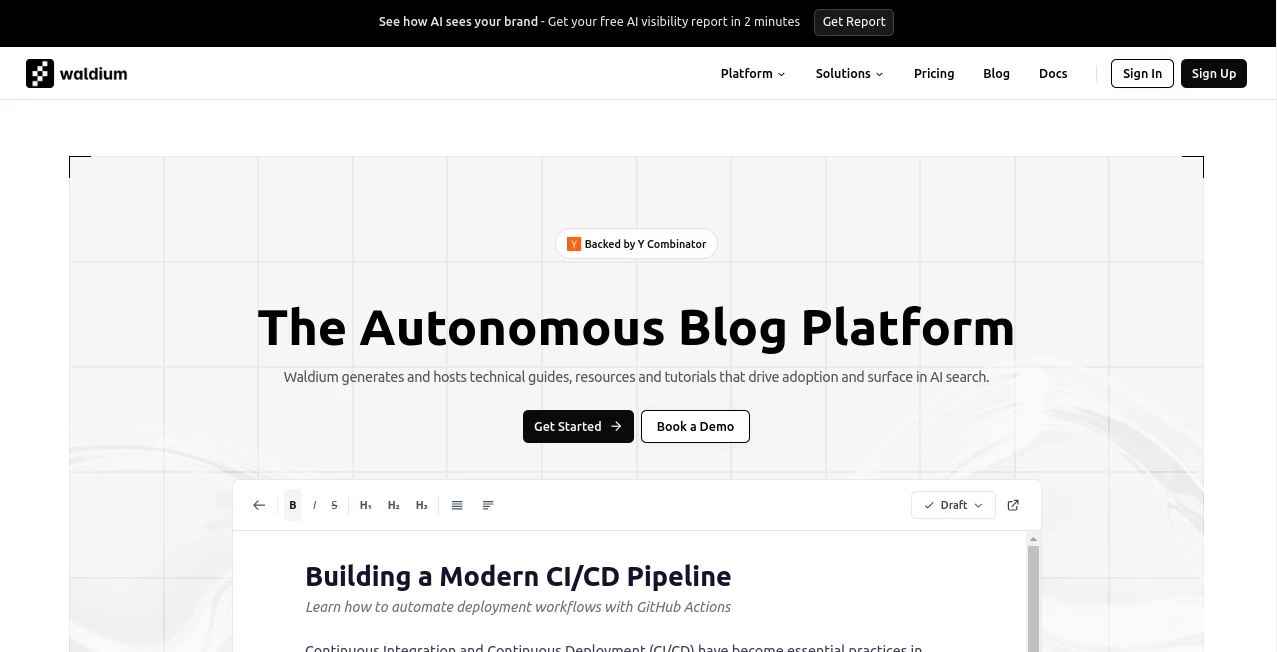
Waldium steps in as a smart sidekick for tech teams racing to keep their docs fresh, whipping up polished guides and tutorials that pop up right when devs need them most. Picture feeding it your API specs once, then watching it churn out content that feels like it came from a pro writer—tailored, accurate, and primed for those AI-powered searches. It's the kind of tool that lets product folks focus on building cool stuff instead of sweating over stale blog posts, turning hidden gems into go-to resources overnight.
Introduction
Waldium hit the scene a bit back, cooked up by folks who'd seen too many sharp tools get buried under outdated docs while competitors stole the spotlight in chatty AI queries. They wanted something that moved at the speed of code commits, so they built this autonomous powerhouse that syncs your tech stack and spits out content that sings to both humans and bots. Devs and growth hackers started whispering about it in Slack channels, sharing wins like how a quick setup led to their integration guide topping recommendations in tools like Cursor. It's grown into that reliable engine for anyone shipping APIs or SDKs, bridging the gap between rapid releases and readable resources with a nudge that feels almost too easy.
Key Features
User Interface
The dashboard hits you with a clean sweep of your latest drafts and live pieces, like spotting a fresh "CI/CD Pipeline Best Practices" sitting pretty next to analytics that show views climbing. Progress bars tick along as content brews, and simple toggles let you peek at word counts or tweak before hitting publish—all without the clutter of endless menus. It's that straightforward vibe where even a busy engineer can glance, grab, and go, feeling more like flipping through a shared notebook than wrangling a full CMS.
Accuracy & Performance
Pulling straight from your synced docs and changelogs, it keeps things spot-on, weaving in the latest endpoints or updates so nothing feels like yesterday's news. Generation zips through in minutes, even for meaty tutorials, landing with code snippets that run clean on the first try. Teams light up over how it dodges those pesky inaccuracies that trip up manual writes, delivering pieces that hold water in real-world tests and keep readers hooked without a single "outdated" flag.
Capabilities
It spins up everything from deep-dive features to troubleshooting flows, packing in YAML examples or API calls that devs can copy-paste straight to their terminals. Hook it to your GitHub for auto-freshens, or let it craft comparison roundups that position your tool as the smart pick. With an API for bulk blasts and analytics that track AI shoutouts, it's built to scale from solo side projects to full DevRel machines, always eyeing that sweet spot where content meets curiosity.
Security & Privacy
Your hosted blogs come locked with active SSL right out of the gate, keeping traffic smooth and safe without you lifting a finger. It treats your knowledge base like a vault—synced once, referenced often, but never spilled—giving you full reins on what gets published or parked as drafts. Privacy stays tight, with no sneaky shares, so you can trust it to handle sensitive specs while your content does the talking.
Use Cases
API builders fire it up post-launch to drop integration how-tos that light up in ChatGPT queries, pulling in curious coders mid-evaluation. Startups in the dev space use it to punch above their weight, cranking out TypeScript pattern guides that rival the big names. Growth squads lean on the analytics to spot which troubleshooting post sparked a signup surge, tweaking their next batch for even bigger ripples. Even compliance-heavy outfits find it shines for specialized explainers that stay sharp and searchable without constant rewrites.
Pros and Cons
Pros:
- Keeps pace with your product's hustle, auto-updating so nothing lags.
- Optimizes for AI eyes, landing your stuff in front of the right searches.
- Handles the hosting heavy lift, freeing you for the fun code bits.
- Scales from quick wins to steady streams without extra hires.
Cons:
- Tuned tight for tech topics, so creative spins might need a human polish.
- Relies on solid source docs—thin inputs could thin the outputs.
- Analytics depth grows with time, not instant deep dives.
Pricing Plans
Waldium keeps it flexible with custom setups that match your scale, starting from a base that covers core syncing and a handful of generates each month. As you ramp up to unlimited publishes and team shares, it layers on extras like priority API calls or advanced tracking, all billed to fit without the sticker shock. Most kick off with a quick chat to nail the right fit, often landing in the mid-hundreds annually for growing crews, with trials that let you test the waters before diving in.
How to Use Waldium
Start by linking your docs or GitHub repo in the setup wizard—it pulls everything in one go and sets the stage. Hit generate for a topic like "REST API Best Practices," watch the steps unfold with real-time peeks, then review the draft for that personal touch before publishing to your domain. Dive into analytics to see what's popping in Claude searches, tweak your knowledge base as features evolve, and let it run autonomous for the rest, checking back only for the wins.
Comparison with Similar Tools
Unlike broad blogging platforms that leave the writing to you, Waldium takes the wheel on tech-specific drafts, saving hours where others just host. Against general AI writers, it edges out with that dev-tool focus and AI-search smarts, though those might flex better for non-code crowds. It carves its niche for fast-moving teams, blending automation with accuracy in a way that feels custom without the custom price tag.
Conclusion
Waldium wraps up the content chase for dev tools by making it effortless and effective, turning your tech edge into stories that spread like wildfire in search chats. It frees up the brainpower for breakthroughs, ensuring your innovations don't just ship—they shine. As AI keeps reshaping how folks find fixes, this platform stays ahead, quietly powering the guides that guide the next wave of builders.
Frequently Asked Questions (FAQ)
How does it make sure my content shows up in AI searches?
By structuring pieces with the right hooks and keywords that match common dev queries, so tools like ChatGPT pull them as top picks.
What's the setup like for non-techies?
Super straightforward—just sync your sources once, and it handles the rest with guided steps that take under an hour.
Can I edit before going live?
Yep, drafts land in your dashboard for tweaks, or flip to auto-publish if you're feeling bold.
Does it work with my custom domain?
Absolutely, it sets up hosting and SSL seamlessly, making blog.yourcompany.com a reality in no time.
How up-to-date does the content stay?
It pulls from live syncs like GitHub changes, so every generate reflects the latest without manual nudges.
AI Writing Assistants , AI Content Generator , AI Research Tool , AI SEO Assistant .
These classifications represent its core capabilities and areas of application. For related tools, explore the linked categories above.
Waldium details
This tool is no longer available on submitaitools.org; find alternatives on Alternative to Waldium.
Pricing
- Free
Apps
- Web Tools
Categories

Waldium Alternatives Product

LyricStudio

Ryne AI

Sourcetable

Serplux

Simplified

ZoraInsights

promptcat

SEOTakeoff

CoinIQ
