
🧠 AI Quiz
Think you really understand Artificial Intelligence?
Test yourself and see how well you know the world of AI.
Answer AI-related questions, compete with other users, and prove that
you’re among the best when it comes to AI knowledge.
Reach the top of our leaderboard.


















Wan Animate
Breathe Life into Characters with Seamless Video Magic

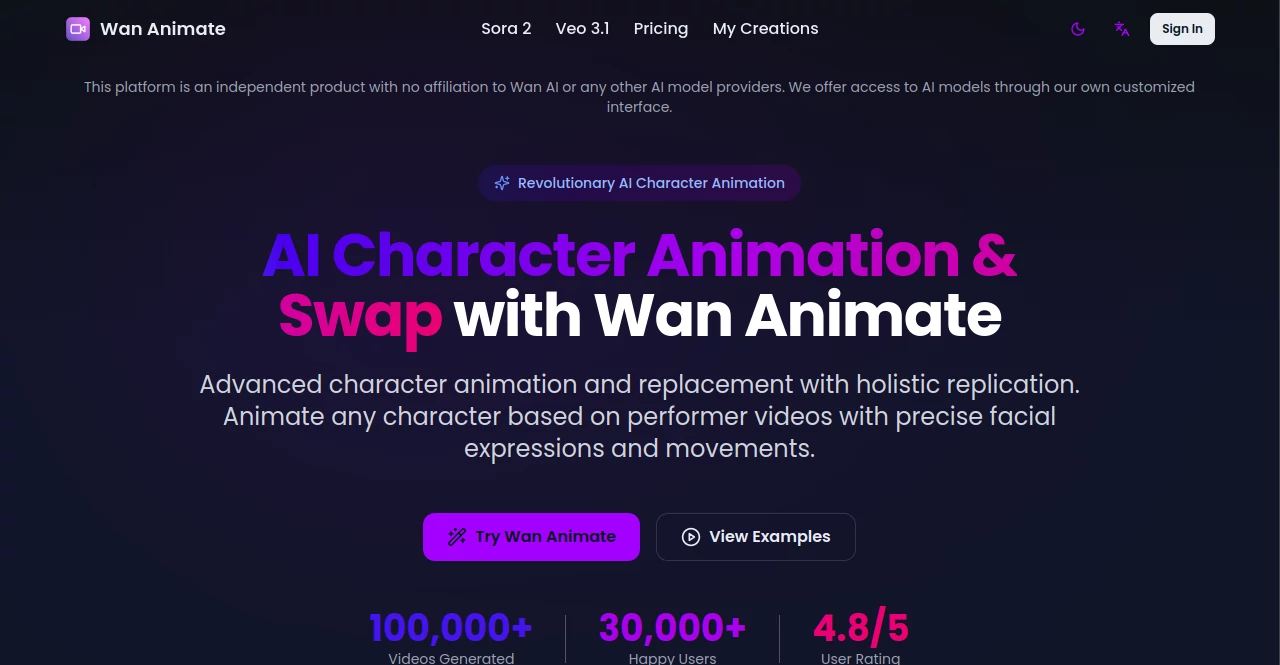
What is Wan Animate?
Wan Animate slips into the creative toolkit like a trusty sidekick, whisking still shots into lively clips or swapping faces in footage while keeping every grin and gesture intact. It's the kind of spot where a quiet portrait suddenly struts across the screen, pulling in creators who crave that wow factor without the endless editing marathons. Over 30,000 folks have already danced with it, churning out more than 100,000 clips that feel handcrafted yet lightning-fast.
Introduction
Wan Animate sprang up as an indie gem a while back, cooked up by tinkerers who saw the hassle in rigging characters for video and figured there had to be a smoother ride. What kicked off as a quiet experiment soon lit up with buzz from YouTubers and studio hands alike, all raving about how it nailed those tricky blends of motion and mood. Now holding a solid 4.8-star nod from its crowd, it's evolved into a hub where ideas zip from sketch to screen, proving that a dash of clever tech can turn solo dreamers into full-blown storytellers overnight.
Key Features
User Interface
You ease in with a drag-and-drop zone that's as welcoming as an open sketchpad, snapping up your character pic and motion clip without a fuss. A quick quality picker—480p for light lifts or 720p for sharper shines—sits right there, and the progress bar ticks along like a patient storyteller. Once the magic brews, your fresh creation pops up front and center, ready for a spin or save, all wrapped in a layout that whispers 'get to work' instead of shouting instructions.
Accuracy & Performance
It captures the subtle twitch of a smile or the sway of a step with a precision that turns heads, thanks to its smart skeleton tracking and face-reading finesse. Even beefy inputs wrap up in a snap, spitting out smooth rolls that hold steady on any screen, no jitters or fades. Creators keep coming back for how it sticks the landing on wild poses or soft shadows, making test runs feel like polished reels from the get-go.
Capabilities
Whether you're jolting a static face into a full strut from a reference reel or slipping a new mug into an existing scene while holding onto the original spark, it handles the handoff like a pro. Toss in environmental tweaks to match lights and hues, and you've got clips that blend worlds seamlessly, all powered by a flexible setup that juggles animation and swaps in one breath. It's geared for bursts up to half a minute, packing enough punch for quick hits or teaser builds.
Security & Privacy
As a standalone player, it keeps your uploads tucked away during the whirl, processing everything on the fly without lingering extras or sneaky shares. You hold the reins on what goes out, with standard wraps around the data flow to ease minds in a world full of watchful eyes. It's the sort of quiet reliability that lets you experiment bold, knowing your raw drafts stay just between you and the screen.
Use Cases
YouTubers lace tutorials with animated guides that nod along to their words, keeping viewers hooked without fancy rigs. Ad teams swap spokesfolks in promos to test vibes across crowds, nailing tones that click universally. Game devs mock up avatar walks for prototypes, speeding from concept to playtest in hours. Even teachers spin historical figures to life for lessons, turning dry facts into chats that kids actually lean into.
Pros and Cons
Pros:
- Realistic blends that save days of manual tweaks.
- One-stop shop for animating or swapping without tool swaps.
- Quick turns that fit indie budgets and tight deadlines.
- High marks from a growing crew of everyday makers.
Cons:
- Short clip caps might nudge longer tales into batches.
- Credit floors add a tick to tiny tests.
- Web-tied, so spotty nets could pause the play.
Pricing Plans
It runs on a pay-per-clip credit system, light on the wallet for starters: one point per second at basic res with a five-point floor, doubling for crisper views and a ten-point kickoff. No big subscriptions to lock you in—just grab what you need and go, scaling smooth from one-off whims to steady streams without the surprise bills.
How to Use Wan Animate
Drop your hero image and motion source into the slots, pick your polish level, and tap the spark to let it brew. Watch the bar climb as it pulls poses and pouts from the feed, then feast your eyes on the fresh fusion. Tweak if the mood strikes, snag the file for your next edit, and you're off—simple as sketching on a napkin but with results that stun.
Comparison with Similar Tools
Unlike bulkier suites that demand deep dives into settings, Wan Animate keeps it breezy for quick wins, though those might offer endless layers for studio polish. Against freebie sketchers, it ups the ante with pro-grade realism minus the wait, edging out for folks who want speed over sprawl. It hits that sweet middle ground, blending ease with punch where others tip too simple or too stuffed.
Conclusion
Wan Animate quietly revolutionizes the clip-making game, handing creators the keys to vibrant worlds without the usual sweat. It turns 'what if' sketches into shareable sparks that captivate, proving a little smart nudge goes miles in storytelling. As more hands reach for that next frame, this corner of the web stays a steady light, inviting bold plays that linger long after the credits roll.
Frequently Asked Questions (FAQ)
What's the max clip length I can feed in?
Up to 30 seconds keeps things snappy, perfect for bites that pack a wallop.
Does it fiddle with lights in my swaps?
Yep, it tunes the new face to match the scene's glow and shade seamlessly.
How real do the motions come out?
Crisp as a live take, grabbing every flick and feeling for true-to-life flow.
Can teams jump in together?
It's solo-friendly but scales for shares, with exports that play nice in groups.
What if my source video's a bit wonky?
It pulls the best from what's there, smoothing rough edges into solid strides.
AI Animated Video , AI Video Editor , AI Video Generator , AI Lip Sync Generator .
These classifications represent its core capabilities and areas of application. For related tools, explore the linked categories above.
Wan Animate details
This tool is no longer available on submitaitools.org; find alternatives on Alternative to Wan Animate.
Pricing
- Free
Apps
- Web Tools
Categories

Wan Animate Alternatives Product

Kapwing

Seedance 2.0

remove bg vi…

Kling Motion
Video to GIF…

Seedance 2 A…

DomoAI

Seedance 2.0

Seedream 6.0
