
🧠 AI Quiz
Think you really understand Artificial Intelligence?
Test yourself and see how well you know the world of AI.
Answer AI-related questions, compete with other users, and prove that
you’re among the best when it comes to AI knowledge.
Reach the top of our leaderboard.


















Wan 2.7
What is Wan 2.7?
There’s something exciting about typing a description and watching a smooth, detailed video appear that actually captures the feeling you had in mind. This tool does that remarkably well. You describe a scene, add a reference image if you want, and it creates clean 1080p clips with natural motion, consistent characters, and good cinematic quality. I’ve seen creators go from rough ideas to shareable videos in minutes, and the results often look far more polished than you’d expect from an AI generator. It’s become one of those tools people keep coming back to because it delivers usable, high-quality output without complicated setups.
Introduction
AI video tools have improved a lot, but many still struggle with motion quality, character consistency, or realistic details. Wan 2.7 stands out by focusing on both quality and ease. It handles text-to-video, image-to-video, and even multimodal inputs, producing up to 15-second 1080p clips that feel thoughtfully directed. The new 4K image generation mode with precise face and color control is particularly impressive. Whether you’re making social media content, storyboards, product ads, or just experimenting creatively, it gives you strong results fast. For many users, it’s the first AI video tool that feels ready for real creative work instead of just demos.
Key Features
User Interface
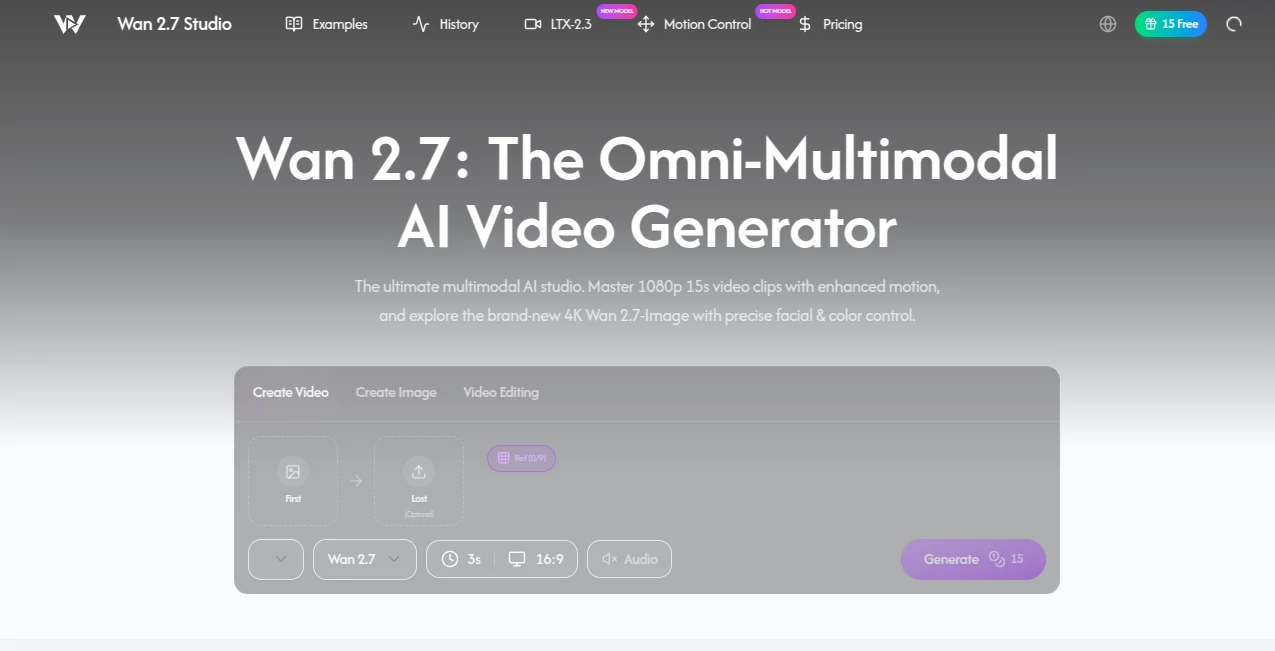
The interface is clean and inviting. A large prompt area, easy image upload for reference, simple toggles for duration and aspect ratio, and a prominent generate button. You can switch between video and image modes effortlessly. Previews load reasonably fast, and the layout avoids clutter so you can stay focused on creating rather than navigating menus. It feels modern without being overwhelming—even first-time users get good results quickly.
Accuracy & Performance
Motion is smooth and natural, with far better character consistency than many competitors. Faces stay recognizable across frames, colors remain stable, and physics feel believable. Generation speed is solid for the quality level, and the 1080p output looks sharp. The tool handles complex prompts involving multiple subjects or camera movements more reliably than most, reducing those frustrating random artifacts that break immersion.
Capabilities
It excels at text-to-video and image-to-video generation, supports multimodal inputs, creates up to 15-second 1080p clips, and includes a strong 4K image generation mode with excellent face and color control. You can guide style, lighting, and composition effectively. The tool is particularly good at maintaining consistency when using reference images, making it useful for character-driven or branded content.
Security & Privacy
Your prompts and uploaded images are handled securely during processing. The platform focuses on delivering results without unnecessary data retention, giving creators confidence when working with personal or client projects.
Use Cases
Social media creators generate eye-catching short videos for Reels and TikTok using simple text prompts or reference photos. Product brands turn static images into dynamic showcase clips. Filmmakers and animators create quick storyboards or test scenes before full production. Educators and storytellers make engaging visual explanations or bedtime story animations. The speed and quality make it ideal whenever you need good-looking video content without a full production team.
Pros and Cons
Pros:
- Strong motion quality and character consistency for AI video.
- Excellent 4K image generation with precise control.
- Fast generation times that support real creative iteration.
- Clean, modern interface that’s easy for beginners and pros alike.
- Free access available to try the quality firsthand.
Cons:
- 15-second limit per clip (though multiple generations can build longer sequences).
- Very complex or highly specific scenes may need prompt refinement.
- Advanced or high-volume use requires paid upgrades.
Pricing Plans
The platform offers free daily generations so you can test the quality without commitment. Paid plans unlock higher limits, faster processing, priority access during peak times, and additional features for heavier users. Pricing is reasonable for the output quality, especially when compared to the time and cost of traditional video production.
How to Use Wan 2.7
Go to the generator, write a clear scene description in the prompt box. Upload a reference image if you want stronger visual control. Choose your preferred aspect ratio and duration, then hit generate. Review the result—regenerate with small prompt tweaks if needed. Download the video or image once you’re happy. For longer content, create multiple short clips and combine them in your editing software. The process is fast and intuitive, letting you go from idea to finished clip in minutes.
Comparison with Similar Tools
Many AI video generators still produce noticeable artifacts, inconsistent characters, or unnatural movement. This one delivers smoother motion and better consistency, especially when using image references. The combination of strong video and high-quality 4K image generation in one place gives it an edge over tools that specialize in only one area. It strikes a nice balance between quality and accessibility.
Conclusion
Creating compelling video content used to require expensive equipment, teams, or lots of time. Tools like this are changing that reality by making high-quality AI video accessible to more creators. It’s not about replacing human creativity—it’s about removing barriers so your ideas can come to life faster and look better than ever. If you’ve been wanting to turn your words or images into moving stories, this is one of the better options available right now. The results speak for themselves.
Frequently Asked Questions (FAQ)
How long are the generated videos?
Up to 15 seconds per clip in 1080p, ideal for short-form content and social media.
Can I use reference images?
Yes—uploading images significantly improves consistency and style control.
Is there a free version?
Yes, you can generate videos daily for free to test the quality.
What resolutions are supported?
1080p for video and up to 4K for image generation.
Can I use it for commercial projects?
Check the terms for paid plans, which generally allow commercial use.
AI Animated Video , AI Image to Video , AI Video Generator , AI Text to Video .
These classifications represent its core capabilities and areas of application. For related tools, explore the linked categories above.
Wan 2.7 details
Pricing
- Free
Apps
- Web Tools
Categories

Wan 2.7 Alternatives Product

AI Baby Dance

Sora 2 AI

Seedance 2.0

Veo 3

Ltx AI - Ltx…

ai seedance …

Seedance 2 A…

ImagineToVid…

Artifox
