
🧠 AI Quiz
Think you really understand Artificial Intelligence?
Test yourself and see how well you know the world of AI.
Answer AI-related questions, compete with other users, and prove that
you’re among the best when it comes to AI knowledge.
Reach the top of our leaderboard.


















Wan 2.7
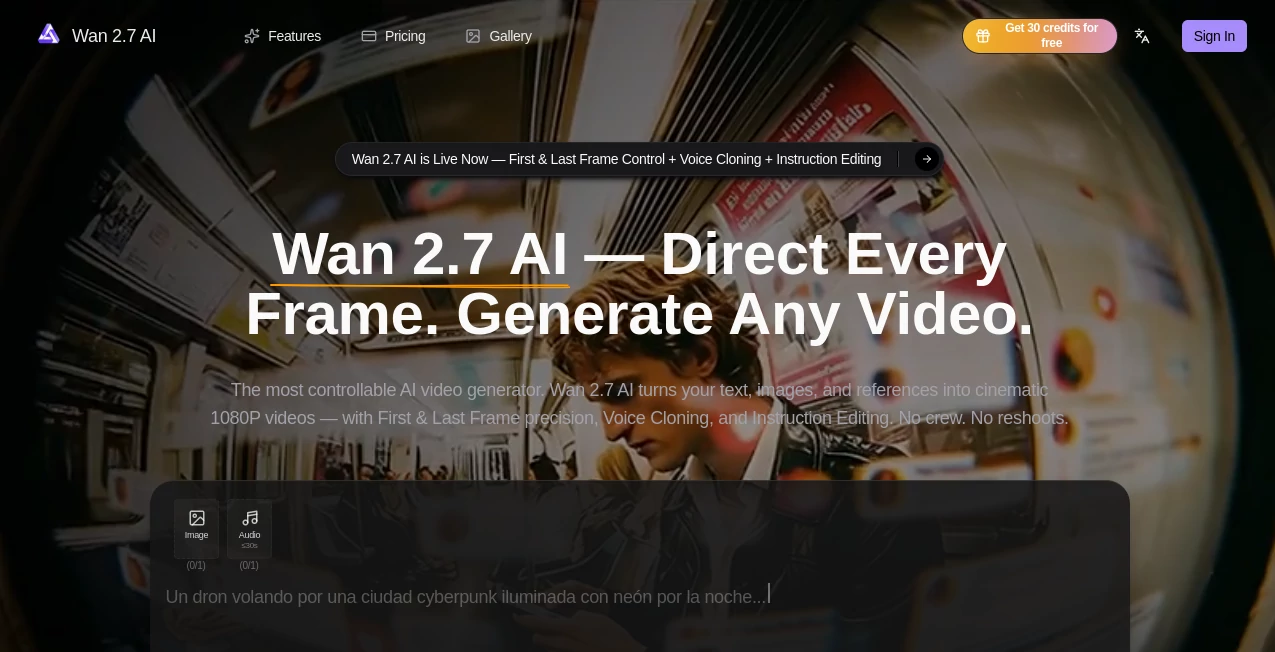
What is Wan 2.7?
You describe a scene, add a starting image or reference clip, and a few moments later a smooth, cinematic video plays with consistent characters, natural motion, and even voice that matches the mood. It feels less like “AI made this” and more like someone actually directed it. I’ve watched creators turn a single prompt into short films that look polished enough to post without heavy editing. The jump from idea to watchable clip is so fast it reignites that childlike excitement of storytelling—except now the camera, lighting, and actors show up on demand.
Introduction
Making video has always been expensive in time and money. Shooting, directing, editing, syncing sound—it adds up quickly. Wan27 AI compresses much of that workflow into one powerful step. Built as a next-generation model, it gives you director-like control: tell it the story, show it a reference, and it handles motion, consistency, and even audio with impressive coherence. Whether you're a solo creator making Reels, a marketer building ads, or a filmmaker prototyping scenes, it removes the usual barriers. The results often surprise people because they carry real emotional weight and visual polish instead of the usual AI glitches.
Key Features
User Interface
The workspace feels clean and focused. You type your prompt, upload reference images or clips for style and character guidance, choose aspect ratio and length, then generate. Previews load quickly so you can iterate without frustration. Controls for first and last frame, voice input, and instruction editing sit right where you need them. It never overwhelms you with options—it quietly gets out of the way so you can focus on the story.
Accuracy & Performance
Character consistency across shots stands out as one of its strongest points. Faces, outfits, and lighting stay believable even with camera movement. Motion feels natural rather than robotic, and native audio sync adds that extra layer of professionalism. Generation times stay reasonable for the quality delivered, letting you experiment freely instead of waiting around. The model handles complex prompts with multiple subjects and actions better than most, reducing those frustrating “almost but not quite” moments.
Capabilities
Text-to-video, image-to-video, hybrid workflows, first and last frame control, voice cloning for dialogue, instruction-based editing, multi-shot storytelling, and cinematic 1080p output. You can guide it with reference videos for motion style, upload voice samples for accurate lip-sync, and refine scenes with natural language instructions. It supports different aspect ratios for social, YouTube, or cinematic use, making it versatile for both quick content and more ambitious projects.
Security & Privacy
Your prompts, images, and generated videos are handled with care. The platform processes content for the task at hand without unnecessary long-term storage or sharing. For creators working with client material or personal ideas, that respectful approach builds real confidence to experiment freely.
Use Cases
A small brand turns one product photo into a polished lifestyle ad with natural movement and voiceover. An indie filmmaker prototypes emotional scenes to test pacing before full production. A content creator builds consistent character Reels that feel like a series instead of random clips. A musician creates official visuals that sync perfectly with their track. Teachers and trainers make engaging explainer videos without hiring production teams. Wherever storytelling needs speed and quality, it delivers.
Pros and Cons
Pros:
- Strong character and style consistency across shots.
- Director-level controls like first/last frame and instruction editing.
- Native voice cloning and audio sync save major post-production time.
- Cinematic quality that feels directed rather than generated.
- Fast enough to support real creative iteration.
Cons:
- Clip lengths are still best for short-to-medium scenes (multi-shot helps for longer stories).
- Very complex or highly specific scenes may need prompt refinement.
- Higher usage and priority features require paid plans.
Pricing Plans
Free daily credits let you test the quality and workflow without commitment. Paid plans unlock higher resolutions, longer clips, faster generation, unlimited usage, and priority access during busy times. The pricing feels balanced for the creative freedom and time it saves—many users say one paid month replaces what they used to spend on freelance editors or stock footage.
How to Use Wan27 AI
Start with a clear prompt describing your scene and desired mood. Upload reference images or clips for stronger visual guidance. Add voice samples if you want accurate dialogue sync. Choose aspect ratio and length, then generate. Review the preview, use instruction editing to refine specific parts (“make the camera slower” or “add more emotion to the expression”), and download when it feels right. For longer narratives, create connected shots and combine them in your editor. The process stays fast and intuitive from idea to final clip.
Comparison with Similar Tools
Many AI video tools still struggle with consistency or produce motion that feels unnatural. This one stands out for its director-level controls and coherent storytelling across frames. Where others give you raw clips that need heavy editing, Wan27 AI delivers output closer to final quality with built-in audio and precise guidance options. It strikes a sweet spot between creative freedom and reliable results that busy creators actually appreciate.
Conclusion
Video creation used to mean choosing between speed and quality. Tools like this quietly remove that compromise. It gives storytellers, marketers, educators, and creators the ability to turn ideas into polished, moving visuals without a full production team. The results carry real cinematic feel and emotional weight, making it easier than ever to share stories that connect. If you’ve ever wished you could bring your ideas to life faster without losing the magic, this is as close as it gets right now.
Frequently Asked Questions (FAQ)
How long can videos be?
Best for short-to-medium clips; multi-shot workflows allow longer storytelling.
Do I need reference images?
Not required, but they dramatically improve character and style consistency.
Can I edit generated videos?
Yes—use instruction editing to refine specific parts with natural language.
Is voice cloning accurate?
Very—upload a clear sample and it syncs dialogue naturally to the motion.
Are there watermarks on free generations?
Free tier may include small watermarks; paid plans remove them completely.
AI Animated Video , AI Image to Video , AI Video Generator , AI Text to Video .
These classifications represent its core capabilities and areas of application. For related tools, explore the linked categories above.
Wan 2.7 details
Pricing
- Free
Apps
- Web Tools
Categories

Wan 2.7 Alternatives Product

See dance 2.…
Kling 4.0 AI

Seedance 2 P…
Seedance 2.0

Fast Wan
Sora 2 Video

soro2
Seedance 2 V…

Seedream 4.0…
