
🧠 AI Quiz
Think you really understand Artificial Intelligence?
Test yourself and see how well you know the world of AI.
Answer AI-related questions, compete with other users, and prove that
you’re among the best when it comes to AI knowledge.
Reach the top of our leaderboard.


















AI paper writer
well-structured drafts for your essays

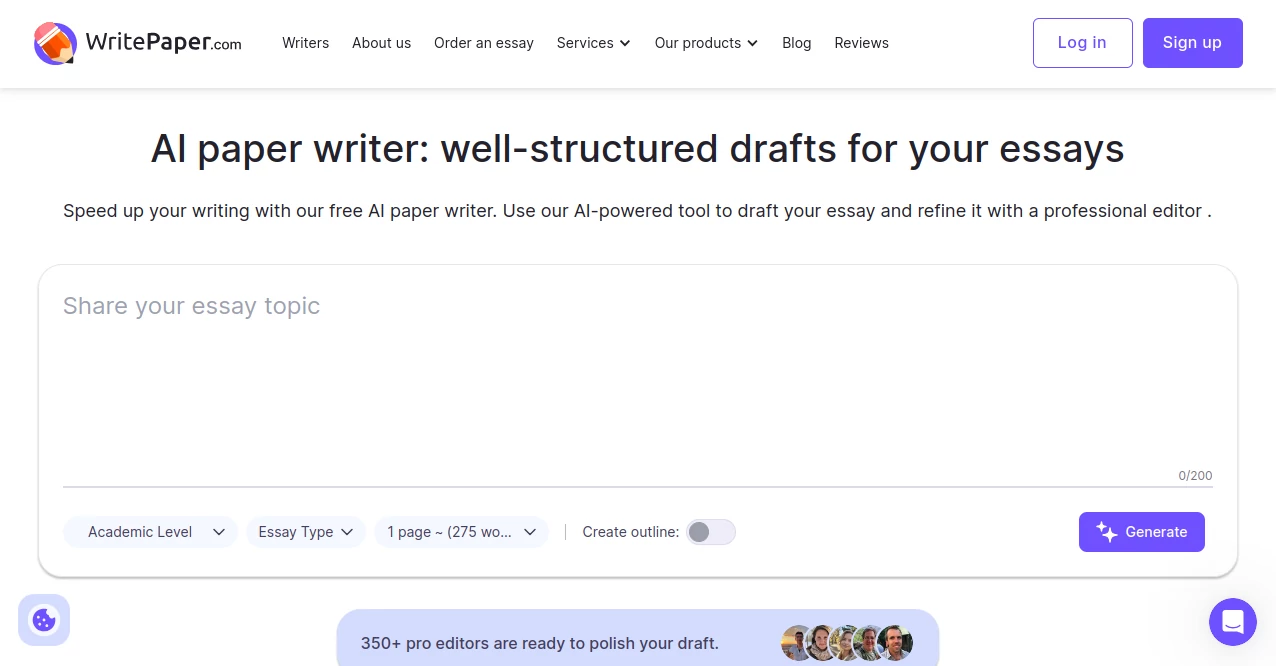
What is AI paper writer?
WritePaper AI Paper Writer slips into the routine of anyone wrestling with a blank page, churning out solid starting points that feel like a helpful nudge from a sharp classmate. It's the kind of spot where you toss in a rough idea and walk away with something fleshed out enough to build on, all without dipping into your wallet. Students and scribblers alike lean on it for those late-night pushes, turning vague thoughts into pages that actually hold water.
Introduction
WritePaper AI Paper Writer came together a while back when a handful of folks knee-deep in academia realized how much time slips away just getting the bones of an essay down. They pieced it as a no-cost lifeline for those grinding through assignments, pulling from shared gripes about staring at screens till dawn. Pretty soon, it caught on in dorm chats and study groups, with users swapping tips on how a quick run through it freed up hours for the real thinking. What keeps it buzzing is that unpretentious vibe—no flashy promises, just a steady hand to kick things off, letting you steer from there with your own voice shining through.
Key Features
User Interface
You ease in with a straightforward setup that doesn't bury you in options right off the bat—a spot to jot your main spark, a dropdown for the flavor of piece you're after, and sliders for length that make sense at a glance. Toggle an outline if you want that roadmap vibe, and the whole thing hums along without extra tabs or confusing paths. It's the sort of clean sweep that lets you focus on your words rather than wrestling the screen, feeling more like a quick notebook flip than a full software dive.
Accuracy & Performance
It lands close to what you had in mind most times, weaving in details that fit the bill without straying too wild, though a once-over always polishes it to perfection. Jobs wrap up in a heartbeat, even for chunkier requests, spitting out something readable that flows without the usual hitches. Writers note how it holds its own on the finer points, like threading arguments smoothly, making it a reliable first swing rather than a wild guess.
Capabilities
It tackles a spread of formats, from storytelling spins to debate-style takedowns, building out full runs or just the skeleton if that's your need. You can nudge it for tweaks on the fly or spin up fresh takes to pick from, and it pairs nicely with checks for fresh takes to keep things honest. Stretch beyond the cap by chaining a couple goes, turning it into a flexible sidekick for bigger builds without feeling boxed in.
Security & Privacy
Your inputs stay light and local in feel, processed quick without hanging onto extras, giving you that easy peace to brainstorm bold. No sign-up walls mean your notes don't linger anywhere sticky, and you can wipe and restart without a trace, keeping the whole exchange as private as a solo session at the library desk.
Use Cases
Undergrads fire it up for term outlines that map the semester's big lifts, dodging the drag of starting cold. Freelance wordsmiths use it to rough out client briefs, saving the sparkle for final shines. Teachers sketch lesson hooks or reading guides, blending facts with flow to engage without the blank stare. Even hobby jotters play with personal riffs, like family lore tales, turning memories into keepsakes that read smooth.
Pros and Cons
Pros:
- No-cost entry that delivers without the usual catches.
- Quick hits that jumpstart without stealing your thunder.
- Flexible tweaks to match your angle just so.
- Handles variety without batting an eye.
Cons:
- Caps at a chunk per go, so epics need a few laps.
- Needs your eye for that final authentic polish.
- Best on clear prompts; fuzzy ones might wander a bit.
Pricing Plans
It's all open access from the jump, no tiers or trials to chase—just dive in and let it roll as far as you like, with that built-in limit per spin that's easy to sidestep. For those wanting more under the hood, a pro edit pass comes free on request, keeping the whole ride light on the pocket while heavy on the help.
How to Use WritePaper AI Paper Writer
Kick off by slipping in your core notion and a quick sketch of where you're headed, then pick the level and style that fits your crowd. Dial in the scope, flip on the frame if it helps, and tap to let it build. Scan the fresh sheet, nudge for changes or spin another, then grab what clicks and layer in your own flair to make it sing.
Comparison with Similar Tools
Where some setups lock the good stuff behind walls, this one flings doors wide from hello, though those might pack fancier bells for repeat heavyweights. Against clunkier builders, it keeps the pace peppy and simple, skipping the bloat but maybe missing deep dives for the ultra-picky. It slots in sweet for folks wanting a fast, free leg up without the extras weighing down.
Conclusion
WritePaper AI Paper Writer stands as that trusty first step for anyone eyeing a page but dreading the void, blending quick smarts with open arms to let ideas breathe. It doesn't claim to craft masterpieces solo, but it sure clears the path for them, turning what-if scribbles into solid starts worth the build. In a world of word wars, this quiet booster reminds us that sometimes the best aid is the one that steps back once the spark catches.
Frequently Asked Questions (FAQ)
What sorts of pieces does it handle best?
It shines on tales that pull heartstrings, arguments that poke thinking, or scenes that paint pictures, plus brainstorming frames and roadmaps.
How fresh are the outputs?
They lean original out the gate; pair with checks for copies or machine marks, then tweak by hand to seal the deal.
Is there a cost to jump in?
Nah, it's wide open—no fees or forms, just up to a couple thousand words a pop, stack 'em for more.
Can I tweak after it spits one out?
You bet—free passes for edits, or fire up a new round to sift the keepers.
Does it work for non-school stuff?
Absolutely, from blog bursts to report roughs, wherever words need a nudge.
AI Essay Writer , AI Report Writing , AI General Writing , AI Creative Writing .
These classifications represent its core capabilities and areas of application. For related tools, explore the linked categories above.
AI paper writer details
This tool is no longer available on submitaitools.org; find alternatives on Alternative to AI paper writer.
Pricing
- Free
Apps
- Web Tools
Categories

AI paper writer Alternatives Product
Slogan Gener…

SuperAI

Course Hero

Grok

ReportMaker.…

Greetings Is…

Sudowrite Mu…

MIBOOKO

CharacterHub
