
🧠 AI Quiz
Think you really understand Artificial Intelligence?
Test yourself and see how well you know the world of AI.
Answer AI-related questions, compete with other users, and prove that
you’re among the best when it comes to AI knowledge.
Reach the top of our leaderboard.

















z image
What is z image?
There's something satisfying about typing a few words and watching a crisp, detailed image appear in seconds—colors pop, details sharpen, and the whole thing feels like it was painted with care. This tool makes that happen right in your browser, no downloads, no complicated setups. You get high-resolution results that often look better than what you expected, whether you're visualizing a product concept, creating art for fun, or building assets for a project. I've seen hobbyists turn casual ideas into gallery-worthy pieces and small business owners quickly generate professional visuals that save them hours of work. It just works, and that simplicity is part of its charm.
Introduction
Most AI image generators push you toward subscriptions, heavy software, or long wait times. This one keeps things light and accessible: you open the page, type your prompt, choose a style or resolution, and get 4K-quality images without leaving your browser. It’s built for speed and quality, with free access to get you started and paid options when you need more power. People use it for everything from quick social media graphics to detailed concept art, and the results consistently impress because they balance creativity with clarity. It feels like having a talented digital artist on call, ready whenever inspiration strikes.
Key Features
User Interface
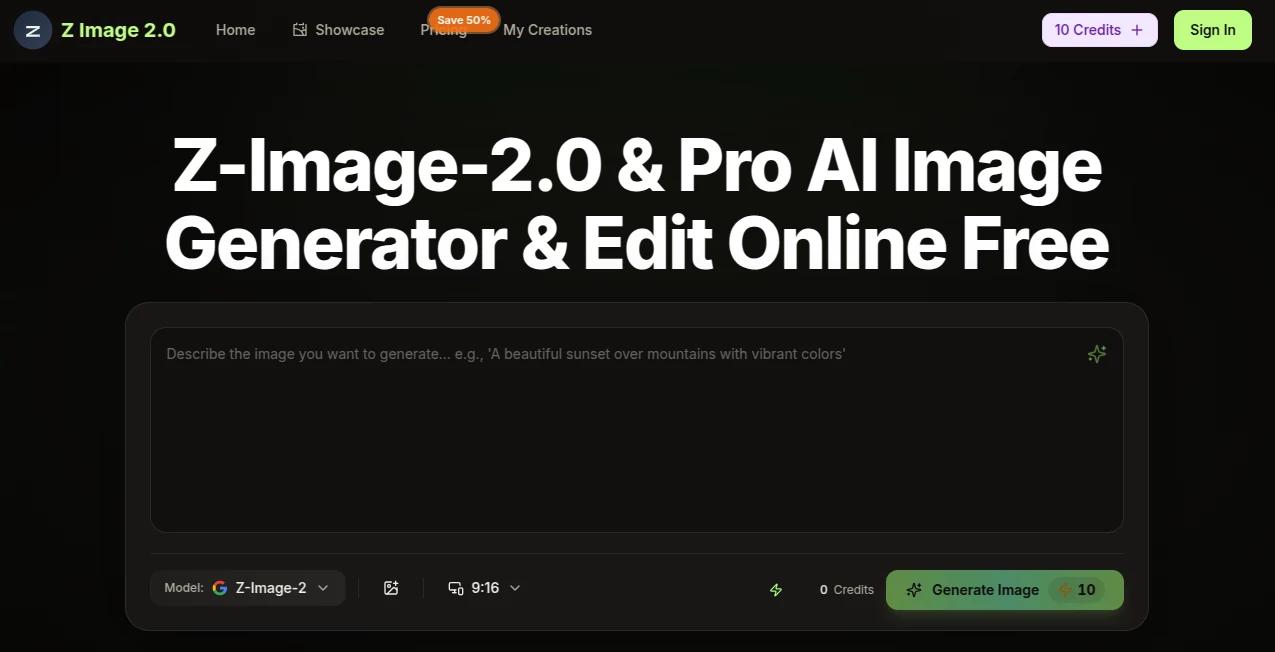
The interface is refreshingly straightforward. A large prompt box sits front and center, with simple options for aspect ratio, style presets, and resolution. You hit generate and watch progress in real time—no confusing menus or hidden settings. Previews load quickly, and you can generate multiple variations to pick the best one. It’s the kind of clean design that lets beginners jump in immediately while still giving experienced users the control they want. Everything feels responsive, even on mobile, so you can create on the go.
Accuracy & Performance
It delivers sharp, coherent images that follow your prompt closely without adding random extras or ignoring details. Faces look natural, compositions make sense, and fine elements like text or intricate patterns come through clearly. Generation is fast—often just seconds for standard sizes—and it scales smoothly to 4K when you need that extra resolution. The consistency across different prompts is impressive; it rarely produces the weird artifacts that plague some other tools, so you spend less time fixing and more time creating.
Capabilities
You can generate from text prompts alone or use image references for stronger guidance. Multiple artistic styles are available, from realistic to painterly to stylized, and you can push resolution up to 4K for print-ready or high-detail work. It handles complex scenes, product visualizations, character concepts, and abstract ideas with surprising fidelity. Batch generation and variation options let you explore ideas quickly, making it practical for both one-off experiments and larger creative projects.
Security & Privacy
Your prompts and generated images are handled privately—processed quickly and not stored longer than necessary unless you choose to save them. No forced accounts for basic use, and the tool doesn’t train on user content. For personal projects or client work, that straightforward approach gives peace of mind, letting you create freely without worrying about where your ideas end up.
Use Cases
A product designer sketches a rough idea and turns it into polished visuals for client presentations in minutes. A social media manager generates eye-catching graphics for posts that stand out in crowded feeds. An indie artist experiments with new styles and concepts without the pressure of traditional tools. A small business owner creates custom illustrations for packaging or marketing materials that feel unique and professional. It shines whenever you need high-quality visuals fast without a steep learning curve or big budget.
Pros and Cons
Pros:
- Browser-based and instant—no downloads or installations required.
- 4K resolution delivers crisp, detailed results suitable for many uses.
- Fast generation keeps your creative flow going without long waits.
- Free tier lets you try it properly before committing to paid plans.
- Simple interface that works for beginners and pros alike.
Cons:
- Free daily limits mean heavy users will want a paid plan.
- Very complex or highly specific artistic directions may need prompt tweaking.
- Some advanced editing features are still evolving.
Pricing Plans
It starts with a generous free tier that gives you enough generations to explore and create real work. Paid plans remove daily limits, unlock faster processing, higher priority, and more advanced options when your needs grow. Pricing is straightforward and scales with usage, so casual creators stay on free while serious users get the extra power without feeling overcharged. Many people find the paid tiers pay for themselves quickly through time saved and quality gained.
How to Use Zimage2
Open the site, type your description in the prompt box—be as detailed or simple as you like. Choose your preferred aspect ratio and style if you want to guide the look. Hit generate and watch the image take shape. Review the result, generate variations if needed, and download the high-res version. For better control, add keywords for lighting, mood, or composition. The whole process is quick enough that you can experiment with several ideas in one short session.
Comparison with Similar Tools
Many AI image generators require accounts, slow down on free tiers, or produce lower-resolution results. This one keeps things browser-simple and focuses on speed and quality without unnecessary barriers. While some tools excel at hyper-specific artistic styles, this one balances broad accessibility with solid 4K output, making it especially practical for everyday creative needs rather than niche experiments. The combination of ease and resolution sets it apart in a crowded field.
Conclusion
Creating good images shouldn’t feel like a chore or a technical battle. This tool makes it feel approachable and rewarding, giving you high-quality results with minimal fuss. Whether you’re brainstorming ideas, building marketing materials, or just having fun with visuals, it consistently delivers crisp, usable images that spark more creativity. In a world full of complicated creative software, its simplicity and power make it a welcome addition to any digital toolbox. Give it a prompt and see what appears—you might be surprised how often it nails exactly what you had in mind.
Frequently Asked Questions (FAQ)
How long does it take to generate an image?
Usually just a few seconds for standard sizes, slightly longer for 4K.
Do I need an account to start?
No—basic generation works without signing up, though an account unlocks saving and more features.
What resolutions are supported?
Up to 4K for high-detail work; lower resolutions are available for faster testing.
Can I use the images commercially?
Yes—check the terms on paid plans for full commercial rights.
What if the first result isn’t perfect?
Try adding more details to your prompt or generate variations—small tweaks often make a big difference.
AI Text to Image , AI Photo & Image Generator , AI Art Generator , AI Design Generator .
These classifications represent its core capabilities and areas of application. For related tools, explore the linked categories above.
z image details
Pricing
- Free
Apps
- Web Tools
Categories

z image Alternatives Product

claude image

ImageKontext…

Brave Pink H…

Nano Banana …

Retro Image …
Free AI Kiss…

Flux2 Klein

Tryonr
NB2 Hub
