
🧠 AI Quiz
Think you really understand Artificial Intelligence?
Test yourself and see how well you know the world of AI.
Answer AI-related questions, compete with other users, and prove that
you’re among the best when it comes to AI knowledge.
Reach the top of our leaderboard.


















Z image AI
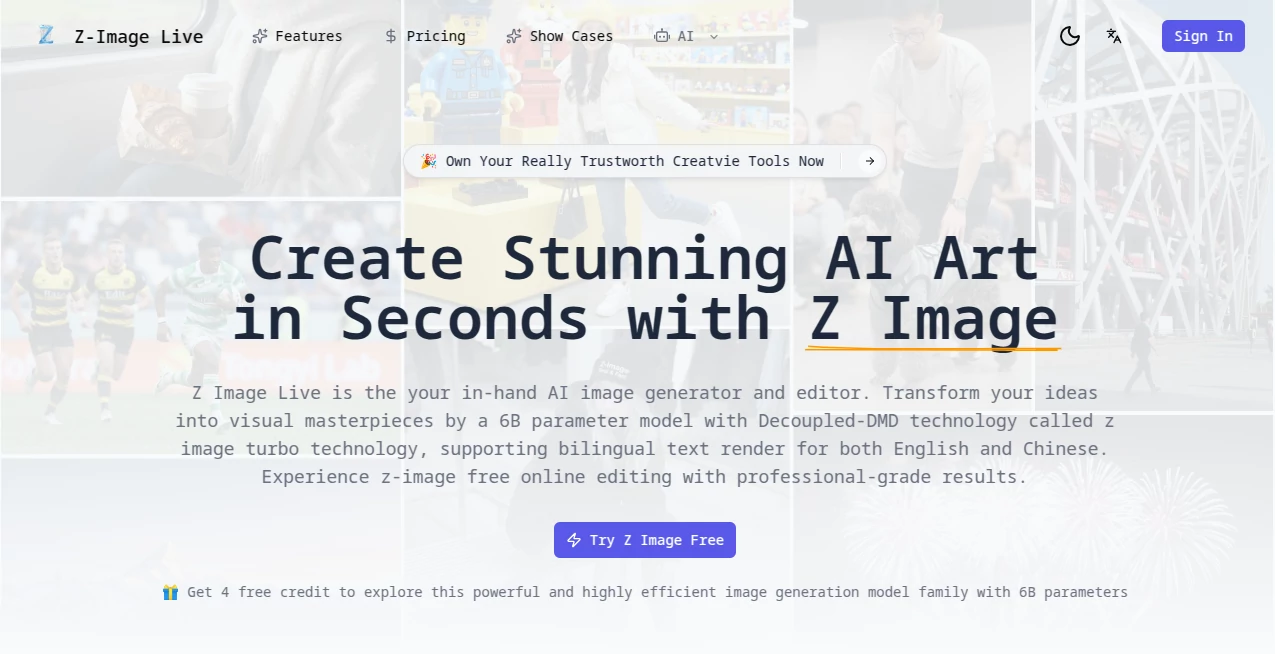
What is Z image AI?
Sometimes you just want an image that perfectly matches the picture in your head—no stock photos, no endless scrolling, no hiring a designer. This tool makes that happen almost instantly. Type a description, hit enter, and a few seconds later you’re staring at artwork that feels custom-made. I’ve had moments where I described a moody cyberpunk alley at dusk and got something so atmospheric I almost forgot I didn’t paint it myself. It’s the kind of creative shortcut that makes you wonder how you ever managed without it.
Introduction
AI image generation used to feel like a lottery—half the time you’d get something weird or off-brand. This platform changes that. It focuses on speed, quality, and giving you real control without burying you in sliders and settings. The results consistently look polished, whether you’re after photorealism, painterly vibes, or something completely surreal. Creators, marketers, writers, and casual experimenters have all found their way here because it delivers usable, beautiful visuals fast. What started as a clean, no-nonsense generator has quietly become a daily go-to for anyone who needs striking visuals yesterday.
Key Features
User Interface
The screen greets you with a single, spacious prompt box and a handful of style presets underneath—no clutter, no intimidation. Type what you want, pick a vibe (cinematic, illustration, retro, etc.), and generate. Variations appear instantly so you can pick or remix the one that hits closest. It’s designed for flow: you spend your energy on the idea, not on figuring out the tool. Even first-timers finish their first piece in under a minute.
Accuracy & Performance
It understands detailed prompts remarkably well—specific lighting, composition, mood, even subtle references to artists or eras. Faces stay consistent when you want them to, hands don’t melt, text renders legibly more often than not. Generations are fast (usually 5–15 seconds), and the quality holds up at higher resolutions. In practice, the hit rate is high enough that most people get something usable on the first or second try, which is rarer than it should be in this space.
Capabilities
Text-to-image of course, but also image-to-image (upload and remix), style transfer, upscaling, inpainting (fix or add details), outpainting (extend the canvas), and prompt enhancement that quietly improves weak descriptions behind the scenes. Multiple aspect ratios, high-res up to 4K on paid plans, negative prompt support, and a growing list of fine-tuned models for different aesthetics. It covers photoreal, anime, oil painting, concept art, product mockups—pretty much anything visual you can describe.
Security & Privacy
Your prompts and generated images stay private by default—no automatic public gallery, no training on your data without explicit opt-in. Free users get temporary storage; paid plans offer private folders and export control. For commercial creators or anyone working with sensitive concepts, that matters. It’s reassuringly straightforward about not harvesting your creativity.
Use Cases
A blogger needs a custom header image for a travel post—describes the scene, generates four options, picks the best, done in five minutes. A small business owner creates product mockups in fantasy settings without hiring a photographer. A novelist generates character portraits and book cover concepts to spark inspiration during writing. A social media manager produces consistent branded visuals for weekly posts without burning through a design budget. It fits anywhere visuals need to be fast, good-looking, and uniquely yours.
Pros and Cons
Pros:
- Exceptionally fast generation without sacrificing detail or coherence.
- Strong prompt understanding—detailed descriptions actually get respected.
- Multiple creative controls (img2img, inpaint, upscale) in one clean package.
- Results look professional enough for real marketing and editorial use.
- Generous free tier lets you test seriously before committing.
Cons:
- Occasional need to rephrase prompts for perfect alignment (still better than most).
- High-res and advanced features require paid plan.
- Can be compute-intensive during peak hours (minor queue on free tier).
Pricing Plans
Free plan gives solid daily credits—enough for meaningful experimentation or light use. Paid tiers unlock unlimited generations, higher resolutions, faster priority queue, private storage, and commercial rights. Pricing starts low and scales sensibly; many users say it’s cheaper than one outsourced graphic per month once they start using it regularly. The value hits hard when you realize how much time and money it saves compared to traditional design routes.
How to Use Zimage
Land on the generator page, type your description in the prompt box (the more specific, the better). Choose a style preset if you want a particular look, or leave it open. Hit generate—wait a short moment—then browse the variations. Like one? Download it. Want tweaks? Use img2img by uploading the result and describing changes, or use inpaint to fix small areas. Save favorites to your gallery (paid) or just download and go. The loop is fast and forgiving—you’ll have something great in minutes.
Comparison with Similar Tools
Lots of generators still produce muddy details, inconsistent faces, or require heavy prompt engineering. This one stands out with cleaner outputs, better composition sense, and a workflow that feels thoughtful rather than chaotic. Where others overwhelm with options, this keeps it focused and effective. It’s not the loudest in the room, but the images it produces often look like they belong in a professional context—which is exactly what most users actually need.
Conclusion
Visual ideas should never get stuck because of time, budget, or skill gaps. This tool quietly removes those obstacles and hands you artwork that feels personal and polished. It’s not about replacing artists—it’s about letting more people create visuals that match their imagination. When you can go from blank page to striking image in under a minute, creativity stops feeling gated. That freedom is addictive, and once you experience it, it’s hard to go back.
Frequently Asked Questions (FAQ)
How detailed should my prompt be?
The more specific, the better—lighting, mood, composition, style references all help. But even short prompts often surprise you with solid results.
Can I use the images commercially?
Yes—paid plans grant full commercial rights; free tier is usually fine for personal use and testing.
Do faces stay consistent if I generate multiple versions?
Img2img mode helps a lot—use the first good face as reference for variations and consistency improves dramatically.
What file types can I download?
High-res PNG and JPEG; upscale to 4K on paid plans.
Is there a limit on free generations?
Daily credits are generous—enough for serious play or small projects before needing to upgrade.
AI Text to Image , AI Image to Image , AI Art Generator , AI Design Generator .
These classifications represent its core capabilities and areas of application. For related tools, explore the linked categories above.
Z image AI details
Pricing
- Free
Apps
- Web Tools
Categories

Z image AI Alternatives Product

ChatGPT Imag…

Generador De…

Nano Image AI

Nano Banana …
Lensgo

X Grok Imagi…
Z-Image Free

Banana AI

WonderShare …
