🧠 AI Quiz
Think you really understand Artificial Intelligence?
Test yourself and see how well you know the world of AI.
Answer AI-related questions, compete with other users, and prove that
you’re among the best when it comes to AI knowledge.
Reach the top of our leaderboard.


















Seedance 2.0 AI
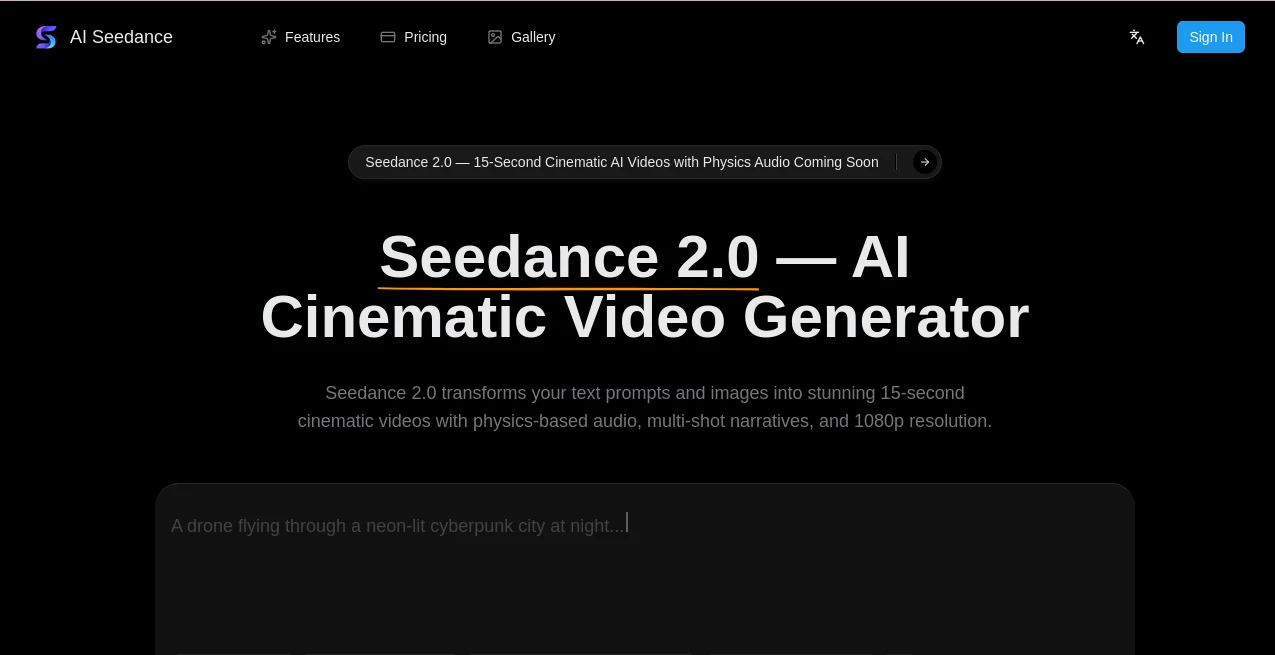
What is Seedance 2.0 AI?
There’s something almost unfair about how quickly this can take a sentence or two and turn it into a short film that looks like it had a full crew behind it. You type a description—maybe a quiet moment between two strangers on a rainy street—and seconds later you’re watching smooth camera moves, believable lighting, and even sound that matches the mood without you having to add it later. I’ve shown clips to people who work in video full-time and watched their eyebrows go up; the physics feel right, the transitions are deliberate, the characters stay consistent. It’s the kind of leap that makes you want to keep feeding it ideas just to see what happens next.
Introduction
Most AI video tools still feel like clever tricks—nice single shots, but the moment you want a real sequence with story flow, they stumble. This one was built differently. It thinks like a director from the start: breaking your prompt into shots, handling cuts and pacing naturally, locking character looks across the whole piece, and even baking in audio that interacts with the environment instead of just sitting on top. The jump from earlier versions to this 2.0 stage is noticeable—longer clips, sharper detail, and that rare sense that the AI actually understood the scene you described. For anyone who’s ever stared at a blank timeline wishing the footage would just appear, this feels like the answer they’ve been waiting for.
Key Features
User Interface
The dashboard keeps things uncluttered so you spend time creating, not configuring. Enter your prompt, drop in any reference images or clips if you want tighter control, pick aspect ratio and duration, and hit generate. Real-time previews let you watch progress, and editing tools (extend, inpaint, swap characters) are right there when you need to refine. It’s designed for flow—intuitive enough that my non-technical friend made a decent ad in under ten minutes on her first try.
Accuracy & Performance
The consistency across shots is one of the biggest wins—same face, same outfit, same vibe from wide establishing frame to tight close-up. Motion respects gravity and inertia, so people don’t glide unnaturally or phase through objects. Generation is fast enough that you can iterate without losing momentum, and 1080p output looks sharp even on larger screens. When I tested a simple walking scene with dialogue, the lip sync and environmental reverb were surprisingly convincing for something generated in one pass.
Capabilities
It handles text-to-video and image-to-video, supports up to 15 seconds of multi-shot storytelling, and gives you six aspect ratios to match any platform. You can feed it multiple references—video for motion style, images for character or scene look, audio for rhythm—and it weaves everything together. Node-based camera control and real-time preview give pros fine-tuned direction, while extend, inpaint, and character swap tools let you iterate without starting over. The built-in acoustic physics is the standout—sound reacts to the space like it’s really there.
Security & Privacy
Your prompts and references stay private; outputs can be set to private visibility with copy protection. The platform follows strong compliance standards, so commercial users don’t have to worry about leaks or unintended sharing. It’s reassuring when you’re generating branded content or client previews.
Use Cases
A marketer creates five quick ad variants for A/B testing, each with the same product but different moods and angles. A short-film hopeful prototypes scenes that would cost thousands to shoot traditionally. A musician makes a visualizer that syncs perfectly to the beat and feel of the track. An educator animates historical moments to make lessons stick. The speed and quality make it practical for all of these—turning “I wish I could show this” into “here it is” without weeks of work.
Pros and Cons
Pros:
- Genuine multi-shot storytelling in one generation—real cinematic flow, not stitched clips.
- Character and object consistency that holds across cuts and movements.
- Physics-aware audio that feels alive instead of pasted on.
- Fast enough to iterate creatively without waiting around.
Cons:
- 15-second limit keeps it focused on shorts and teasers rather than long narratives.
- Complex prompts sometimes need a second try for perfect alignment.
Pricing Plans
Entry is welcoming—free daily credits let you explore and see the quality before spending anything. Paid plans scale cleanly: Standard gives a healthy monthly allowance with watermark-free 1080p, Pro doubles down on credits and speed, and Ultra is built for high-volume creators who need the fastest queues and largest quotas. Yearly billing cuts the cost noticeably, and credits roll over on some tiers so you’re never racing against expiration. It’s structured so the value feels immediate.
How to Use Seedance
Start with a clear prompt—describe the scene, mood, camera moves, and any key actions. Upload reference images for characters or style, or a clip if you want to guide motion. Choose aspect ratio (vertical for social, wide for cinematic), set duration up to 15 seconds, and generate. Watch the preview, then use extend or inpaint to adjust length or fix small areas. Download the MP4 when it’s right. The loop is fast—prompt, generate, tweak, export—so you can build a series of clips in one focused sitting.
Comparison with Similar Tools
Where many generators still produce single static shots or struggle with continuity, this one delivers true multi-shot narratives with natural pacing and transitions. The integrated physics-based audio sets it apart—no need to layer sound later. Speed and consistency often feel a step ahead, especially for story-driven content rather than abstract effects. It’s less about raw gimmicks and more about usable, polished output that creators can actually ship.
Conclusion
This isn’t just another video generator; it’s a shortcut to the kind of cinematic polish that used to take teams and weeks. By thinking in scenes rather than frames, by keeping characters consistent, by making audio feel like part of the world, it lowers the bar for telling visual stories. For marketers chasing engagement, creators testing ideas, or anyone who wants motion without months of production, it’s a quiet revolution. Try one prompt. See what happens.
Frequently Asked Questions (FAQ)
How long can videos be?
Up to 15 seconds of coherent multi-shot content—perfect for social, ads, teasers.
Do I need references?
Text alone works great; images or clips just give tighter control over style and character.
Is audio generated automatically?>
Yes—physics-based sound that reacts to the scene; upload your own track if preferred.
What resolutions are available?
Up to 1080p, with six aspect ratios to fit any platform.
Are outputs watermark-free?
Paid plans remove watermarks; free trials include them.
AI Animated Video , AI Image to Video , AI Text to Video , AI Video Generator .
These classifications represent its core capabilities and areas of application. For related tools, explore the linked categories above.
Seedance 2.0 AI details
Pricing
- Free
Apps
- Web Tools
Categories

Seedance 2.0 AI Alternatives Product

Nano Banana …

Sora 2 Video

gpt video
Veo 3.2 AI V…

Wan AI

Seedance 2.0…

Paper Animat…

MuseCraft.AI

Seedance 2.0…