🧠 AI Quiz
Think you really understand Artificial Intelligence?
Test yourself and see how well you know the world of AI.
Answer AI-related questions, compete with other users, and prove that
you’re among the best when it comes to AI knowledge.
Reach the top of our leaderboard.


















AI Age Progress
What is AI Age Progress?
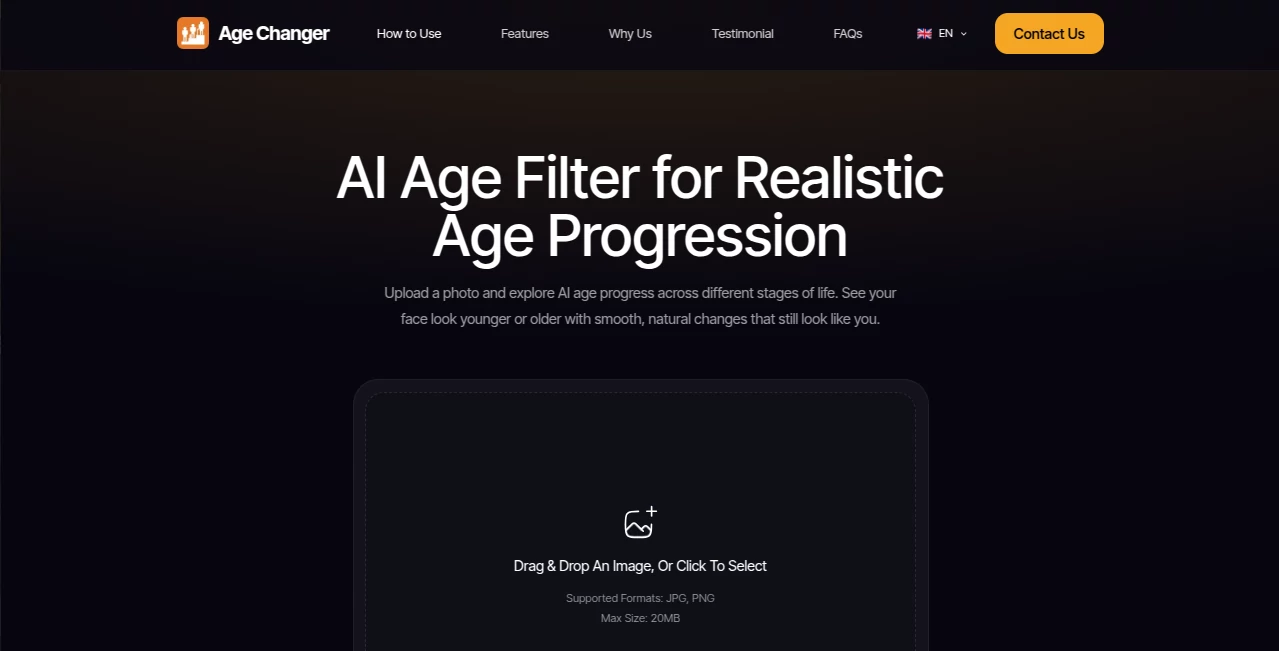
There’s something oddly captivating about seeing yourself decades older—laugh lines you don’t yet have, silver threading through your hair, eyes that carry stories you haven’t lived. This tool captures that curiosity and turns it into a quick, surprisingly believable glimpse. Upload a clear selfie, choose how far forward you want to look (30s, 50s, 70s, or custom), and in moments you’re staring at a version of yourself that feels eerily possible. I’ve watched people share these with family and get the same reaction every time: stunned silence, then laughter, then “wait… do I really look like that in the future?” It’s fun, it’s a little haunting, and it’s weirdly addictive.
Introduction
Age-progression used to mean forensic sketches or Hollywood makeup departments. Now it’s just you, your phone, and a few seconds. This platform makes the impossible ordinary: realistic aging effects that respect bone structure, skin texture, and natural changes rather than slapping on cartoon wrinkles. It’s become a quiet favorite for everything from casual “what if” experiments to creative projects that need believable older versions of people. The results aren’t perfect (nothing AI is), but they’re good enough that most people pause, smile, and immediately want to try another age or a different expression. That reaction—surprise mixed with recognition—is what keeps users hooked.
Key Features
User Interface
Dead simple from the first second. Big upload area, slider for age range, optional gender/style tweaks, and a prominent “Generate” button. No account forced for basic use, no endless forms. Results appear fast with side-by-side original vs aged view so you can compare instantly. It’s clean, intuitive, and mobile-friendly—exactly what you want when you’re just messing around with your face for fun.
Accuracy & Performance
The aging feels thoughtful: skin texture changes naturally, hair thins or grays realistically, jawline softens or firms depending on age. It avoids the common pitfalls—overly plastic skin, random beard growth, or face shape distortion. Processing usually takes 5–20 seconds depending on server load. Multiple generations per photo are fast enough to experiment with different expressions or lighting. The realism-to-speed ratio is impressive; most outputs look convincingly aged rather than cartoonish.
Capabilities
Single-photo aging (child to elderly), adjustable age targets, gender/style presets (masculine/feminine/neutral, realistic/cartoonish), batch processing for multiple photos, high-resolution downloads, and optional facial enhancement before aging. It handles diverse skin tones, hairstyles, and expressions well, and the results work for personal fun, creative mockups, genealogy projects, or even light marketing visuals (think “your future self using our product”).
Security & Privacy
Photos are processed in memory and deleted shortly after generation—no long-term storage unless you explicitly download and keep the result yourself. No mandatory sign-up means no profile tied to your face. For casual use or one-off experiments, that low-commitment privacy feels just right.
Use Cases
A daughter generates aged versions of her parents as an anniversary gift—the emotional reactions when they see “themselves in 30 years” are priceless. A content creator makes “future me” videos reacting to current trends. A makeup artist shows clients how skincare routines might pay off decades later. Genealogy buffs age old family photos to see what ancestors might have looked like in later years. Even couples use it for laughs—seeing each other at 80 with matching gray hair becomes instant profile-picture material. It’s playful, sentimental, and surprisingly shareable.
Pros and Cons
Pros:
- Results look convincingly human, not like generic aging filters.
- Fast processing lets you experiment without waiting around.
- Multiple style and age options give real creative range.
- High-res downloads perfect for prints, social posts, or gifts.
- Free tier is generous—no hard paywall to try the magic.
Cons:
- Very low-quality or heavily filtered input photos can reduce realism.
- Extreme ages (very young or very old) sometimes push believability.
- Unlimited generations and premium styles require paid access.
Pricing Plans
Free tier gives several high-quality generations per day—enough for fun or testing. Premium unlocks unlimited runs, priority processing, extra style packs, no small watermark, and batch uploads. It’s priced like a streaming subscription—affordable enough that many users upgrade after one really good result they want to keep making variations of.
How to Use AI Age Progress
Upload a clear, well-lit selfie (front-facing works best). Slide the age selector to your target range (30s, 50s, 70s, or custom). Pick a style if you want (realistic, cartoon, artistic). Hit generate and wait a few seconds. Compare the side-by-side, download your favorite version. Want variations? Generate a few more with slight prompt tweaks or different expressions. That’s it—under a minute from photo to future self.
Comparison with Similar Tools
Many age filters are fun but cartoonish or obviously fake. This one prioritizes realism—skin texture, natural hair changes, believable bone structure shifts. Where others produce only one fixed result, the adjustable sliders and style options here give meaningful control. Speed, quality, and share-ready resolution make it stand out among free and low-cost alternatives.
Conclusion
Seeing your future face is strange, funny, and oddly moving all at once. This tool captures that feeling perfectly—quick, realistic, and surprisingly personal. It turns idle curiosity into shareable moments, thoughtful gifts, or creative fuel. Whether you’re doing it for laughs, reflection, or content, it delivers every time. Sometimes the best tech is the kind that makes us pause, smile, and wonder just a little about what’s ahead.
Frequently Asked Questions (FAQ)
How many free generations do I get?
Usually 5–10 per day depending on server load—plenty to play with.
Does it work on group photos?
Best on single faces; groups can work but results vary with face size and overlap.
Can I print the aged versions?
Yes—high-res downloads look sharp on posters, canvases, mugs, etc.
What if my photo is low quality?
It still tries, but brighter, clearer selfies give the most accurate aging.
Is there a watermark on free results?
Small and unobtrusive; premium removes it completely.
Photo & Image Editor , AI Image to Image , AI Design Generator , AI Fun Tools .
These classifications represent its core capabilities and areas of application. For related tools, explore the linked categories above.
AI Age Progress details
Pricing
- Free
Apps
- Web Tools
Categories

AI Age Progress Alternatives Product
Robux Tax Ca…

ShinePhoto

Nano Banana 2

Just Christm…

Lexica AI

GPT Image 1.5

AI Hairstyle

MakeMyOC

NanoAI