
🧠 AI Quiz
Think you really understand Artificial Intelligence?
Test yourself and see how well you know the world of AI.
Answer AI-related questions, compete with other users, and prove that
you’re among the best when it comes to AI knowledge.
Reach the top of our leaderboard.

















AI Clothes
What is AI Clothes?
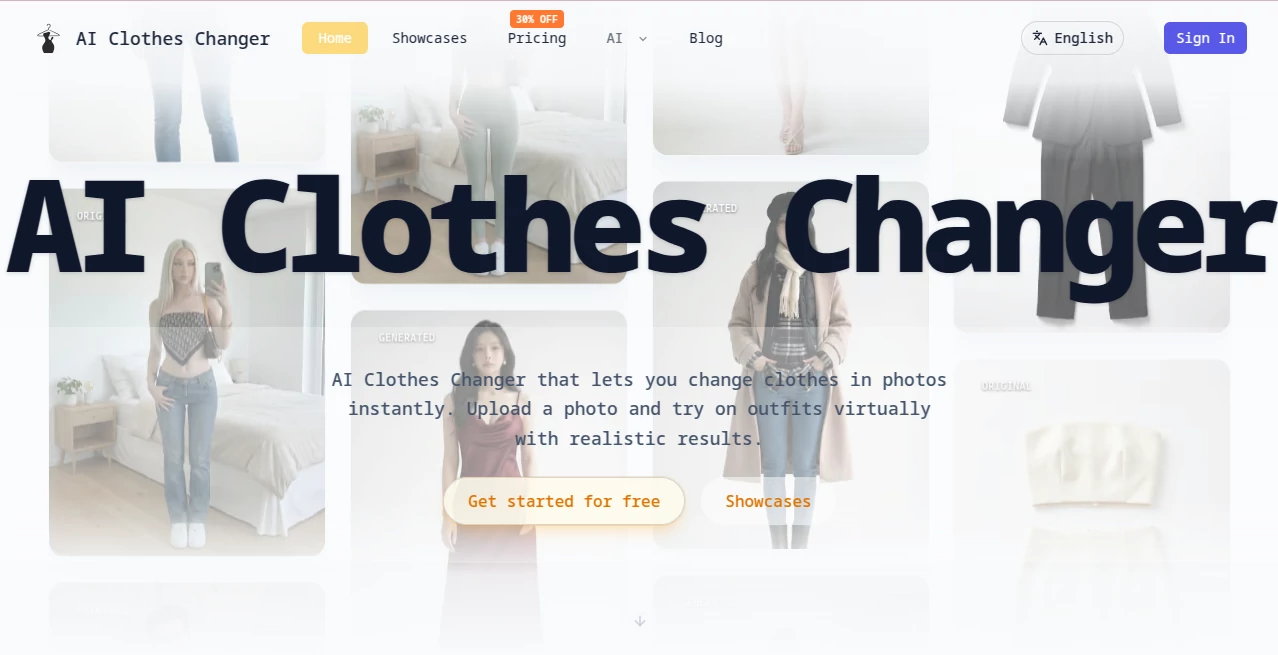
There’s something oddly satisfying about seeing yourself in a completely different outfit without ever leaving the couch. This tool turns that daydream into reality with such ease that it almost feels like cheating. Upload a photo of yourself, toss in a picture of the clothes you’re curious about—or just describe them—and suddenly you’re wearing something new, looking natural, pose intact, background unchanged. I tried it with a friend’s vacation pic; we swapped her sundress for a sharp blazer and trousers, and the result was so convincing she saved it as her next LinkedIn profile shot. It’s quick, it’s fun, and it actually works.
Introduction
Trying on clothes has always been part of the thrill of shopping, but physical fitting rooms come with mirrors that lie, lighting that flatters nobody, and the hassle of queues. This platform skips all that. It uses smart AI to swap outfits in your photos so realistically that you can test looks, mix pieces, and play with styles in seconds. What started as a clever way to preview fashion ideas has become a daily go-to for people who want to experiment without commitment. Whether you’re styling a date night, mocking up social content, or helping a client visualize a wardrobe refresh, the results feel personal and believable—never like a cheap filter slapped on top.
Key Features
User Interface
The layout is refreshingly simple. You get two clear drop zones—one for your photo, one for clothing images—plus a prompt box that suggests ideas if you’re drawing a blank. Aspect ratio choices sit nearby, and a big “Generate” button waits patiently. Everything happens right there on one screen; no digging through menus or losing your place. It’s the kind of design that lets you focus on playing with outfits instead of figuring out the tool.
Accuracy & Performance
The AI keeps your face, posture, and surroundings exactly as they were while only changing what you asked for. Hands, hair, lighting—all stay consistent. Results come back fast, usually in under half a minute, and the realism holds up even when combining multiple pieces like a top, pants, shoes, and accessories. I’ve seen it handle tricky angles and patterned fabrics without melting into weirdness, which is more than most tools can claim.
Capabilities
You can upload up to four clothing images at once, mix them freely, and layer in text prompts for extra control—like specifying “loose fit” or “matte finish.” It supports everything from full outfit swaps to targeted changes (just the shirt, just the jacket). Aspect ratios cover square posts, portrait stories, landscape banners, and more. The output keeps your original lighting and body shape, so it never looks pasted-on. It’s flexible enough for personal fun, influencer content, or even quick e-commerce previews.
Security & Privacy
Your photos stay yours. The system processes them securely and doesn’t keep them longer than needed. There’s no sense of your images being harvested or repurposed. For anyone cautious about uploading personal shots, that matters—a lot. It lets you experiment freely without that nagging background worry.
Use Cases
A content creator tests ten different tops for an upcoming reel without changing outfits once. Someone preparing for a wedding virtually tries on dresses and accessories, narrowing choices before booking appointments. A small online shop owner generates product images with different models wearing the same piece. Friends send each other silly swaps just to laugh. It fits anywhere curiosity about “what if I wore this” shows up.
Pros and Cons
Pros:
- Incredibly realistic swaps that respect your actual body and lighting.
- Combines image uploads and text prompts for precise control.
- Handles multiple items at once—build full looks easily.
- Fast enough to feel playful instead of clinical.
Cons:
- Needs decent input photos for the best magic to happen.
- Free tier has limits that encourage upgrading for heavy use.
Pricing Plans
You can jump in for free with limited generations to get a real feel. Paid plans unlock higher volumes, no watermarks, faster queues, and commercial rights—priced in a way that feels fair whether you’re dipping in occasionally or relying on it daily. The structure rewards curiosity first and scales naturally as your needs grow.
How to Use AI Clothes Changer
Upload a clear photo of yourself (or choose a model). Drop in one to four clothing images—or skip to a text description if you prefer. Pick an aspect ratio that fits your use (square for Instagram, vertical for stories). Click generate, wait a short moment, and see the result. Tweak the prompt or swap pieces and run again until it feels right. Download and share. It’s as simple as it sounds, and that simplicity is what makes it addictive.
Comparison with Similar Tools
Plenty of apps slap clothes on photos, but most leave edges messy, lighting off, or proportions strange. This one stands out by keeping everything grounded—your actual shape, real shadows, natural folds. Where others feel like stickers, the swaps here blend. It gives more control with combined image-and-text input and handles full outfits better than most single-focus tools. For anyone who cares about realism over gimmicks, it quickly becomes the favorite.
Conclusion
Trying on clothes should be fun, fast, and fearless—not stressful or expensive. This platform makes it all three, quietly raising the bar for what virtual styling can be. Whether you’re shopping smarter, creating content faster, or just playing with possibilities, it hands you a mirror that never judges and always delivers. Give it a photo and a curious thought; you might be surprised how quickly “what if” turns into “this is it.”
Frequently Asked Questions (FAQ)
Do I need perfect photos to start?
Clear, well-lit shots work best, but it handles everyday pics surprisingly well.
Can I combine multiple clothing items?
Yes—up to four images plus a prompt lets you build complete looks.
Is the result realistic enough for professional use?
Many use it for e-commerce previews and social content; it holds up nicely.
What if the first try isn’t perfect?
Tweak the prompt or swap images and generate again—iteration is quick.
Are the generated images private?
Your photos are processed securely and not stored beyond the session.
Photo & Image Editor , AI Image to Image , AI Clothing Generator , AI Design Generator .
These classifications represent its core capabilities and areas of application. For related tools, explore the linked categories above.
AI Clothes details
Pricing
- Free
Apps
- Web Tools
Categories

AI Clothes Alternatives Product

Banana 2

SlideStorm AI
Nano Banana …

nana banana …

Ultra Face S…

AI Photo Edi…

Reztune

ModelsLab

Z image AI
