🧠 AI Quiz
Think you really understand Artificial Intelligence?
Test yourself and see how well you know the world of AI.
Answer AI-related questions, compete with other users, and prove that
you’re among the best when it comes to AI knowledge.
Reach the top of our leaderboard.


















AI Convert Hub

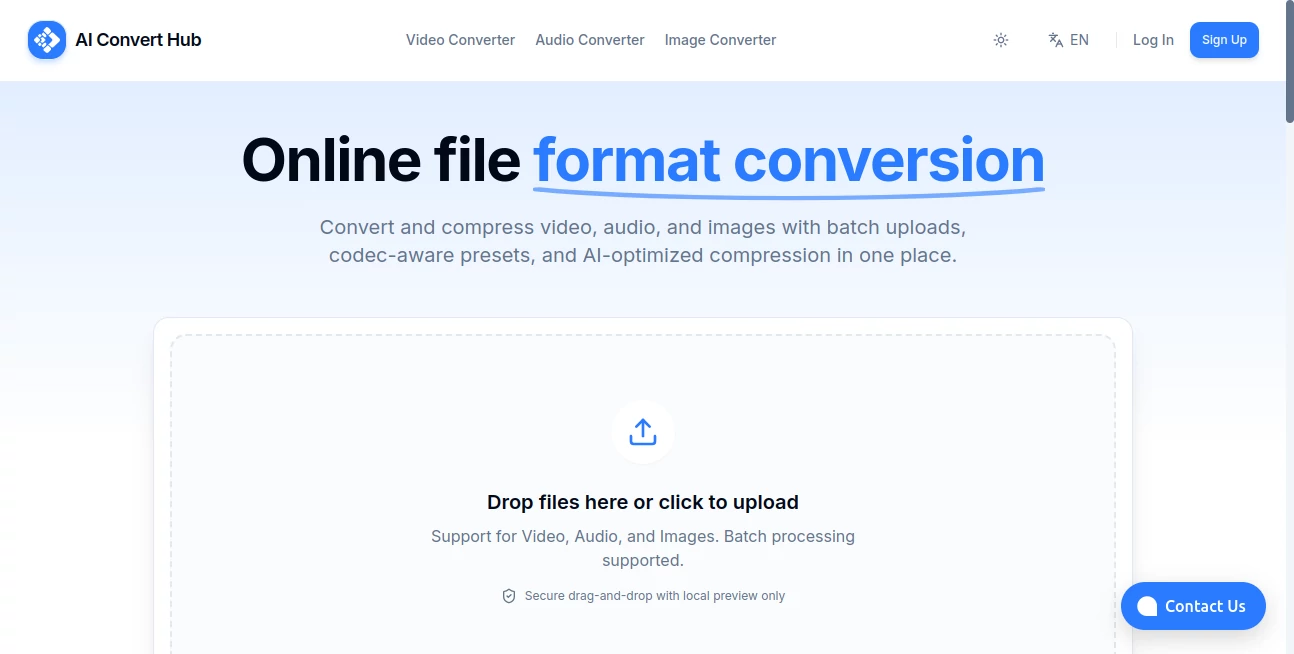
What is AI Convert Hub?
Imagine never again wrestling with incompatible files or waiting forever for conversions that eat up your bandwidth—this clever online spot handles it all with a smoothness that's downright refreshing. Whether you're juggling clips for a project or tweaking tracks on the go, it steps in like a reliable friend, turning headaches into simple clicks. I've lost count of the times a quick swap here saved an evening of frustration, delivering clean results that just work, every single time.
Introduction
In the rush of daily digital life, file formats can feel like sneaky roadblocks, stalling everything from sharing vacation videos to prepping presentation sounds. This platform cuts straight through that mess, offering a straightforward hub powered by smart tech to shift between video, audio, and image types without the usual fuss or fees lurking in the shadows. It's built for folks like us—busy creators, remote workers, casual sharers—who need things done fast and right. What draws people in is that rare blend of power and politeness: no ads screaming at you, no hidden upsells mid-process, just solid performance that earns quiet loyalty from users who've finally found a converter they can trust.
Key Features
User Interface
From the moment you arrive, it's all clean lines and clear choices—pick your category, upload your file, select the target format, and watch progress tick along without a single confusing detour. Buttons are big and bold, instructions whisper when needed, and the whole thing adapts nicely to phones or desktops alike. It's the kind of thoughtful design that makes you wonder why others complicate it so much; one friend mentioned how she converted a batch of family photos during a train ride, no squinting or swearing involved.
Accuracy & Performance
The conversions come out crisp and true to the original, preserving quality where it counts—colors stay vibrant in images, sound clear in audio, motion smooth in videos—without those annoying artifacts that plague lesser options. Speed is a standout too; even chunky files wrap up quicker than expected, thanks to efficient backend magic that doesn't bog down your connection. In my own tests with old home movies, the outputs played flawlessly on every device, no re-encoding nightmares in sight.
Capabilities
It covers a wide ground: flip videos between popular codecs, extract or change audio tracks, resize or reformat images—all with options that let you fine-tune bitrate or resolution if you want, but defaults that nail it for most. Batch processing sneaks in for multiple files, and the range of supported types feels comprehensive without overwhelming. It's particularly handy for bridging gaps, like turning a phone recording into a shareable clip or prepping pics for web upload, always with that consistent reliability.
Security & Privacy
Files get processed securely on the server, then promptly wiped once you're done downloading—no lingering copies or data mining in the background. It's a straightforward promise of privacy that puts minds at ease, especially for personal media or work docs. Users appreciate this no-nonsense approach in a world full of trackers, knowing their stuff stays between them and the task at hand.
Use Cases
A teacher preps lesson clips by trimming formats for classroom projectors, saving precious prep time. Photographers batch-optimize shoots for client galleries, keeping workflows humming. Podcasters pull clean audio from video interviews, ready for editing without extra steps. Even families archive old tapes digitally, converting batches over weekends into treasures that play on modern screens—it's these everyday rescues that turn skeptics into regulars.
Pros and Cons
Pros:
- Lightning-quick and quality-conscious, rarely letting details slip.
- No-account ease for casual needs, yet robust for regulars.
- Broad format support that covers most common hurdles.
- Clean, ad-free experience that respects your time and screen.
Cons:
- Very large files might hit limits on the free side.
- Advanced editing beyond basic conversion isn't in the mix.
Pricing Plans
It's generously free for core use, handling everyday conversions without a paywall popping up mid-task—ideal for occasional needs or testing the waters. Premium tiers likely unlock higher limits or faster queues for heavy users, but the base offering feels complete enough that many stick around without upgrading. This approachable model keeps barriers low, inviting everyone to benefit from the efficiency.
How to Use AI Convert Hub
Head to the category that fits—video, audio, or image—then upload your file with a simple drag or browse. Choose the desired output from the dropdown (plenty of options there), tweak any settings if you're feeling particular, and hit convert. A progress bar keeps you posted, and once done, download or share straight away. For batches, queue them up and let it run; I often handle weekend archives this way, sipping coffee while it sorts the lot.
Comparison with Similar Tools
Plenty of converters crowd the web, but few match this one's balance of speed, cleanliness, and no-strings access—where others bombard with ads or cap quality on free runs, this delivers steady results without the noise. It's not the flashiest, but for reliable, everyday shifts across media types, it often comes out on top, especially when you value privacy and performance over bells you rarely ring.
Conclusion
At the end of the day, it's tools like this that quietly make digital life smoother, removing those small but stubborn frictions that add up over time. Whether you're a pro juggling formats or just someone sharing memories, it offers that rare dependable boost without demanding much in return. Give it a spin next time a file fights back—you might find yourself wondering how you managed without it.
Frequently Asked Questions (FAQ)
What formats are supported?
A solid range for video (MP4, AVI, MOV, etc.), audio (MP3, WAV), and images (JPG, PNG, GIF), covering most daily needs.
Is it really free?
Yes for standard use—no sign-up forced, no watermarks sneaking in.
How safe are my files?
Processed securely and deleted after, with no storage beyond your download.
Can I convert multiple files?
Batch options make it easy, though limits apply on bigger hauls.
Does it work on mobile?
Smoothly, with responsive design that fits smaller screens perfectly.
Photo & Image Editor , AI Productivity Tools , AI Documents Assistant , AI Files Assistant .
These classifications represent its core capabilities and areas of application. For related tools, explore the linked categories above.
AI Convert Hub details
This tool is no longer available on submitaitools.org; find alternatives on Alternative to AI Convert Hub.
Pricing
- Free
Apps
- Web Tools
Categories

AI Convert Hub Alternatives Product

Nano Banana …

AIImageEdit

Nano Banana …

Image Unblur

ImgEnhancer

Better Image

ChatGPT Imag…

AI Picture G…

deck cleaner