🧠 AI Quiz
Think you really understand Artificial Intelligence?
Test yourself and see how well you know the world of AI.
Answer AI-related questions, compete with other users, and prove that
you’re among the best when it comes to AI knowledge.
Reach the top of our leaderboard.


















Ai Home Design
What is Ai Home Design?
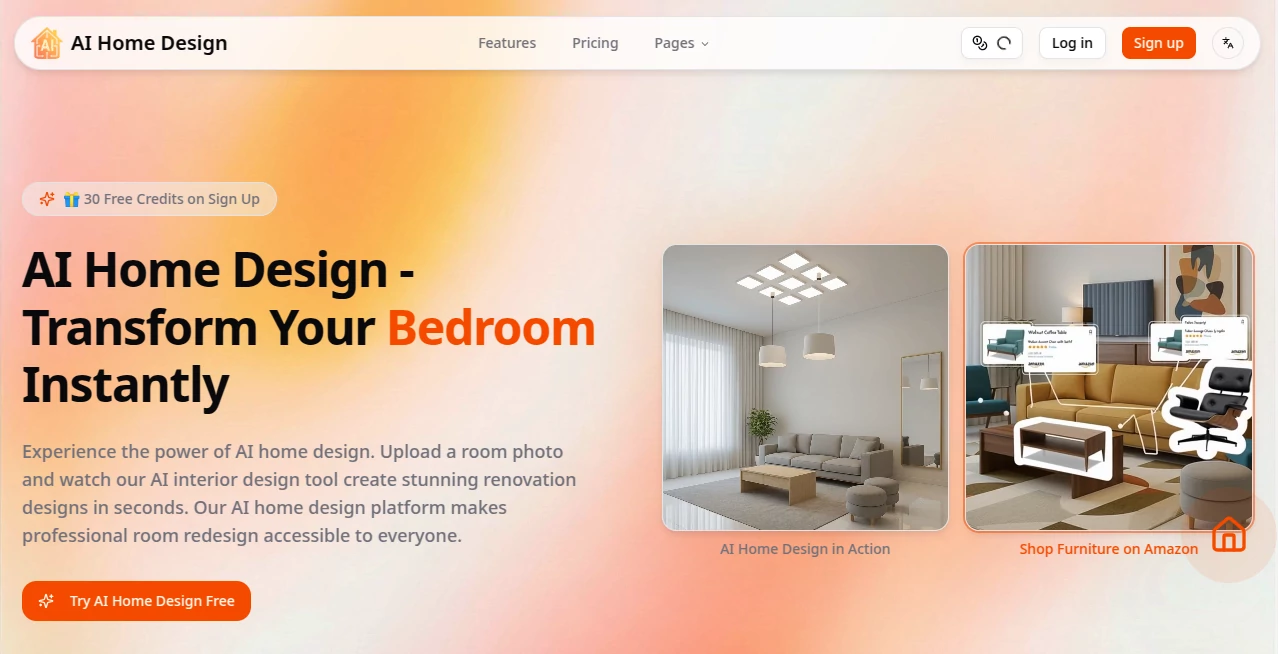
Walking into a room and imagining a completely different look has always been fun in theory, but exhausting in practice. You sketch ideas on paper, scroll through endless Pinterest boards, or hire a designer and wait weeks for concepts. This tool changes that experience entirely. Upload a photo of your living room, kitchen, bedroom—any space—and within seconds you get realistic redesigns in whatever style you choose. The results look thoughtful, not generic, with furniture that fits the space and lighting that feels natural. I’ve seen homeowners stare at their screen in disbelief, saying “That’s my room… but better.” It turns daydreaming into something you can actually see and act on.
Introduction
Home design used to feel reserved for people with big budgets or design degrees. This platform opens the door for everyone. Whether you’re refreshing a tired bedroom, planning a kitchen remodel, or just curious what your space could look like in a different style, it delivers professional-level concepts instantly. Upload a photo, pick a vibe (modern, cozy, minimalist, bohemian, etc.), and watch as the AI reimagines the room while keeping the actual layout and architecture intact. It’s become a daily habit for many: quick experiments during lunch breaks, late-night inspiration sessions, or serious planning before calling contractors. The best part? It respects your existing space instead of replacing it with something unrecognizable.
Key Features
User Interface
The experience is deliberately simple and welcoming. A large upload area invites your room photo, followed by style selectors that show clear thumbnails so you know exactly what you’re choosing. Generation happens quickly, and results appear as a clean gallery with before-and-after views. You can swipe through variations, zoom in to check details, and regenerate with slight tweaks. No steep learning curve, no confusing dashboards—just an intuitive flow that lets you focus on ideas rather than buttons.
Accuracy & Performance
It understands real rooms. Walls, windows, doors, and existing furniture stay in place while the AI intelligently replaces colors, materials, lighting, and décor. The output feels believable—furniture scales correctly, shadows match the original lighting, and the overall composition respects the room’s proportions. Processing is fast enough that you can try multiple styles in one sitting without losing patience. The consistency across different room types (small apartments, large living rooms, kitchens) is impressive.
Capabilities
Upload any interior photo and redesign it in dozens of styles. Generate immersive video tours that walk you through the new space, helping you visualize flow and scale. One-click shopping links let you see and buy similar furniture pieces shown in the redesign. It handles everything from subtle refreshes (new paint and curtains) to complete overhauls (new flooring, furniture layouts, accent walls). The combination of static redesigns and dynamic video tours gives you both quick ideas and deeper understanding of how the space would actually feel.
Security & Privacy
Your photos are processed securely and not used to train models without consent. The platform focuses on delivering value to you rather than harvesting data. For homeowners sharing personal living spaces or designers working with client photos, that thoughtful approach builds confidence—you can experiment freely without worrying about where your images end up.
Use Cases
A young couple uploads their dated rental living room and experiments with modern minimalist and warm Scandinavian styles before deciding what furniture to buy. A homeowner planning a kitchen renovation generates multiple color schemes and layout ideas to show the contractor, saving hours of back-and-forth. An interior designer uses it to quickly present concepts to clients during initial consultations, making meetings more visual and productive. Even someone moving into a new house tests different paint colors and furniture arrangements virtually before committing. It’s practical for big decisions and fun for casual “what if” moments.
Pros and Cons
Pros:
- Results look professional and realistic, not cartoonish or generic.
- Video tours add a sense of space and flow that static images can’t match.
- One-click shopping makes inspiration immediately actionable.
- Fast enough to try many variations without frustration.
- Free access lets you test the quality before committing.
Cons:
- Highly customized or unusual room layouts can sometimes need manual tweaks.
- Video generation and advanced features require credits or paid plans.
- Extremely cluttered rooms may need some pre-cleanup for best results.
Pricing Plans
It starts with a generous free tier that lets you redesign several rooms and see the quality firsthand. Paid plans unlock more generations, higher-resolution outputs, unlimited video tours, and priority processing. The structure is flexible—pay for what you need, whether occasional inspiration or full renovation planning. Many users say the time and money saved on professional consultations more than covers the cost.
How to Use AI Home Design
Take a clear photo of your room (good lighting helps). Upload it on the site. Choose a design style or describe what you’re looking for. Wait a few seconds as the AI processes. Browse the generated options, compare before and after, and watch the video tour if available. Like a particular furniture piece? Click to see shopping options. Download the images or share the link with family or your designer. Repeat with different styles until you find the one that feels right. The whole process is quick enough to do during a coffee break.
Comparison with Similar Tools
Many AI design tools produce pretty but unrealistic renders that ignore your actual room dimensions or lighting. This one keeps the original architecture and proportions intact while still offering creative freedom. The addition of video tours and shopping links sets it apart from tools that only give static images. It feels more like a practical helper for real decisions and less like a novelty generator.
Conclusion
Redesigning a home should spark excitement, not stress or endless indecision. This tool brings that excitement back by making professional-level visualization fast, accessible, and fun. It bridges the gap between “I wish my room looked like this” and “here’s exactly how it could look.” Whether you’re planning a major renovation, refreshing a single room, or just dreaming about possibilities, it gives you clear, inspiring answers in moments. Sometimes the best changes start with seeing them first—and this makes seeing effortless.
Frequently Asked Questions (FAQ)
How clear does my photo need to be?
Good lighting and a reasonably straight shot work best, but it handles everyday phone photos surprisingly well.
Can I redesign the same room in multiple styles?
Yes—generate as many variations as you like to compare different moods and palettes.
Are the video tours realistic?
They give a genuine sense of walking through the redesigned space, helping you judge scale and flow.
Is it only for interiors?
Primarily focused on room redesign, though it can handle some exterior and garden ideas too.
Do I need design experience?
Not at all—the tool is built for complete beginners who just know what they like.
AI Design Assistant , AI Design Generator , AI Interior & Room Design .
These classifications represent its core capabilities and areas of application. For related tools, explore the linked categories above.
Ai Home Design details
Pricing
- Free
Apps
- Web Tools
Categories

Ai Home Design Alternatives Product

ai banana

KOOX AI

Z-Image Gene…

Z image AI

Nano Banana 2

Roblox Man F…

Ambigram Gen…

ChromaPeel

Nano Banana …