🧠 AI Quiz
Think you really understand Artificial Intelligence?
Test yourself and see how well you know the world of AI.
Answer AI-related questions, compete with other users, and prove that
you’re among the best when it comes to AI knowledge.
Reach the top of our leaderboard.


















AI Image to Video

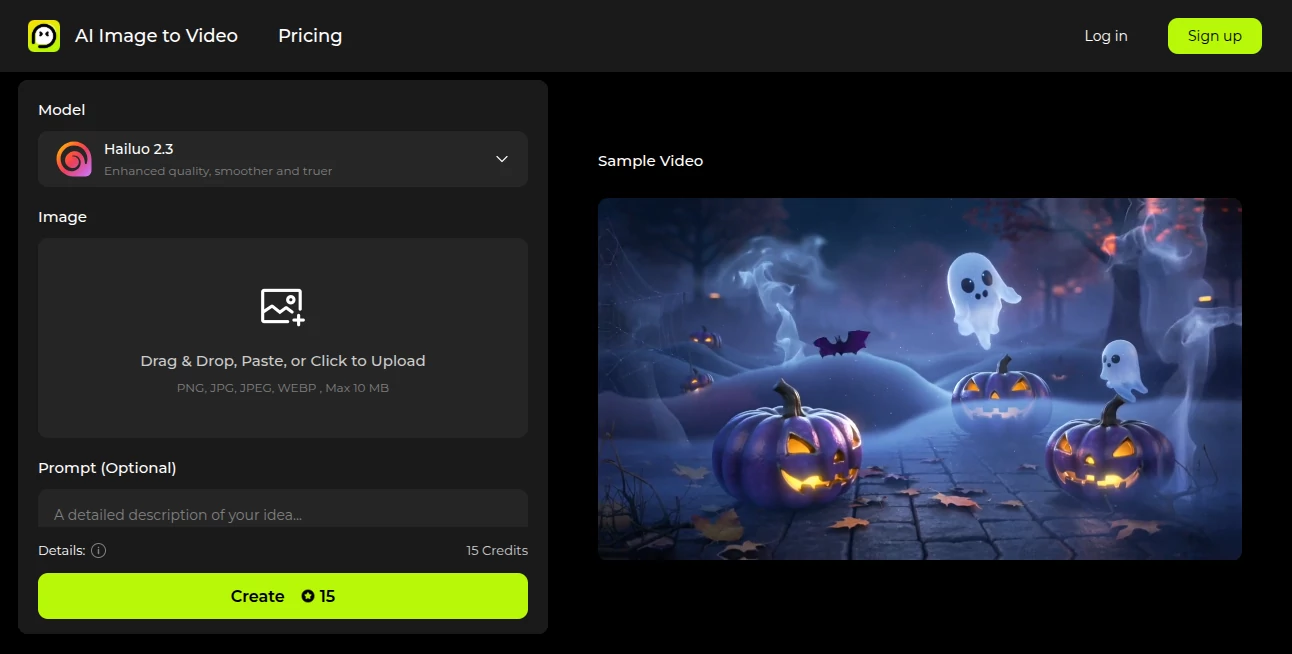
What is AI Image to Video?
There's a quiet thrill in watching a still photo suddenly breathe—waves crashing, lights twinkling, or a simple product spinning just right to catch the eye. This tool captures that thrill perfectly, letting you upload any snapshot and turn it into a smooth, high-definition clip with just a few clicks. I tried it with an old travel photo of a sailboat at dusk, added a gentle prompt for movement, and the result felt like a mini movie—fluid, cinematic, and ready to share. It's the kind of straightforward magic that makes you want to dig through your camera roll for more.
Introduction
At a time when short clips rule feeds and ads, having a reliable way to animate images changes everything. This platform stands out by blending powerful AI—like the Hailuo model—with an approachable setup that anyone can jump into. Upload a picture, toss in a description if you want guided motion, tweak a couple settings, and you're done. No watermarks on the finals, HD quality that holds up on big screens, and options for multiple variations mean you get choices without the wait. It's built for those moments when a static shot just isn't enough, whether you're sprucing up social posts or prototyping marketing ideas.
Key Features
User Interface
It keeps things delightfully simple: a big upload area that accepts drags or clicks, a prompt box for extra direction, and clear selectors for length, clarity, and how many versions to spin. Previews load right there, with a sample player to set the tone before you start. Everything feels intuitive—one evening, I was experimenting with product shots, adjusting prompts on the fly, and it never felt cluttered or confusing.
Accuracy & Performance
The motion comes out remarkably natural, with smooth transitions and details that stay true to your original image, thanks to an engine tuned for realistic flow. Generations wrap quickly, often ready before you've finished your coffee, and the multiple output option lets you pick the winner without reruns. In my hands-on plays, it handled everything from subtle bokeh shifts to bolder camera pushes with impressive fidelity.
Capabilities
Turn photos into 6- or 10-second clips at 768p or full 1080p, blending your image with text prompts for styles from minimalist to full cinematic. Generate up to four variations at once for quick comparisons, all in HD without marks. It's versatile for adding life to portraits, products, landscapes, or abstracts—essentially, whatever you feed it gets a thoughtful animation boost.
Security & Privacy
Uploads process securely, with a focus on keeping things straightforward and private—no unnecessary lingering or sharing. It's reassuring for personal or business use, letting you create freely without second-guessing the backend.
Use Cases
E-commerce folks animate product shots for ads that convert better, like skincare bottles gliding on ribbons. Travel bloggers bring vacation stills to life with gentle waves or city pans. Marketers craft quick demos for socials, while real estate agents turn property photos into inviting tours. Even casual users revive old memories or mock up concepts, finding new ways to tell stories in seconds.
Pros and Cons
Pros:
- Clean, watermark-free HD clips that look professionally done.
- Multiple variations help nail the perfect take quickly.
- Prompt flexibility for creative control without complexity.
- Free access with trial credits to get started right away.
Cons:
- Short clips suit bursts, not longer narratives.
- Credits needed for generations, though generous to begin.
Pricing Plans
Dive in free with trial credits that let you test the waters fully—no card required upfront. Each run uses a modest amount, with straightforward top-ups or plans for heavier creators, keeping it accessible whether you're occasional or all-in.
How to Use AIImageToVideo
Grab a clear image—up to 10MB in common formats—drop it in, add a prompt if you want specific motion, choose your length and resolution, then select how many tries. Hit create, watch the progress, preview the results side-by-side, and download your favorite. It's that direct; I often chain a few prompts to refine until it clicks perfectly.
Comparison with Similar Tools
It holds its own against pricier or more restricted options by delivering clean HD without marks and solid variation choices, focusing on ease and quality where others might complicate or compromise. For everyday creators wanting reliable animation from images, it strikes a sweet balance of power and approachability.
Conclusion
This tool quietly excels at bridging stills and motion, giving your images a voice that's engaging and effortless to summon. It's a joyful shortcut for anyone with photos waiting to move, proving that great video snippets don't need big setups—just a smart spark. Give it a spin with something personal; the transformation might just surprise you.
Frequently Asked Questions (FAQ)
What file sizes work best?
Up to 10MB in PNG, JPG, or similar—clear and well-composed for smoother results.
How long are the clips?
Choose 6 or 10 seconds, ideal for quick, impactful bursts.
Do outputs have watermarks?
None at all—clean HD ready for anywhere.
Can I guide the motion?
Yes, with optional text prompts for precise direction.
How many can I generate at once?
Up to four variations for easy picking.
AI Animated Video , AI Image to Video , AI Video Generator , AI Text to Video .
These classifications represent its core capabilities and areas of application. For related tools, explore the linked categories above.
AI Image to Video details
This tool is no longer available on submitaitools.org; find alternatives on Alternative to AI Image to Video.
Pricing
- Free
Apps
- Web Tools
Categories

AI Image to Video Alternatives Product

Veo 4

Seedance AI

Kling 5.0

kling 3 AI

Seedance 2.0

Nano Banana …
Seedance 2.0…

Kling 5.0
AI Baby Video