


















AI Plant Hub
What is AI Plant Hub?
Most plant care content online falls into one of two camps: vague lifestyle advice with no numbers, or dense horticultural guides written for people with greenhouses and soil pH meters. Neither is much help when you're standing in your apartment at 7am wondering if the monstera in the corner has been overwatered again.
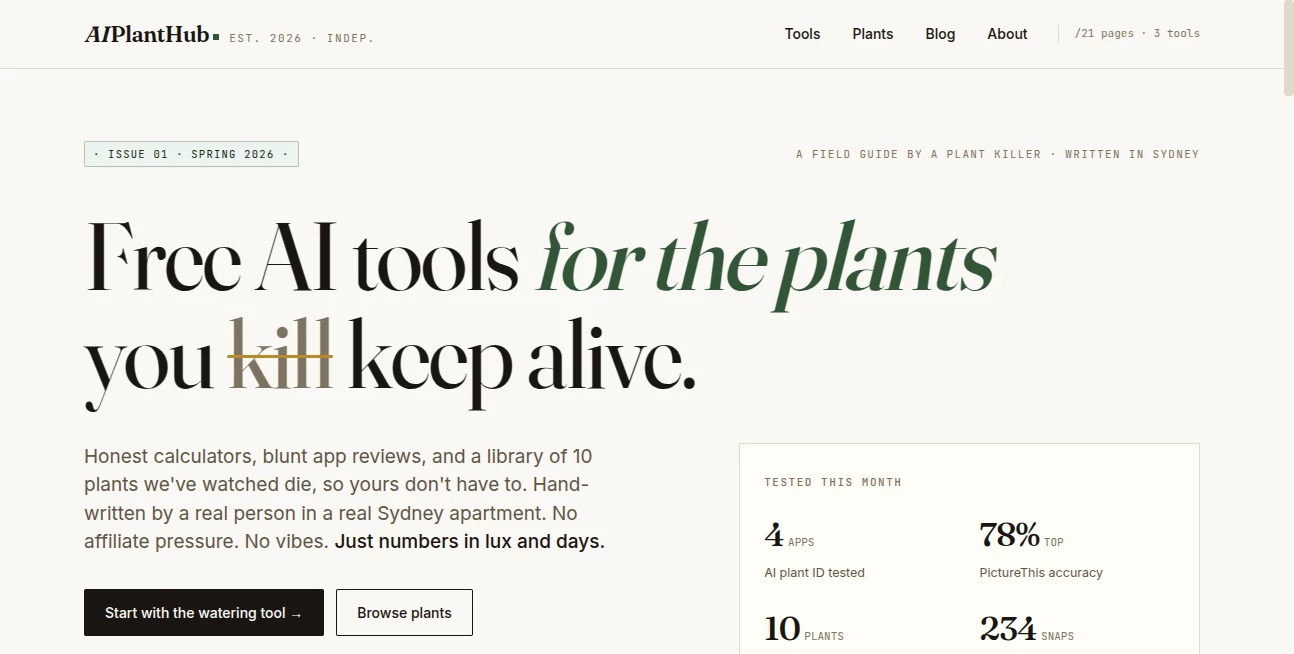
This is a different kind of resource. Built by a self-described plant killer in a Sydney apartment, this independent platform takes a genuinely data-first approach to houseplant care. Three free AI-powered tools, a library of ten plants with verified care data, and a blog that doesn't shy away from calling out bad advice. No sign-ups. No affiliate angles. No vague recommendations dressed up as expertise.
The whole thing was built on a simple premise: plant owners deserve actual numbers — watering intervals in days, light levels in lux, app accuracy in percentages — not reassuring copy about "thriving in indirect light." If you've killed more plants than you'd like to admit, this is the resource that explains why, in plain terms.
Key Features
User Interface
The design is deliberately stripped back. No cluttered dashboards, no onboarding flows, no notifications asking you to upgrade. Each of the three tools loads immediately, does one job clearly, and gets out of the way. The plant library follows a consistent structure — a quick summary, a care table, watering guidance, light requirements, propagation notes, and a FAQ — so you can skim what you need and leave.
Everything is static by design. That's not a limitation — it's a deliberate choice that means pages load fast, nothing breaks, and there's no account to forget the password to. For a resource you're likely accessing on your phone while eyeing a drooping plant, that speed and simplicity genuinely matters.
Accuracy & Performance
The care data across the plant library is cross-referenced against three recognised sources: RHS (Royal Horticultural Society) 2025 data, AVMA guidance, and research published in AoB Plants 2024. That's a meaningful commitment for a free tool — most houseplant sites cite nothing at all.
The AI plant identifier comparison tool is particularly rigorous. Four major apps — PictureThis, Plant.net, Plantum, and Google Lens — were tested against 234 real photos taken in a city apartment, not staged studio conditions. The result: PictureThis came out on top with 78% accuracy under those conditions. That's useful, honest data. It tells you something about how these apps actually perform in the environments most people are using them, not in controlled conditions designed to make accuracy numbers look good.
Capabilities
Three tools form the core of the platform, and each one solves a specific problem that generic plant care advice consistently fails to address:
- Watering Schedule Generator: Covers 10 plants across summer and winter, with variations for pot type and light conditions. Outputs a specific number of days between watering — not "water when dry" or "once a week," but an actual figure based on plant, season, and your setup. Forty different combinations are covered.
- AI Plant Identifier Comparison: A benchmarked breakdown of how four identification apps performed across 234 test photos from a real apartment. If you've been wondering which app to trust when you're trying to identify a mystery cutting, this gives you an evidence-based answer rather than a sponsored recommendation.
- Light Requirement Matcher: Input your window direction and size, get a filtered shortlist of plants that will actually survive in that spot. Covers five window directions and returns up to ten matched plants. This is the tool that would have saved a lot of people from buying a fiddle-leaf fig for a north-facing room.
The plant library currently covers ten species, each with the same detailed structure: fiddle-leaf fig, monstera, pothos, ZZ plant, snake plant, peace lily, philodendron, rubber plant, and more. Every entry is written to the same standard — no filler, no padding, just the information someone actually needs to keep that plant alive.
Security & Privacy
There are no accounts, no photo uploads stored on servers, no API keys required from users, and no tracking beyond basic analytics. The privacy policy is clear and the tools are entirely client-side where possible. For a tool dealing with nothing more sensitive than houseplant queries, the approach is appropriately minimal — you're not being asked to hand over data to get a watering schedule.
The independence of the site is also worth noting as a kind of trust signal: no affiliate links, no sponsored recommendations, no commercial relationships that might influence which app gets recommended or which plant gets featured. In a space where most content is monetised through affiliate commissions, that's genuinely unusual.
Use Cases
The clearest user is someone who has killed a plant before — probably more than one — and wants to understand why without wading through content written to sell them something. The watering schedule tool is particularly useful here: overwatering is the most common cause of houseplant death, and "water when the top inch of soil is dry" is advice that means something different for a pothos in a terracotta pot in a bright room versus the same plant in a plastic pot on a north-facing shelf.
The light requirement matcher solves a problem that usually doesn't come up until after the plant is already dying. Most people choose plants based on aesthetics and then try to make them work in whatever space they have. Flipping that process — starting with the light you actually have and finding what fits — is a more rational approach, and the tool makes it quick.
- New plant owners who want a reliable care baseline without having to cross-reference multiple conflicting sources
- Apartment dwellers with restricted light conditions trying to figure out what will actually survive on a north or east-facing windowsill
- Anyone choosing a plant identification app and wanting to know which one performs best in realistic indoor conditions
- Experienced plant owners fact-checking care advice they've seen elsewhere against verified sources
- People who've killed the same plant twice and want to understand what actually went wrong before buying a third
Pros and Cons
What stands out positively:
- Completely free, with no sign-up required for any of the tools
- Care data cited against real sources — RHS, AVMA, and AoB Plants — rather than pulled from generic plant care forums
- The plant ID comparison is based on genuine testing, not manufacturer claims or sponsored placements
- Honest, direct writing style that doesn't oversell or pad content to fill space
- Fast, static pages that work well on mobile without an app download
- No affiliate links means recommendations reflect actual performance rather than commission rates
- The "banned words" editorial policy is a small but meaningful signal about the quality of thinking behind the content
Limitations worth knowing:
- The plant library currently covers only ten species — excellent for what's there, but limited if your collection runs deeper
- Tools are static and don't personalise over time or remember your plants between sessions
- No community features or forum for more specific questions
- Geographic focus is Sydney-based, which affects some seasonal guidance for users in other climates
- No mobile app — browser only, which works well but some users prefer a dedicated app experience
Pricing Plans
Everything on this platform is free. All three tools, the full plant library, and the blog are accessible without creating an account, entering payment details, or sitting through a trial period. There are no premium tiers, no locked features, and no upgrade prompts.
This is relatively unusual for a tool that delivers genuinely useful, well-researched outputs. The absence of a freemium model means the experience isn't shaped around converting free users to paid plans — you get everything, straightforwardly, from the first visit. For users who've grown accustomed to plant care apps that gate their best features behind a subscription, this is a refreshing contrast.
How to Use AI Plant Hub
There's no setup. Open the site, pick the tool that matches your question, and use it. That said, here's how to get the most from each of the three tools:
- Watering Schedule Generator: Select your plant from the ten available options, specify the season, your pot type, and your light conditions. The tool returns a specific watering interval in days. Note the source it cites — this gives you something to verify against if you want to dig deeper.
- AI Plant Identifier Comparison: Browse the breakdown of how PictureThis, Plant.net, Plantum, and Google Lens performed across 234 apartment photos. The results are organised clearly by accuracy rate and test conditions. If you're trying to identify an unknown plant, this tells you which app to trust first.
- Light Requirement Matcher: Select your window direction and approximate size. The tool filters the available plant library to species that match those light conditions. This is the right starting point when furnishing a new space or replacing a plant that didn't survive a particular spot.
For deeper reading, the blog covers specific scenarios — monstera yellow leaves, north-facing window survival, aerial root decisions — in the same evidence-first style as the tools. Each post is worth reading in full rather than skimming, which is not something you can say about most plant care content.
Comparison with Similar Tools
The most direct comparisons are the plant identification apps reviewed on the platform itself — PictureThis, Plantum, Plant.net, and Google Lens. These are mobile-first apps with broader feature sets: community forums, disease diagnosis, shopping integrations, and personal plant journals. PictureThis in particular has a polished interface and a large plant database. The trade-off is cost (PictureThis runs a subscription) and the fact that their recommendations exist within a commercial context.
Greg and Planta are popular plant care apps that offer personalised watering reminders and care schedules. They're well-designed and widely used. The distinction here is that their care data isn't always cited against primary sources, and their business models involve affiliate relationships that can subtly shape which plants and products get featured.
This platform doesn't compete with those apps on features — it doesn't have push notifications, a plant journal, or a disease diagnosis tool. What it offers instead is something those apps don't prioritise: fully cited care data, independent app testing with real numbers, and content written without any commercial angle. For someone who wants to cross-check advice they've received from a plant app against sourced horticultural data, this is the right place to do that.
Conclusion
There's a lot of houseplant content on the internet. Most of it is written to rank for search terms and monetised through affiliate links. The advice is often contradictory, the sourcing is absent, and the tone is uniformly optimistic in a way that doesn't help you when your peace lily is yellowing for the third time.
This platform is a deliberate correction to that pattern. Three focused tools built on real data, a plant library that cites its sources, and a blog that explains rather than reassures. The fact that it's entirely free and requires nothing from you — no account, no email address, no app download — makes it an easy first stop for any houseplant question that deserves a straight answer.
If you've been relying on general advice and your plants keep dying anyway, the watering schedule generator alone is worth five minutes of your time. It might not change everything. But knowing that your snake plant wants water every 21 days in summer, not every seven, is the kind of specific information that actually makes a difference.
Frequently Asked Questions (FAQ)
Is anything on this platform behind a paywall?
No. All three tools and the full plant library are completely free. There are no premium features, no account required, and no payment information needed.
How was the plant care data verified?
Care data in the plant library is cross-referenced against three sources: RHS 2025 guidelines, AVMA guidance, and research published in AoB Plants 2024. Each output cites the source it was computed from, so you can verify independently if you want to.
How was the AI plant identification comparison conducted?
Four apps — PictureThis, Plant.net, Plantum, and Google Lens — were tested against 234 photos taken in a real Sydney city apartment, under realistic indoor conditions. PictureThis achieved the highest accuracy rate at 78% across those tests.
Can the tools personalise over time or remember my plants?
Not currently. The tools are static and session-based — there's no account system, so nothing is saved between visits. This keeps the platform fast and private, but it does mean you'll need to re-enter your details each time.
How many plants are in the library?
Ten species are currently documented in detail: fiddle-leaf fig, monstera, pothos, ZZ plant, snake plant, peace lily, philodendron, rubber plant, and others. The library is described as ongoing, so more species are expected to be added over time.
Are there affiliate links or sponsored recommendations?
No. The platform explicitly operates without affiliate copy. App recommendations and care advice are based on independent testing and sourced data, not commercial relationships.
AI Life Assistant , AI Fun Tools , AI Education Assistant , AI Research Tool .
These classifications represent its core capabilities and areas of application. For related tools, explore the linked categories above.

AI Plant Hub Alternatives Product

Connections …

Rate My Prof…

NYT Sudoku

Smart Chicke…

JSON to TOON…

Anime Vangua…

CoinIQ

Create a Car…

Casper Pract…
