🧠 AI Quiz
Think you really understand Artificial Intelligence?
Test yourself and see how well you know the world of AI.
Answer AI-related questions, compete with other users, and prove that
you’re among the best when it comes to AI knowledge.
Reach the top of our leaderboard.


















Airbrush

What is Airbrush?
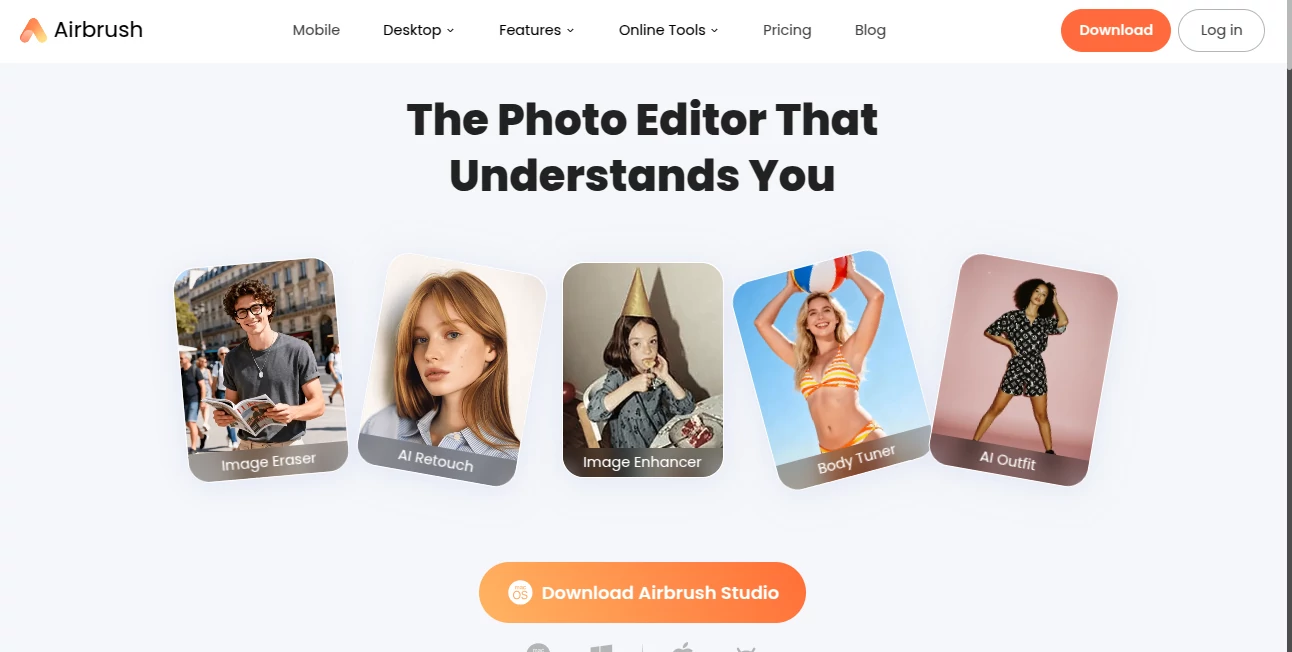
Ever looked at a photo and wished you could smooth out that one imperfection or brighten the mood without spending hours in editing software? This tool makes it happen in a few taps, turning ordinary snaps into polished portraits that feel naturally flawless. I’ve watched friends upload a candid group shot, tweak a few sliders, and suddenly everyone looks like they stepped out of a magazine—without any of that overdone, plastic look that screams “edited.” It’s the kind of help that feels like a personal retoucher who knows exactly when to stop.
Introduction
Airbrush was built for real people who want beautiful photos fast, without needing to master complicated tools. It’s especially loved by anyone who takes a lot of selfies, portraits, or lifestyle shots and just wants them to look their best—quickly and naturally. Users often say it’s the first app they open after a photoshoot, and it rarely disappoints. Whether you’re prepping for a dating profile, social media post, or just want to look good in family photos, it delivers results that feel authentic, not artificial. The magic lies in how gently it enhances—never pushing too hard, always keeping you looking like you, only better.
Key Features
User Interface
The layout is clean and inviting: upload a photo, and you’re immediately greeted with a simple set of tools that are easy to understand. Everything is right there—skin smoothing, teeth whitening, eye enhancement—each with a slider that lets you dial in exactly how much you want. No buried menus or confusing icons. It’s designed so even first-timers feel confident, and the before-and-after toggle makes it easy to see the difference without second-guessing.
Accuracy & Performance
It’s impressively precise at detecting skin, eyes, and facial features, even in tricky lighting or angles. The AI doesn’t overdo it—skin looks soft and natural, not like porcelain. Processing is fast, usually under a few seconds, and the results are consistent across different skin tones and lighting conditions. People often say it’s one of the few apps that doesn’t leave them looking like they’ve been airbrushed into oblivion.
Capabilities
Beyond basic retouching, you can reshape faces subtly, adjust body proportions, change hair color, and even remove objects from the background. There are also fun extras like makeup application and background blur that work surprisingly well. The real standout is the natural look—everything blends seamlessly, so the photo still feels like a real moment, just elevated.
Security & Privacy
Your photos are processed securely and deleted from their servers after editing. There’s no long-term storage unless you choose to save your work. It’s reassuring to know your personal images aren’t being kept or used for training—especially important when you’re sharing unfiltered selfies or family photos.
Use Cases
Online daters use it to put their best foot forward without looking fake. Influencers keep their feed consistent with quick touch-ups. Professionals preparing headshots or product shots save time and money. Even parents smoothing out a child’s photo for a holiday card appreciate how gentle and natural the results are. It’s versatile enough for everyday use, yet powerful enough for more serious creative work.
Pros and Cons
Pros:
- Natural-looking results that enhance rather than overhaul.
- Super simple interface—perfect for non-techy users.
- Fast processing, even on mobile.
- Great range of tools, from subtle fixes to creative changes.
Cons:
- Some advanced features require a subscription.
- Free version adds a small watermark on downloads.
Pricing Plans
You can start for free and get a taste of the core tools. For full access, including unlimited saves and no watermarks, the premium plan is very reasonably priced—often less than a coffee a month. There’s a yearly option that saves even more, and occasional discounts make it feel like a no-brainer for regular users.
How to Use Airbrush
Upload your photo (or take one directly in the app), then browse the tools. Start with skin smoothing—slide until it looks good, then move to eyes or teeth if needed. Use the before-and-after toggle to check your work. When you’re happy, save or share directly. It takes about 30 seconds to do a full edit once you know the flow.
Comparison with Similar Tools
While some apps go overboard with filters or heavy retouching, this one stands out for its natural look and ease of use. Others might offer more dramatic changes, but they often leave skin looking fake or over-processed. This tool strikes the perfect balance—professional results without the “Instagram filter” vibe.
Conclusion
If you want your photos to look their best without losing the real you, this is the tool to have. It’s fast, intuitive, and delivers results that make you feel confident sharing. Whether it’s a dating profile, social post, or just a memory you want to preserve, it’s the gentle boost that makes all the difference.
Frequently Asked Questions (FAQ)
Is it really natural-looking?
Yes—most users say it’s the most natural retouching app they’ve tried.
Can I use it on my phone?
Absolutely, it works great on mobile and desktop.
Do I need to pay to remove watermarks?
Yes, but the subscription is affordable and removes them completely.
Does it work on group photos?
Yes, it detects multiple faces and lets you edit each one individually.
What if I don’t like the edit?
You can always undo or revert—nothing is permanent until you save.
AI Photo & Image Generator , AI Selfie & Portrait , Photo & Image Editor , AI Photo Enhancer .
These classifications represent its core capabilities and areas of application. For related tools, explore the linked categories above.
Airbrush details
This tool is no longer available on submitaitools.org; find alternatives on Alternative to Airbrush.
Pricing
- Free
Apps
- Web Tools
Categories

Airbrush Alternatives Product
ZeroEdit

UNi-1 AI

NanoBnana-Im…
PaperYak

Tryonr

insMind

Image to STL

WonderShare …
Nano Banana …