🧠 AI Quiz
Think you really understand Artificial Intelligence?
Test yourself and see how well you know the world of AI.
Answer AI-related questions, compete with other users, and prove that
you’re among the best when it comes to AI knowledge.
Reach the top of our leaderboard.


















Best AI SVG Generator
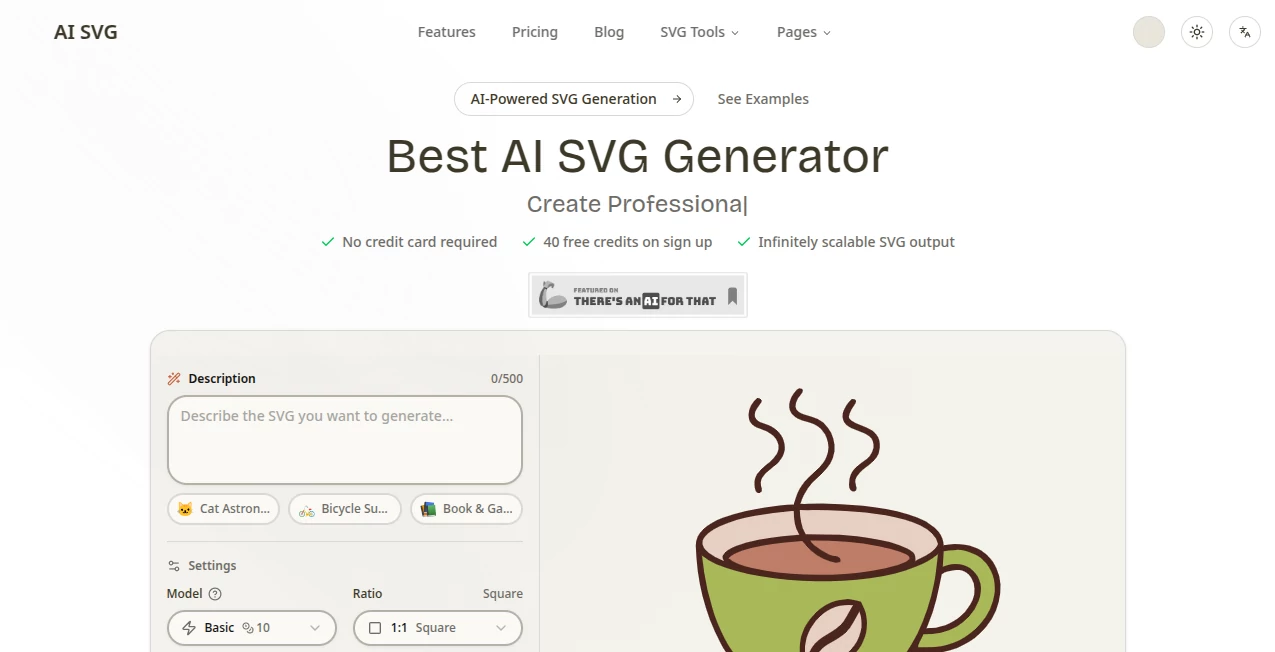
What is Best AI SVG Generator?
There’s something deeply satisfying about typing a simple description and watching a crisp, scalable vector graphic appear that looks like it was drawn by a skilled illustrator. This tool makes that moment feel almost routine. Whether you need a clean icon for your app, a custom illustration for a presentation, or a bold logo concept, it delivers production-ready SVGs that are light, editable, and look intentional. I’ve used it to mock up interface icons in minutes instead of hours, and watched designers light up when they see how clean the code exports. It’s not just fast — it feels like the AI actually understands design principles.
Introduction
Creating vector graphics has always been a bit of a barrier. You either needed design skills and Illustrator, or you settled for raster images that don’t scale well. This platform removes that barrier entirely. Describe what you want in plain English, choose a style if you like, and get clean, editable SVG code that works perfectly on websites, in design software, or for print. The output is remarkably tidy — no bloated code, no weird artifacts — which makes it a favorite among developers and designers who value both speed and quality. It’s become one of those tools people quietly rely on when they need vectors fast without sacrificing polish.
Key Features
User Interface
The experience is refreshingly straightforward. A big prompt box sits front and center, with style presets and model options neatly arranged so you don’t feel overwhelmed. You type your idea, hit generate, and clean previews appear quickly. The interface stays out of your way — no cluttered toolbars or confusing options. Even first-time users can create something usable in under a minute, while experienced creators appreciate how much control they still have through simple adjustments.
Accuracy & Performance
The results consistently impress with how well they match the prompt while maintaining clean lines and proper SVG structure. Complex compositions with multiple elements come out coherent, and simple icons look crisp and professional. Generation is fast enough that you can iterate quickly — try different wording or styles without long waits. The output code is optimized and editable, which is a huge advantage over tools that produce messy or raster-based results.
Capabilities
It handles everything from simple icons and logos to detailed illustrations and scene compositions. You can guide it with text prompts, choose from multiple artistic styles, and generate SVGs that are ready for web use, animation, or further editing in design software. The tool supports both quick concepts and more refined outputs, making it versatile for designers, developers, marketers, and content creators who need vectors on demand.
Security & Privacy
Your prompts and generated SVGs are handled with care. The platform doesn’t store your creations long-term unless you choose to save them, and there’s no aggressive data collection. For professionals working on client projects or sensitive designs, that respectful approach to privacy adds real peace of mind.
Use Cases
A frontend developer needs custom icons for a new dashboard and generates a full set in one sitting. A marketer creates branded illustrations for social media campaigns without hiring a designer. A teacher makes simple educational diagrams for slides. An indie game dev quickly prototypes UI elements and item icons. Anyone who works with digital content finds themselves reaching for it when they need scalable graphics without the usual hassle.
Pros and Cons
Pros:
- Extremely clean, editable SVG output that developers actually love.
- Fast generation with impressive prompt understanding.
- Multiple styles and quality levels to match different needs.
- Simple interface that respects your time and creative flow.
- Great balance of speed and quality for everyday design tasks.
Cons:
- Very complex or highly detailed scenes can still benefit from prompt refinement.
- Advanced features and higher usage limits require a paid plan.
- Some ultra-specific artistic styles may need a few attempts to perfect.
Pricing Plans
The free tier is generous enough for regular personal and light professional use, letting you test the quality and workflow without commitment. Paid plans unlock faster generation, higher limits, priority access to newer models, and commercial usage rights. Pricing feels fair for the time and design cost it saves — many users say it quickly pays for itself through faster project turnaround.
How to Use AI SVG Generator
Type a clear description of what you want (“minimalist mountain landscape icon, clean lines, blue tones” or “cute cartoon fox character, friendly expression”). Choose a style preset if desired, select your preferred model quality, and hit generate. Review the preview, regenerate with small prompt tweaks if needed, then download the SVG file. The code is clean and ready to use immediately in your projects or design software. For best results, be specific about style, composition, and mood.
Comparison with Similar Tools
Many AI image tools produce raster graphics that lose quality when scaled or require manual tracing. This one stands out by delivering true vector output from the start — clean code, perfect scalability, and immediate usability. While some competitors focus only on artistic flair, this tool balances creativity with practical, production-ready results that developers and designers both appreciate.
Conclusion
Vector graphics shouldn’t be a bottleneck in your creative process. This tool makes creating them feel approachable, fast, and genuinely useful. It bridges the gap between having an idea and having a polished, scalable asset ready to use. Whether you’re building products, teaching, marketing, or just exploring ideas visually, it quietly removes friction and lets your creativity flow more freely. For anyone who works with digital design, it’s one of those tools that quickly becomes indispensable.
Frequently Asked Questions (FAQ)
How good is the SVG code quality?
Excellent — clean, optimized, and fully editable in design tools like Figma, Illustrator, or code editors.
Can I use the SVGs commercially?
Yes, paid plans include full commercial rights for your generated graphics.
What kinds of images work best?
Clear, descriptive prompts work wonderfully. The tool handles icons, illustrations, logos, patterns, and simple scenes very well.
Do I need design experience?
Not at all. The tool is designed so anyone can create usable vectors with good prompts.
How fast are generations?
Most SVGs generate in just a few seconds, making iteration quick and enjoyable.
Photo & Image Editor , AI Graphic Design , AI Design Generator , AI Image to Image .
These classifications represent its core capabilities and areas of application. For related tools, explore the linked categories above.
Best AI SVG Generator details
Pricing
- Free
Apps
- Web Tools
Categories

Best AI SVG Generator Alternatives Product
Picnana

HY Motion
HD Photo Con…

Nano Banana 2

Nano Banana 2

Grok Imagine

Simplified
seedream 6

Nano Banana …