
🧠 AI Quiz
Think you really understand Artificial Intelligence?
Test yourself and see how well you know the world of AI.
Answer AI-related questions, compete with other users, and prove that
you’re among the best when it comes to AI knowledge.
Reach the top of our leaderboard.


















Allscreenshots

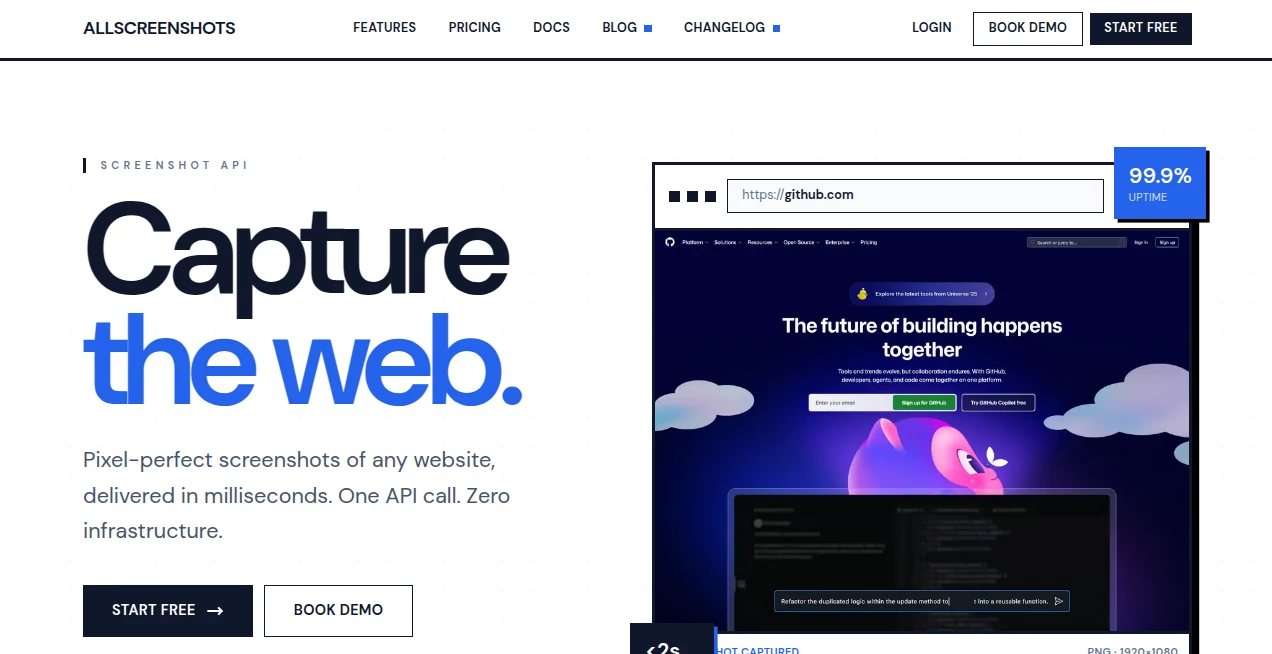
What is Allscreenshots?
Anyone who’s ever tried to screenshot a full webpage knows the pain: awkward scrolling, cut-off elements, mismatched lighting across sections, or spending ten minutes stitching pieces together in Photoshop. This tool ends that frustration in the most elegant way possible. Paste any URL, hit go, and seconds later you have a crisp, full-length capture that looks like a pro designer framed it—perfect shadows, consistent colors, no scroll artifacts. I’ve used it for client mockup reviews, social proof graphics, competitor analysis decks, and even personal portfolio pieces. Every time, the result is cleaner and faster than anything I could do manually.
Introduction
Screenshots are everywhere—sales decks, blog posts, bug reports, tutorials, landing page archives—but most people settle for messy captures because the alternatives are clunky or expensive. This platform quietly solves that. It’s not just a screenshot tool; it’s a polished presentation generator that turns any live webpage into a beautiful, shareable image in one click. No extensions, no desktop apps, no fiddling with browser dev tools. The output is so clean that marketers, designers, and founders use it daily to make their work look instantly professional. It’s one of those rare tools where the first use makes you wonder how you ever lived without it.
Key Features
User Interface
The experience is beautifully minimal. One input field for the URL, a few optional toggles (device frame, width, dark mode, full page vs viewport), and a prominent “Capture” button. No login required to start, no account nagging. Results appear instantly with a side-by-side preview (original page vs screenshot), and download options are right there—no hunting through menus. It feels like the tool was designed by someone who hates wasting time as much as you do.
Accuracy & Performance
It captures the entire page exactly as rendered—pixel-perfect, including dynamic elements, custom fonts, and responsive layouts. No missing sections, no scroll seams, no color shifts. Processing is near-instant for most sites (under 5 seconds), even long ones. The image quality is sharp at 2× or 4× retina, and file sizes stay reasonable thanks to smart compression. In practice, it handles complex sites (e-commerce, dashboards, portfolios) flawlessly where browser extensions often choke.
Capabilities
Full-page captures (no matter how long), device frames (iPhone, MacBook, iPad, custom), custom viewport widths, dark/light mode forcing, retina/4× quality, PNG or JPEG export, direct download or copy-to-clipboard. It renders JavaScript-heavy pages correctly (animations wait to finish, lazy-loaded content appears), and it supports password-protected or locally hosted pages via simple authentication fields. The output is presentation-ready—ideal for reports, pitches, documentation, or social sharing.
Security & Privacy
No account is required for core use, so your URLs and captures aren’t tied to a personal profile. All processing happens server-side and images are not stored after download. For private dashboards or staging sites, you can add basic auth credentials directly in the form—they’re never logged or saved. That combination of zero-friction access and strong privacy makes it trustworthy for both personal and client work.
Use Cases
A marketer grabs clean full-page shots of competitor landing pages for strategy decks—looks professional without hours of stitching. A product designer captures their own app in multiple device frames for portfolio polish. A support engineer screenshots tricky bug states (long scroll pages with error messages) and shares them instantly with devs. A blogger archives beautiful versions of articles before redesigns. An agency uses it for client approval rounds—crisp, framed captures make feedback clearer and faster. Wherever visual proof or presentation matters, it quietly elevates the result.
Pros and Cons
Pros:
- Instant full-page captures—no scrolling, no stitching, no artifacts.
- Beautiful device frames and retina quality make outputs look premium.
- Handles JS-heavy, responsive, and dynamic sites reliably.
- Zero setup, no extension, works from any browser.
- Generous free tier lets you test thoroughly before upgrading.
Cons:
- Very long/infinite-scroll pages may need viewport limiting.
- Advanced features (batch, custom headers, team sharing) require paid plan.
- Extremely complex authenticated dashboards can occasionally need manual tweaks.
Pricing Plans
Free tier gives a solid number of captures per day—plenty for occasional use or testing. Paid plans unlock unlimited captures, batch processing, priority queue during peak times, custom headers/auth for private pages, and team sharing features. Pricing is modest—many users say one month saves more time than a single outsourced design task. It’s built for real workflows, not just hobbyists.
How to Use AllScreenshots
Paste the URL of the page you want to capture. Choose device frame (or none), set viewport width if needed, toggle dark mode or full-page vs visible area. Click “Capture.” Wait a few seconds, preview the result, adjust if necessary, then download PNG/JPEG or copy to clipboard. For private pages, add basic auth credentials in the optional fields. Done—professional-looking screenshot in under 30 seconds.
Comparison with Similar Tools
Browser extensions often cut off content or add UI junk. Desktop apps require installation and can be slow on long pages. Online tools frequently watermark free outputs or compress too aggressively. This one delivers clean, full-length, high-quality captures with zero friction and no forced branding on paid use. Speed, polish, and reliability make it the clear choice when presentation actually matters.
Conclusion
In a world where first impressions happen in milliseconds, a clean, professional screenshot can tip the scale. This tool turns what used to be a tedious chore into a one-click delight. Whether you’re pitching, documenting, analyzing, or just archiving beautiful web moments, it gives you results that look expensive without costing much time or money. Sometimes the smallest workflow upgrade makes the biggest visual difference—and this is one of those upgrades worth having in your back pocket.
Frequently Asked Questions (FAQ)
How long can the captured page be?
Practically unlimited—handles very long pages (thousands of pixels) without issue.
Do I need an account to use it?
No—free captures work anonymously; account optional for saved history/batch.
Can it capture password-protected pages?
Yes—enter basic auth credentials directly in the form; works for staging sites.
What file formats are supported?
PNG and JPEG exports at retina quality.
Is there a watermark on free screenshots?
Very subtle on free tier; completely removed on paid plans.
These classifications represent its core capabilities and areas of application. For related tools, explore the linked categories above.
Allscreenshots details
This tool is no longer available on submitaitools.org; find alternatives on Alternative to Allscreenshots.
Pricing
- Free
Apps
- Web Tools
Categories

Allscreenshots Alternatives Product

NewTools site

ToolPilot AI

AgentHunter

Ai Ranking
aiextension
PopWave

SciSpace
NotebookVault

AIStage
