🧠 AI Quiz
Think you really understand Artificial Intelligence?
Test yourself and see how well you know the world of AI.
Answer AI-related questions, compete with other users, and prove that
you’re among the best when it comes to AI knowledge.
Reach the top of our leaderboard.


















AppWizzy

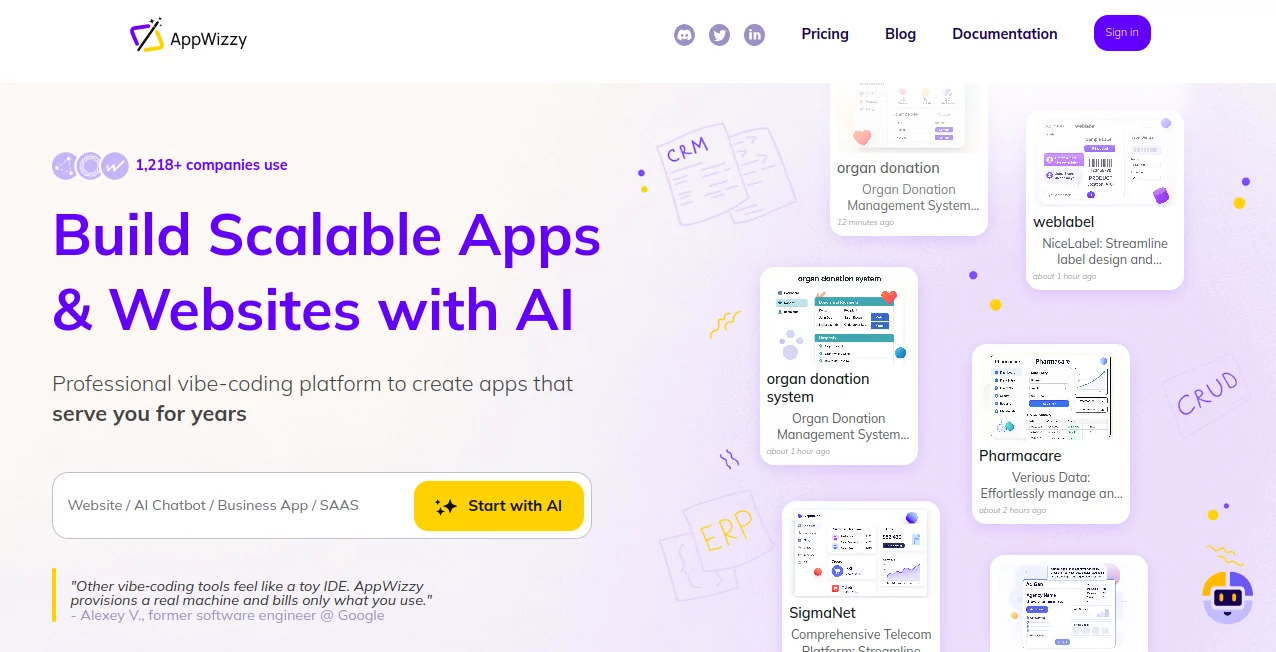
What is AppWizzy?
AppWizzy steps in as a game-changer for anyone dreaming up digital projects, handing over a full-fledged setup in the cloud that turns casual descriptions into robust, ready-to-run applications. This platform feels like having a sharp-minded collaborator who handles the heavy details, from wiring up data flows to launching live without a hitch. Builders who've dived in often share stories of whipping together complex setups in what feels like no time, making it a go-to for those who want results without the usual roadblocks.
Introduction
AppWizzy came together from the shared gripes of creators bogged down by fragmented tools that promised ease but delivered headaches, especially when it came to blending front-end flair with sturdy back-end bones. It rolled out with a fresh angle, giving users a genuine workspace up in the clouds rather than a limited playground, and quickly drew in a crowd of innovators from startups to established outfits. Over the months, feedback from folks like busy CEOs and hands-on developers has shaped it into something that truly accelerates the path from spark to spotlight, with real-world wins like pathology platforms or meeting trackers born from quick sessions. At its heart, it's about making the build process feel collaborative and fluid, so ideas land as polished products without the endless tweaks.
Key Features
User Interface
The dashboard greets you with a welcoming chat window that takes your plain-spoken ideas and runs with them, pulling up previews and options in a layout that's more conversation than control panel. Tabs for templates and edits slide in naturally, with a code-friendly view that mirrors familiar editors, keeping things intuitive even as projects grow. It's the sort of setup that lets you jump between brainstorming and building without losing your place, feeling polished yet approachable from the first glance.
Accuracy & Performance
When you outline a feature, it maps out the structure with a precision that keeps things aligned to your vision, handling intricate links and data paths without stray ends. The whole operation hums along swiftly, provisioning resources on demand and delivering deploys that scale smoothly under load, even for beefier setups. Users point to how it holds steady during iterative rounds, churning out changes that fit seamlessly without the drag of restarts or slowdowns.
Capabilities
It covers the full spectrum, from sketching out schemas for data handling to weaving in connections with outside services, all while supporting a range of setups like dynamic languages or relational stores. You can start from ready-made starters for common needs or go blank slate, then layer on team inputs or version controls to keep everything tracked. The real strength lies in that seamless shift to production, where one nudge sends it live with all the pipes in place.
Security & Privacy
Everything runs on trusted cloud foundations with built-in shields for data in motion, keeping your builds locked down without extra steps on your end. Private spaces and access logs give you oversight, while policies ensure mishaps get rolled back quick, so your work stays safe and sound. It's designed with that baseline trust in mind, letting you focus on crafting rather than constantly checking the locks.
Use Cases
Startup leads prototype customer trackers that pull in real-time insights, testing waters fast before committing resources. Health tech teams assemble workflow aids that manage sensitive streams, streamlining reviews without custom code marathons. Meeting organizers set up shared hubs for notes and follow-ups, turning chaotic calls into organized outcomes. Even climate watchers build forecast interfaces that crunch patterns, proving its reach across fields that demand both speed and solidity.
Pros and Cons
Pros:
- Handles full builds from description to deploy, skipping fragmented steps.
- Cloud resources scale with needs, no local hardware headaches.
- Template library jump-starts common projects without starting cold.
- Team features keep collaborations clean and traceable.
Cons:
- Credit system might surprise light users with quick tallies.
- Best for those comfy with basic tech terms, not total newcomers.
- Advanced perks hide behind higher tiers for solo explorers.
Pricing Plans
The entry point lets you tinker with a few public projects at no cost, tossing in a handful of usage points to get the feel without commitment. From there, a mid-range option opens unlimited spaces and steady resources for around twenty a month, with room for small groups and extra buffers. Top-end custom setups cater to bigger crews with ample points and dedicated guidance, while yearly shifts or bundles sweeten the deal for steady hands. It's all about matching your pace, with clear tallies so surprises stay low.
How to Use AppWizzy
Start by sketching your project in the chat, picking a foundation from the selection or going fresh. Watch it outline the bones, then refine through back-and-forth until it clicks, pulling in any needed connections. Flip to edit mode for fine touches, test in the live view, and push the button to go public. Track usage along the way, pausing when idle to keep things lean, and loop in others for shared spins.
Comparison with Similar Tools
Unlike lighter setups that stick to surface layers, AppWizzy dives deep with full environments, though those might suit super-simple sketches better. Against traditional stacks, it cuts the setup slog with smart assists, but could trail for those craving total manual reins. It stands out for balanced builders who want power without the puzzle, blending ease with enough depth to handle real runs.
Conclusion
AppWizzy wraps the whirlwind of web and app crafting into something approachable yet capable, turning bold notions into breathing realities with a nudge. It empowers the doers to focus on what matters—the unique twist that sets their work apart—while handling the groundwork with quiet competence. As digital demands keep climbing, this platform positions itself as a steady partner, ready to evolve alongside the next wave of innovative builds.
Frequently Asked Questions (FAQ)
What's the starting point for a new project?
Just describe it in everyday words, and it sketches the plan automatically.
Can I work with others on the same build?
Yes, add team members to share edits and keep everything logged.
How do costs add up?
Based on usage points for assists and daily fees for active spaces.
What if an edit goes sideways?
Roll it back quick, with points returned for clear misfires.
Supports my preferred setup?
Covers popular languages and stores, with room to mix.
AI Website Builder , AI No-Code & Low-Code , AI Developer Tools , AI App Builder .
These classifications represent its core capabilities and areas of application. For related tools, explore the linked categories above.
AppWizzy details
This tool is no longer available on submitaitools.org; find alternatives on Alternative to AppWizzy.
Pricing
- Free
Apps
- Web Tools
Categories

AppWizzy Alternatives Product

Wplace Live

DevUtilX

ChatFlowchart

Prelight

Ultralytics

JustCopy.ai

Somnio

Tate-A-Tate

volume shade…