
🧠 AI Quiz
Think you really understand Artificial Intelligence?
Test yourself and see how well you know the world of AI.
Answer AI-related questions, compete with other users, and prove that
you’re among the best when it comes to AI knowledge.
Reach the top of our leaderboard.


















ArchRender

What is ArchRender?
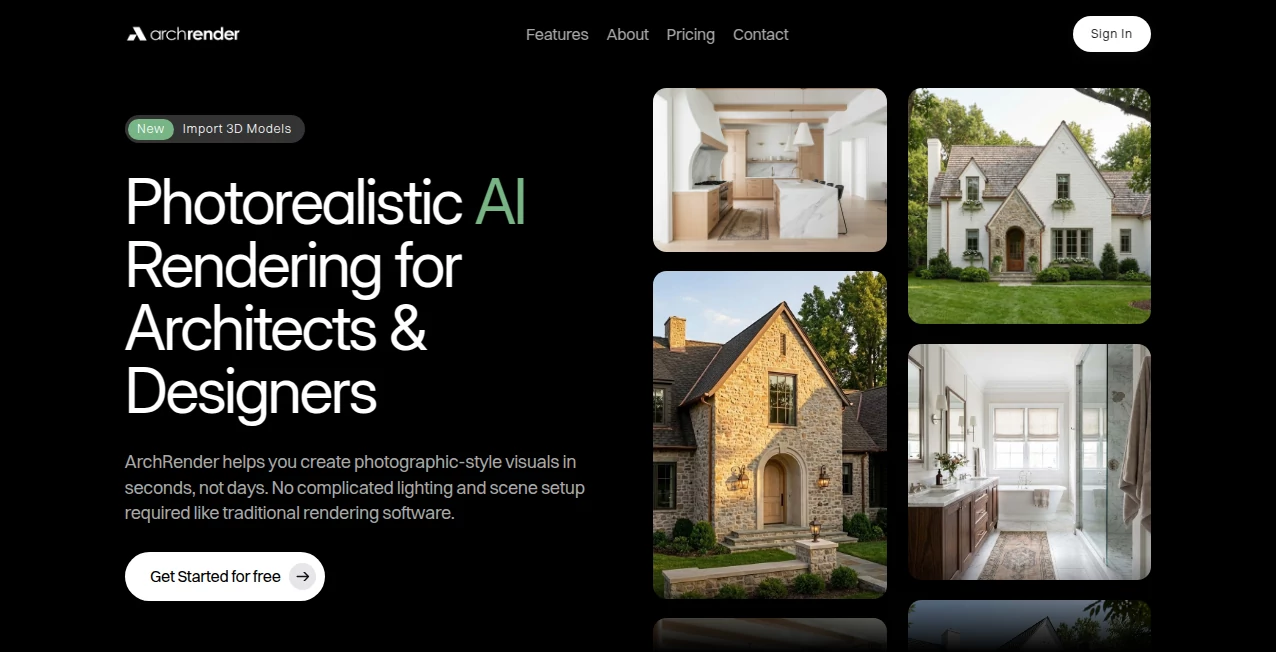
There's a moment every architect or designer knows: you’ve got a solid model, the design is there, but turning it into a beautiful, client-ready render still feels like a separate full-day job. This tool changes that equation. Upload your 3D model or floor plan, pick a style, and in under a minute you’re looking at something that looks like it came from a high-end visualization studio—soft natural lighting, realistic materials, atmospheric depth, all without touching a render engine. I’ve seen junior designers use it to impress clients in the morning and senior architects quietly rely on it to test lighting ideas before committing hours to V-Ray or Corona. The speed is addictive, but the quality is what keeps people coming back.
Introduction
Architectural visualization has always been a bottleneck: powerful but slow, expensive, and skill-heavy. This platform removes most of that friction. It takes your SketchUp, Revit, Rhino, Blender, or even hand-drawn floor plans and generates polished, photorealistic (or stylized) renders almost instantly. No need to set up lights, materials, cameras, or wait for denoising passes. It understands architectural language—windows, facades, interiors, landscaping—and applies thoughtful lighting and composition choices automatically. For studios racing deadlines, solo architects pitching ideas, or students building portfolios, it’s become the shortcut that doesn’t compromise on quality. The results often look like someone spent half a day tweaking, when really it was 30 seconds of waiting.
Key Features
User Interface
The workspace is intentionally calm. Upload your model or image, choose from a curated set of render styles (modern minimalist, warm Scandinavian, brutalist drama, etc.), adjust a few intuitive sliders (lighting mood, vegetation density, sky type), and hit render. Previews appear quickly so you can compare variations side-by-side. No deep dive into render settings—just enough control to guide the look without drowning you in parameters. It feels like working with a talented visualizer who already knows what looks good.
Accuracy & Performance
It reads architectural geometry intelligently—preserves window placements, respects material intent, understands interior vs exterior. Lighting is natural and balanced: soft indirect bounce, realistic sun angles, no floating shadows. Generations are consistently fast (20–90 seconds depending on complexity and resolution), and outputs are sharp at 2K–4K with no obvious AI artifacts. The model rarely “guesses wrong” on structural elements or proportions, which is rare in image-to-render AI tools.
Capabilities
Converts 3D models, floor plans, elevations, or even hand sketches into photorealistic or stylized renders. Supports interior & exterior scenes, day/night cycles, seasonal variations, material enhancement, vegetation & context addition, and multiple camera angles from one upload. Style presets range from hyper-realistic to concept-art mood. High-resolution outputs are clean and print/web-ready. It handles both clean CAD imports and messy scanned sketches with surprising grace.
Security & Privacy
Uploads are processed temporarily and deleted after download—no long-term storage, no model training on user projects. No mandatory account for basic use, so client-sensitive designs stay private by default. For architects handling competition entries or proprietary developments, that clean workflow is a genuine relief.
Use Cases
A residential architect uploads a quick SketchUp massing and generates client presentation renders before the first meeting—suddenly the design feels tangible. An interior designer tests five mood variations on a living room concept in under ten minutes. A landscape architect adds seasonal context to a site plan to show clients spring vs winter views. A student builds a portfolio of polished renders from rough models, saving weeks of render-farm time. Wherever speed and presentation quality matter, it quietly becomes indispensable.
Pros and Cons
Pros:
- Generation speed that lets you iterate lighting and style in real time.
- Results look like high-end viz-studio work, not typical AI output.
- Handles both clean 3D models and messy sketches/scans reliably.
- Thoughtful style presets that actually suit architectural aesthetics.
- Free tier generous enough to test on real projects.
Cons:
- Maximum resolution and batch processing live behind paid plans.
- Very complex or poorly lit source models may need light prep for best results.
- Some ultra-specific material looks still require manual post-work.
Pricing Plans
Free tier offers several high-quality renders per day—enough for testing, small projects, or occasional use. Paid plans unlock higher resolutions, unlimited generations, batch mode, priority queue, and commercial rights without attribution. Pricing stays reasonable for the time and quality it saves—many studios say it replaces the cost of a junior renderer after just a few months.
How to Use ArchRender
Export your model or sketch as image (or upload directly if supported format). Drag into the upload area. Choose a style preset that matches your project mood (modern, warm, dramatic, etc.). Adjust lighting mood, vegetation, sky if desired. Hit generate—preview appears in seconds. Compare variations, tweak sliders, download the winner in high resolution. For larger projects, paid users can batch multiple angles or variations at once. That’s it—professional render in under two minutes.
Comparison with Similar Tools
Traditional render engines require hours of setup and waiting. Other AI renderers often produce inconsistent lighting or over-stylized results. This one combines speed, architectural understanding, and visual taste in a way that feels purpose-built for the industry. It sits between full manual control and fully automatic chaos—giving enough guidance to produce usable, beautiful results without forcing you to become a render technician.
Conclusion
Architecture is about ideas, not render times. This tool frees you to spend more time designing and less time waiting for the machine to catch up. It turns “I’ll render that later” into “here’s how it looks right now.” When your client sees a beautiful visualization minutes after you sketch an idea, the conversation changes—from doubt to excitement. For architects, designers, and students who want to show, not just tell, that shift is priceless.
Frequently Asked Questions (FAQ)
How fast are renders?
Most finish in 20–90 seconds depending on complexity and resolution.
What file formats can I upload?
Common image formats (PNG, JPG) work best; 3D model screenshots or exports are ideal.
Can I use the renders commercially?
Yes—paid plans grant full commercial rights; free tier allows personal and portfolio use.
Do I need a 3D model?
No—hand-drawn sketches, floor plans, and even photos of physical models work well.
What if the result isn’t quite right?
Tweak style, lighting mood, or reference strength and regenerate—usually one or two tries nail it.
AI 3D Model Generator , Photo & Image Editor , AI Design Generator , AI Image to Image .
These classifications represent its core capabilities and areas of application. For related tools, explore the linked categories above.
ArchRender details
This tool is no longer available on submitaitools.org; find alternatives on Alternative to ArchRender.
Pricing
- Free
Apps
- Web Tools
Categories

ArchRender Alternatives Product

PostPlus AI

qwen image 2…

Gpt Image 1.5

Image to STL

Roblox Man F…

SeeDream 4.5

Ultra Face S…

Image Text E…

GPT Image 1.5
