
🧠 AI Quiz
Think you really understand Artificial Intelligence?
Test yourself and see how well you know the world of AI.
Answer AI-related questions, compete with other users, and prove that
you’re among the best when it comes to AI knowledge.
Reach the top of our leaderboard.

















Banana AI
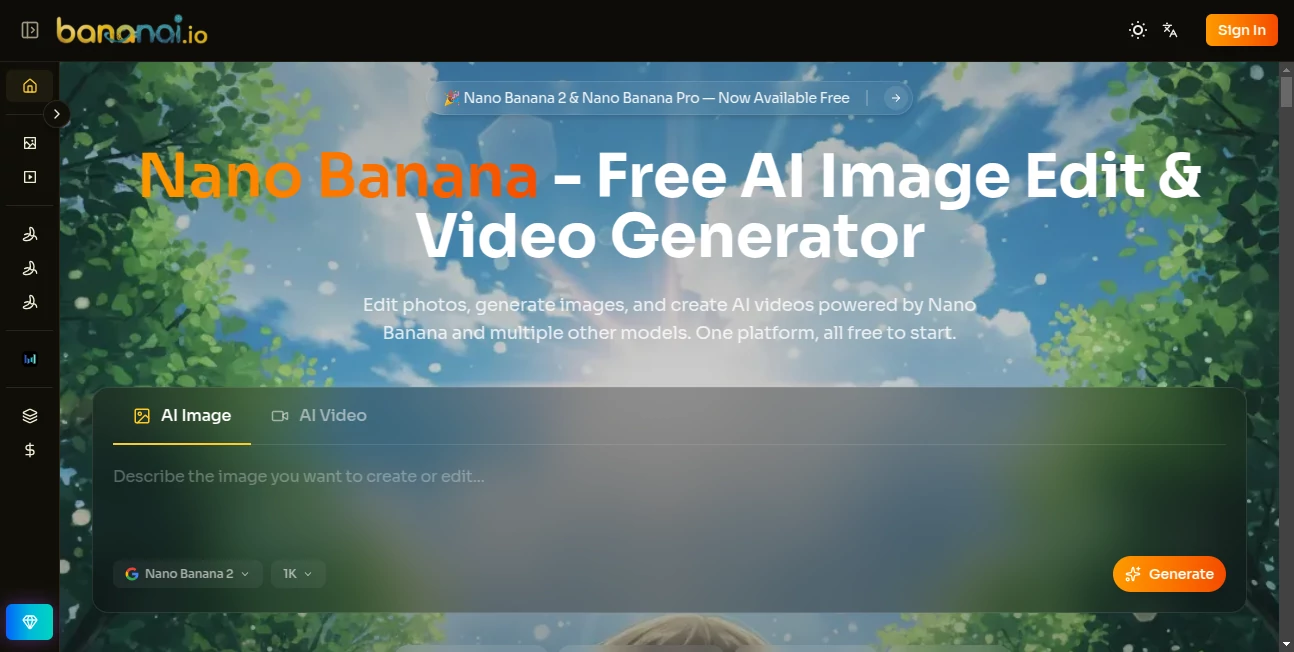
What is Banana AI?
Some days you just want to take an ordinary photo and turn it into something special—maybe change the background, swap the style, or bring it to life as a short video—without spending hours in complicated software. This platform makes that feel effortless. Upload an image, type what you want, and watch it transform in seconds. I’ve used it to turn a plain product shot into a lifestyle scene that actually sold better, and to create fun little videos from still photos that made my friends laugh. It’s the kind of tool that quietly removes the friction between your idea and the final result, letting you focus on being creative instead of fighting the tech.
Introduction
In a world full of AI image tools, it’s rare to find one that feels both powerful and genuinely approachable. Banana AI brings together strong image editing, text-to-image generation, and video creation in one clean space. Powered by advanced models including Nano Banana variants, it lets you edit existing photos with simple text instructions, generate new images from scratch, or turn stills into short videos. The best part? It’s designed for real people with real projects—not just tech enthusiasts. Whether you’re a small business owner refreshing product visuals, a content creator needing quick assets, or someone who just wants to play with creative ideas, it delivers fast, high-quality results without a steep learning curve.
Key Features
User Interface
The workspace is clean and inviting. A big upload area for your images, a clear prompt box where you describe changes or new ideas, and well-organized options for different modes (edit, generate, video). Previews appear quickly so you can iterate without frustration. Everything feels intuitive—like having a helpful creative friend who understands exactly what you mean when you say “make the background a sunset beach” or “turn this into a cartoon version.”
Accuracy & Performance
It excels at understanding context. Tell it to remove an object, change clothing, or shift the lighting, and it usually gets the details right while keeping the rest of the image natural. Generations are fast, often just a few seconds, and the quality holds up even on complex requests. Faces stay consistent, proportions make sense, and the results rarely look overly artificial. In practice, the first or second try is usually good enough to use, which saves a lot of time compared to tools that require endless prompting.
Capabilities
You can edit photos with text instructions (remove, add, restyle, change backgrounds), generate completely new images from prompts, and create short AI videos from images or text. It supports multiple styles, aspect ratios, and fine control over details like lighting, mood, and composition. The combination of strong editing and video features in one place makes it versatile for marketing visuals, social content, product mockups, and creative experiments.
Security & Privacy
Your uploads are processed securely and not used for training unless you explicitly allow it. The platform keeps things straightforward—no unnecessary data collection. For personal photos or client work, that respectful approach builds confidence that your images stay yours.
Use Cases
A small online shop owner uploads product photos and turns them into lifestyle scenes that better show how items fit into real life, boosting sales. A social media creator generates consistent character videos for Reels without filming every day. A designer quickly restyles mockups to show different color options to clients. Parents create custom bedtime story illustrations or short animated clips for their kids. The tool fits anywhere visual content needs to be better, faster, or more engaging.
Pros and Cons
Pros:
- Combines powerful editing, generation, and video in one easy platform.
- Fast results that often need very little tweaking.
- Natural-looking outputs that respect the original image when editing.
- Free to start with good capabilities for casual and light professional use.
Cons:
- Video length and advanced features may require paid plans for heavy users.
- Very complex or highly specific scenes can still benefit from clearer prompts.
Pricing Plans
It starts free with solid daily limits that let you test and create meaningfully without paying. Paid plans unlock higher limits, faster processing, more video capabilities, and priority access during busy times. The pricing feels fair for the creative freedom and time it saves—many users find the upgrade worthwhile once they start using it regularly for work or projects.
How to Use Banana AI
Upload your starting image (or start from a text prompt if generating new). Write a clear description of what you want—“change the background to a mountain lake at sunset” or “turn this photo into a Pixar-style animation.” Choose any style options or video mode if needed. Hit generate, review the preview, and download when it looks right. For video, add motion instructions or let the tool suggest natural movement. The process is quick enough that you can experiment with several variations in one session.
Comparison with Similar Tools
Many AI editors are either too basic or overly complicated with too many sliders and settings. This one keeps things simple while delivering strong results across editing, generation, and video. Where some tools struggle with consistency or natural looks, Banana AI maintains coherence and realism better in most cases. It’s especially nice for users who want one reliable place instead of juggling multiple specialized tools.
Conclusion
Visual content moves fast these days, and having the right tools can make the difference between good ideas that stay stuck and great ideas that actually get seen. Banana AI makes creating and improving visuals feel approachable and fun again. It respects your time, delivers quality that impresses, and keeps getting better. If you’ve ever wished you could transform photos or bring ideas to life faster, this is one of those tools worth trying—you’ll likely find yourself coming back to it often.
Frequently Asked Questions (FAQ)
How good is the free version?
Very usable for most personal and light professional needs—many people get great results without upgrading right away.
Can I edit real product photos for my store?
Yes—users commonly use it to improve backgrounds, lighting, and overall appeal of product images.
Does it work well for video creation?
It does—especially turning still images into short, smooth clips with natural motion.
Are my uploaded images private?
Yes—the platform processes them securely without unnecessary storage or sharing.
What if the first result isn’t perfect?
Just refine your prompt or generate variations—small changes often lead to much better outputs.
AI Photo & Image Generator , AI Image to Video , Photo & Image Editor , AI Image to Image .
These classifications represent its core capabilities and areas of application. For related tools, explore the linked categories above.
Banana AI details
Pricing
- Free
Apps
- Web Tools
Categories

Banana AI Alternatives Product

AI Polaroid …
AniFlow AI
Seedance 3.0

ChromaPeel
AudioVideoGe…
Free AI Kiss…
Unblur Image

Edit Stamp
Nano Banana …
