🧠 AI Quiz
Think you really understand Artificial Intelligence?
Test yourself and see how well you know the world of AI.
Answer AI-related questions, compete with other users, and prove that
you’re among the best when it comes to AI knowledge.
Reach the top of our leaderboard.


















Banana Prompts AI
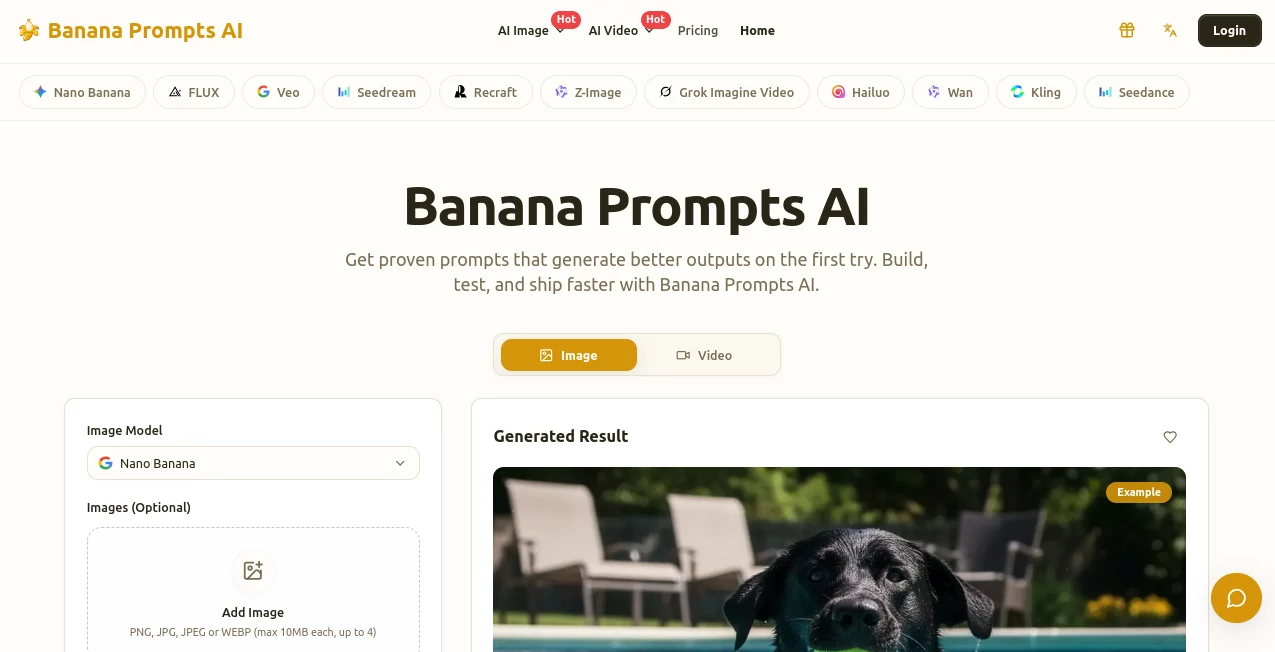
What is Banana Prompts AI?
Sometimes the difference between a mediocre AI image and one that stops you scrolling is just a few well-chosen words in the prompt. Banana Prompts makes finding or building those magic words feel effortless. It’s a lively gallery where artists share prompts that actually work, complete with the resulting images so you can see exactly what each one produces. I’ve spent evenings browsing it like a cookbook, copying a prompt here, tweaking one there, and suddenly getting outputs that feel intentional instead of random. For anyone who’s ever stared at a blank prompt box wondering why the AI isn’t delivering, this feels like finally having a cheat sheet written by people who’ve already done the trial and error.
Introduction
Good prompts are the secret sauce behind great AI visuals, but discovering what actually works can take forever. Banana Prompts solves that by turning prompt crafting into a shared, visual experience. It’s part library, part studio—browse thousands of tested prompts for image and video generation, see the exact results they produce, and copy them with one click. Whether you’re new to AI art or a seasoned creator, it saves hours of guessing and helps you understand why certain wording leads to better lighting, composition, or style. The community aspect is genuine: artists share not just the prompt but the thinking behind it, making the whole process feel collaborative rather than solitary.
Key Features
User Interface
The site feels welcoming and focused. A clean grid of example images invites you to browse by style, subject, or trending prompts. Click any card and you instantly see the full prompt text alongside the generated result. One-click copy buttons make it stupidly easy to grab what you like. There’s also a studio-like section where you can test and refine prompts on the fly. No cluttered sidebars or confusing navigation—just beautiful visuals and useful information presented exactly when you need it.
Accuracy & Performance
The prompts here are battle-tested. Because you can see the actual output next to each prompt, you know what to expect instead of hoping for the best. They cover a wide range of models and consistently deliver stronger results than generic prompting—better detail, more accurate text rendering, improved composition, and fewer weird artifacts. Loading is fast, searching is intuitive, and the quality of shared prompts is high thanks to community curation and examples.
Capabilities
You can browse prompts for still images and video, filter by style (cinematic, photoreal, illustration, etc.), search by keyword, and even contribute your own successful prompts. The platform helps you understand prompt structure through real examples, making it easier to combine techniques or create your own variations. It works as both an inspiration gallery and a practical toolbox—perfect for quick wins or deeper learning about what makes AI visuals pop.
Security & Privacy
Your activity stays private while browsing, and sharing prompts is optional and controlled by you. No forced accounts for basic exploration, and the focus remains on creative sharing rather than data collection. It’s a refreshing approach in a space that often feels overly nosy.
Use Cases
A marketer looking for eye-catching product visuals copies a proven prompt, tweaks the product description, and gets social-ready images in minutes. An illustrator uses the gallery to explore new styles and quickly adapt them to their own work. A video creator finds effective text-to-video prompts and adapts them for short Reels or ads. Beginners use it as a learning resource, gradually building their own prompt skills by studying what works. It fits anyone who wants better AI outputs without spending hours experimenting blindly.
Pros and Cons
Pros:
- Real before-and-after examples show exactly what each prompt delivers.
- One-click copying saves time and reduces frustration.
- Strong community sharing keeps the library fresh and diverse.
- Helps you actually understand prompting instead of just copying blindly.
- Works beautifully for both quick inspiration and serious creative work.
Cons:
- Best results still depend on the underlying AI model you use.
- Some advanced or niche styles have fewer examples.
- Free access has limits; heavier daily use benefits from paid plans.
Pricing Plans
The free tier gives generous access to browsing and copying prompts—enough for most casual or occasional users. Paid plans unlock unlimited access, priority features, the ability to save personal prompt collections, and sometimes early access to new content. Pricing stays reasonable for the time and creative boost it provides, especially for creators who rely on strong visuals regularly.
How to Use Banana Prompts
Browse the gallery by scrolling or using filters until something catches your eye. Click a card to see the full prompt and the generated image. Copy the prompt with one click, paste it into your favorite AI image or video tool, and generate. Tweak a few words to make it your own, or combine elements from different prompts for something unique. Over time, you’ll start recognizing patterns and writing stronger prompts yourself. It’s simple enough for beginners yet deep enough to grow with you.
Comparison with Similar Tools
Many prompt libraries feel like random collections with little context. Banana Prompts stands out because every entry shows the actual result, making it far more practical and educational. While some tools focus only on one model or style, this one covers a broad range and emphasizes real-world usability. The combination of visual examples, easy copying, and community insight gives it an edge over generic prompt collections or basic generators.
Conclusion
Great AI art starts with great prompts, but finding them shouldn’t feel like guesswork. Banana Prompts turns that search into an enjoyable, productive experience—part inspiration gallery, part practical toolbox, and part creative community. It saves time, reduces frustration, and helps you create visuals you’re actually proud to share. Whether you’re a casual creator looking for quick wins or a serious artist refining your craft, it’s one of those tools that quietly makes everything better. If you’ve ever wished prompting was less trial and more reliable craft, this is where that wish comes true.
Frequently Asked Questions (FAQ)
Do I need an account to browse prompts?
No—you can explore and copy freely without signing up.
Are the prompts model-specific?
Many work across popular image and video models, though some are optimized for specific ones like Nano Banana.
Can I contribute my own prompts?
Yes—the community aspect encourages sharing successful prompts with examples.
How often is the gallery updated?
New prompts and trending examples are added regularly by the community and curators.
Is there a limit on free use?
Free access is generous for browsing and copying; paid plans remove any restrictions for heavy users.
AI Creative Writing , AI Content Generator , AI Art Generator , AI Design Generator .
These classifications represent its core capabilities and areas of application. For related tools, explore the linked categories above.
Banana Prompts AI details
Pricing
- Free
Apps
- Web Tools
Categories

Banana Prompts AI Alternatives Product

Seedream 5.0

Berrioo

ReportMaker.…

ChatGPT Imag…

QR Menu Gene…

AI Best

GenPPT AI

Mage

square face …