🧠 AI Quiz
Think you really understand Artificial Intelligence?
Test yourself and see how well you know the world of AI.
Answer AI-related questions, compete with other users, and prove that
you’re among the best when it comes to AI knowledge.
Reach the top of our leaderboard.

















BeautyPlus

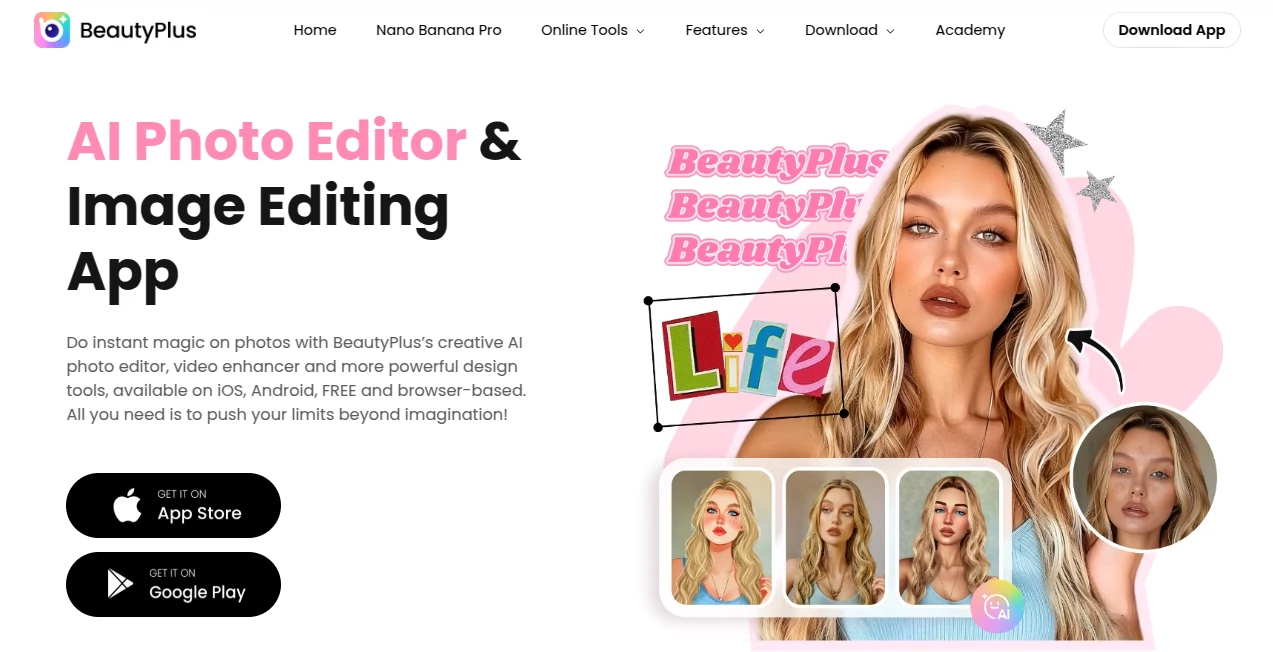
What is BeautyPlus?
Ever snapped a photo that almost felt perfect, only to wish you could smooth things out or add that extra glow without it looking fake? This little gem makes that wish come true in the most natural way, turning everyday selfies and shots into something you're proud to share. I've been using it for months now—quick touch-ups on vacation pics, subtle enhancements for work headshots—and every time, the results feel like "me, but better," not some overdone filter job. It's the kind of app that quietly becomes a daily habit because it just gets what you want.
Introduction
BeautyPlus has quietly built a loyal following by focusing on what really matters: making you look your best while keeping edits believable and easy. With over 800 million downloads, it's more than just another editor—it's a go-to for anyone who wants polished portraits without spending hours fiddling. What draws people in is the AI that works behind the scenes, recognizing faces and applying adjustments that enhance natural beauty rather than mask it. A friend of mine, who hates heavy makeup but loves looking fresh in photos, swears by it for her Instagram stories; she says it saves her time and confidence every single day. It's that rare tool that feels personal, like it's designed with real people in mind.
Key Features
User Interface
The app opens straight into a welcoming camera view, but the real joy is in the editing screen—clean, intuitive, with tools that slide into place without overwhelming you. Sliders for skin smoothness or eye brightness appear right where you need them, and the preview updates instantly so you see changes as you go. It's thoughtful design that lets you focus on the photo, not the buttons; even beginners feel like pros after a few swipes.
Accuracy & Performance
The AI here is impressively smart—it detects facial features with precision, applying retouches that blend seamlessly rather than looking plastered on. Skin looks even without going plastic, eyes brighten naturally, and body adjustments maintain proportions that feel right. Performance is snappy too; even on older phones, edits happen fast, and batch processing for multiple shots saves time when you're in a hurry.
Capabilities
From subtle face tuning—smoothing skin, whitening teeth, reshaping features—to creative flair like cartoon filters, anime styles, and background removal, it covers a wide range without sacrificing quality. Body reshaping tools offer gentle, realistic tweaks, while makeup options let you experiment with looks that suit your vibe. Add stickers, collages, or even video enhancements, and you've got a versatile kit that grows with your needs.
Security & Privacy
Photos stay private on your device by default, with cloud features only kicking in if you choose to save or share. The app follows strict guidelines, and premium users get extra assurance with no data sharing. It's reassuring knowing your personal shots aren't being harvested—peace of mind that lets you edit freely.
Use Cases
Daily selfie lovers use it for quick glow-ups before posting—smooth skin and bright eyes in seconds. Content creators batch-edit product shots, removing distractions or changing backgrounds to match themes. Travelers enhance trip photos, restoring old memories or adding artistic filters for standout social posts. Even professionals rely on it for headshots that look polished yet authentic, saving time on retouching sessions.
Pros and Cons
Pros:
- Natural-looking results that enhance without overdoing it.
- Intuitive tools that make editing feel effortless and fun.
- Free core features with plenty of creative options to play with.
- Fast performance that doesn't slow down your phone.
Cons:
- Some advanced filters and tools sit behind premium, which can feel limiting at first.
- Occasional ads in the free version, though they're not too intrusive.
Pricing Plans
The core app is free to download and use, with a generous set of tools available right away. Premium unlocks over 20 extra features like exclusive filters, ad-free editing, and advanced AI effects—monthly or yearly subscriptions that fit different budgets. A trial often lets you test the upgrade risk-free, and many users say the premium perks quickly pay off in time and creativity saved.
How to Use BeautyPlus
Open the app and snap a selfie or import a photo from your gallery. Swipe through the editing tools—start with auto-beautify for a quick boost, then fine-tune skin, eyes, or makeup as needed. Experiment with filters or background changes, previewing everything live. Save or share directly to socials when you're happy; it's that simple, and the results look effortlessly good every time.
Comparison with Similar Tools
Unlike heavier editors that demand hours of tweaking, this one focuses on natural, fast results with AI that feels tuned for real faces. Other apps might offer more niche filters, but they often leave edits looking artificial—here, subtlety wins. It's lighter on resources too, running smoothly where others lag, making it the go-to for anyone who wants beauty without the battle.
Conclusion
BeautyPlus quietly stands out by making photo editing feel personal and powerful without the fuss. It celebrates natural beauty while giving you creative freedom, turning ordinary moments into ones worth sharing. If you've ever wanted photos that reflect the best version of you—effortlessly—this is the tool that delivers, time after time.
Frequently Asked Questions (FAQ)
Is the app completely free?
Yes for core editing, with premium options unlocking extras like advanced filters and no ads.
Does it work on videos too?
Absolutely—video enhancement and retouch tools let you polish clips just as easily.
Can I remove backgrounds?
One of the standout features: AI removes objects or backgrounds cleanly in seconds.
How natural do the edits look?
Very—the AI is designed for subtle, realistic enhancements that don't scream "edited."
Is it safe for my photos?
Photos process locally by default, with strong privacy controls throughout.
AI Photo & Image Generator , Photo & Image Editor , AI Graphic Design , AI Image to Image .
These classifications represent its core capabilities and areas of application. For related tools, explore the linked categories above.
BeautyPlus details
This tool is no longer available on submitaitools.org; find alternatives on Alternative to BeautyPlus.
Pricing
- Free
Apps
- Web Tools
- iOS Apps
- Android Apps
Categories

BeautyPlus Alternatives Product

Nano Banana …

Square Image

MakeMyOC

RGB to CMYK …
Nano Figure

Tryonr
chibi art
GPT Image 1.5

AI Hairstyle