
🧠 AI Quiz
Think you really understand Artificial Intelligence?
Test yourself and see how well you know the world of AI.
Answer AI-related questions, compete with other users, and prove that
you’re among the best when it comes to AI knowledge.
Reach the top of our leaderboard.


















CodeFlying
Build Apps Through Casual Conversations

What is CodeFlying?
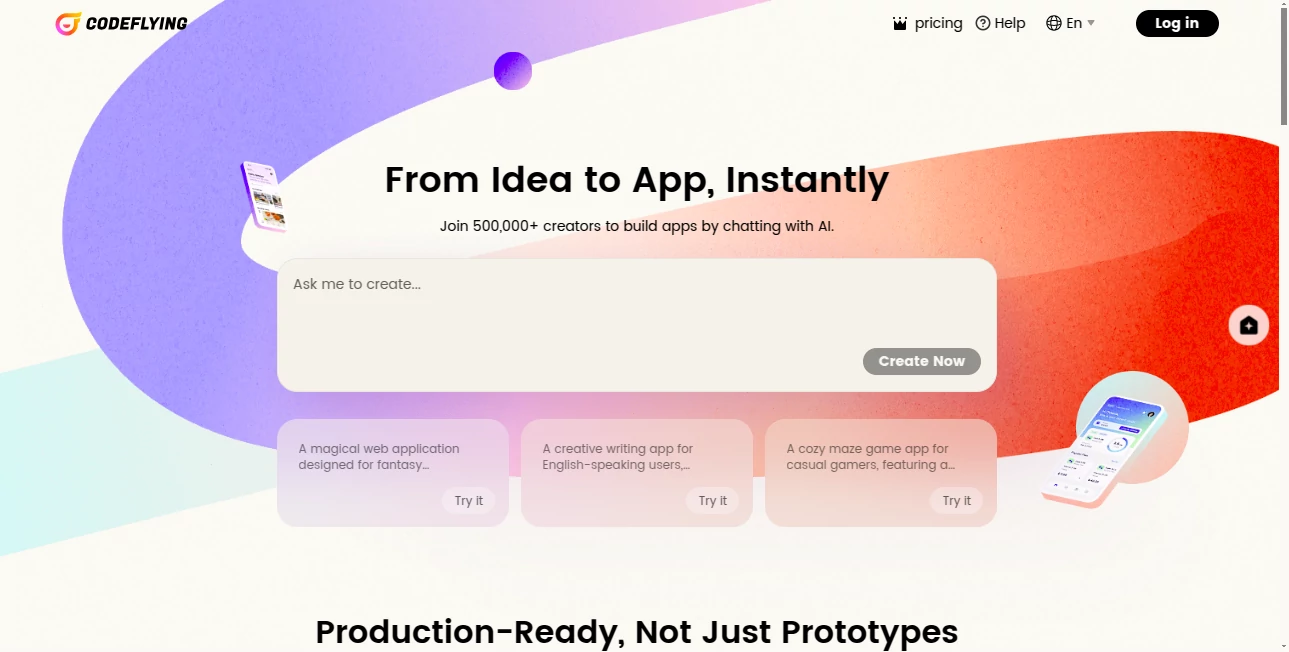
CodeFlying opens the door to app creation for those who prefer talking over typing lines of code, letting you describe your project in plain words and watching it take shape step by step. This approach feels like brainstorming with a sharp-minded partner who handles the technical bits, turning loose ideas into functional setups without the usual barriers. Many who've dipped in share how it freed them from endless tutorials, sparking projects that might have stayed as sketches on a napkin.
Introduction
CodeFlying came together from a desire to make building digital tools less about memorizing syntax and more about sharing visions clearly, started by a group who'd grown weary of the disconnect between what they dreamed and what they could deliver. It rolled out quietly at first, gaining steam through word from indie makers who turned weekend whims into working demos overnight. What draws people in is that sense of partnership—it listens, asks back, and builds alongside, evolving from simple prototypes to polished pieces as your thoughts sharpen. Over time, it's become a spot where beginners brush up against real results, proving that a good chat can carry you further than a stack of manuals.
Key Features
User Interface
The screen greets you with a familiar chat window, much like messaging a friend, where you jot your app outline and see replies that nudge for details or confirm steps. A side panel previews the growing structure, with tabs for code views or test runs that pop open without cluttering the flow. It's designed to keep your eyes on the conversation, with subtle highlights for choices like layouts or links, making the whole exchange feel natural even if you're new to the backend dance.
Accuracy & Performance
It tunes into your descriptions with a keen ear, piecing together elements that align closely with what you meant, often nailing the intent on the first pass through careful follow-ups. Responses land promptly, layering additions without noticeable waits, so your momentum builds rather than breaks. Users often point out how it spots inconsistencies early, like mismatched data flows, saving headaches down the line with suggestions that feel spot-on rather than scripted.
Capabilities
From sketching basic trackers to weaving in user logins or pulling outside data, it covers the span of everyday app needs, handling front displays to quiet server tasks in one thread. You can pivot mid-chat to test tweaks or expand scopes, and it supports common setups like mobile views or simple shares. The strength lies in that ongoing dialogue, where each exchange refines the build, turning a vague notion into something ready to roll out.
Security & Privacy
Your project chats stay tucked away in personal threads, with no automatic shares or peeks from others, and options to lock down exports if you're sharing snippets. It processes everything in a contained space, clearing temps after sessions, so sensitive outlines don't linger. That built-in caution gives peace of mind, especially for those testing business ideas, knowing the blueprint remains yours to reveal when ready.
Use Cases
Freelancers outline client dashboards during calls, feeding notes straight in to mock up interfaces that wow at the next meeting. Hobbyists spin personal planners for habits or budgets, iterating as life throws curves. Small teams prototype features for feedback loops, blending inputs from quick group huddles into shared prototypes. Even educators use it to demonstrate app logic in class, walking through builds live to show how ideas unfold into code.
Pros and Cons
Pros:
- Turns talk into tangible builds, skipping the syntax slog.
- Adaptive chats that clarify without confusing.
- Quick previews keep the energy high from start to finish.
- Scales from tiny tests to fuller frameworks seamlessly.
Cons:
- Best with clear starting points; fuzzy goals can loop a bit.
- Advanced custom bits might need a manual nudge later.
- Free layer limits depth for bigger ambitions.
Pricing Plans
A basic free pass lets you explore with limited threads and simple scopes, ideal for dipping toes or one-off trials. Upgrading to core access around twenty dollars monthly unlocks unlimited chats and fuller feature sets, while pro tiers at fifty add team shares and priority speeds. Yearly choices cut the cost a notch, and a trial stretch gives full flavor without the upfront bite, easing the leap.
How to Use CodeFlying
Start a new conversation by outlining your app's main goal, like a note app with reminders, and let it probe for pieces like storage or styles. Respond to its questions to flesh out, watching the preview update with each turn. Run tests right in the chat, tweak based on what shows, and export the final bundle when it feels solid. Bookmark key threads for future forks, building a personal archive of apps that grow with you.
Comparison with Similar Tools
Unlike rigid builders that lock you into templates, CodeFlying's chat flow bends to your words, though those might suit if you crave drag-and-drop certainty. Against full-code generators, it eases entry for non-coders but could lag in raw power for deep dives. It strikes a chord for conversational creators, blending accessibility with enough muscle where others tip too far one way or the other.
Conclusion
CodeFlying captures the joy of making without the maze, proving that a simple exchange can birth something substantial. It empowers the idea-havers to outpace the implementation blues, turning 'someday' sketches into today's tools. As more folks chase custom creations, this chatty companion stands ready, whispering that the next great build might start with just a sentence or two.
Frequently Asked Questions (FAQ)
Do I need tech know-how to get going?
Not at all—just describe what you want, and it guides the rest.
Can I tweak the code it makes?
Yes, exports come open for edits in your favorite spot.
What kinds of apps does it handle?
From trackers to portals, as long as it's web or mobile basics.
How private are my sessions?
Fully yours, with no shares unless you choose to collaborate.
What if the build doesn't quite fit?
Chat on to refine—it's built for back-and-forth fixes.
AI No-Code & Low-Code , AI Code Generator , AI Developer Tools , AI App Builder .
These classifications represent its core capabilities and areas of application. For related tools, explore the linked categories above.
CodeFlying details
This tool is no longer available on submitaitools.org; find alternatives on Alternative to CodeFlying.
Pricing
- Free
Apps
- Web Tools
Categories

CodeFlying Alternatives Product

Klyra AI

CodeProt

Kimi K2.5
axiom.ai

PromptCoder

ace.me

volume shade…

cznull

Lovable
