
🧠 AI Quiz
Think you really understand Artificial Intelligence?
Test yourself and see how well you know the world of AI.
Answer AI-related questions, compete with other users, and prove that
you’re among the best when it comes to AI knowledge.
Reach the top of our leaderboard.

















Color-Analysis-art
What is Color-Analysis-art?
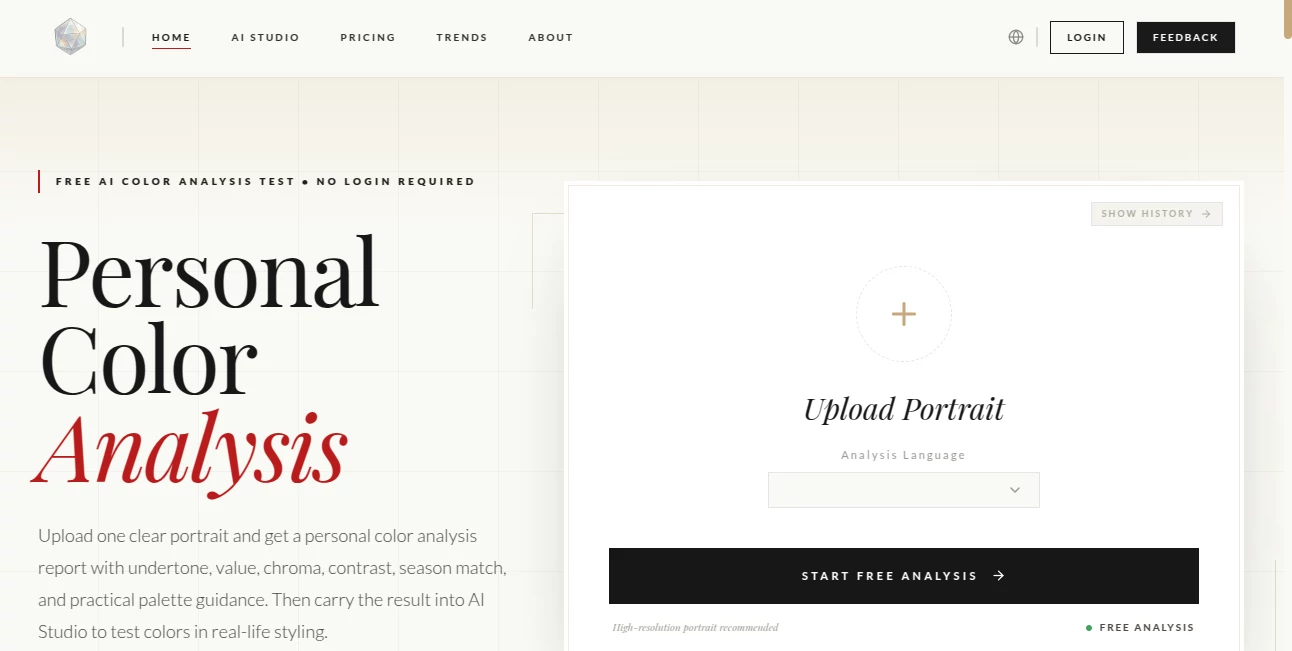
Standing in front of a closet full of clothes and still feeling like nothing looks quite right is a strangely common frustration. This tool takes the guesswork out of that moment. You upload one clear portrait, and it analyzes your natural coloring—undertone, value, chroma, contrast—and returns a thoughtful report that points you toward the colors that actually make you look brighter, healthier, and more like yourself. I’ve watched friends go from “I just wear black because it’s safe” to confidently picking up soft autumn tones or bright spring hues after one analysis. The difference in how they look and feel in those colors is striking, and it all starts with a single photo.
Introduction
Personal color analysis has helped people for decades, but booking a session with a professional can be expensive and time-consuming. This platform brings that same insight online in a simple, accessible way. It looks at the unique signals in your face—warmth or coolness, lightness or depth, intensity and contrast—and translates them into practical advice: which colors will harmonize with you and which ones tend to wash you out. It doesn’t force you into a rigid “season” box; instead, it offers a thoughtful shortlist and clear guidance you can actually use when shopping, choosing makeup, or planning photoshoots. For many, it’s the first time their wardrobe finally starts working with them instead of against them.
Key Features
User Interface
The process is delightfully straightforward. You upload a well-lit portrait, the tool quickly checks photo quality, and then delivers a clean, easy-to-read report. Language options make it welcoming for international users, and the layout focuses on what matters: your results and how to apply them. There’s no clutter, no confusing jargon—just helpful visuals and straightforward explanations that feel like advice from a knowledgeable friend rather than a cold report.
Accuracy & Performance
The analysis pays close attention to real facial signals rather than guessing. Clearer photos yield more stable and nuanced results, but even average shots produce useful insights. It handles different skin tones, hair colors, and contrast levels with care, avoiding the one-size-fits-all pitfalls that plague simpler tools. Users often comment that the recommendations feel spot-on once they test the colors in real life, especially the distinction between “safe” neutrals that actually mute them versus the ones that bring them to life.
Capabilities
It evaluates undertone (warm, cool, or balanced), value (light vs deep), chroma (bright vs soft), and overall contrast. From there, it suggests a season shortlist rather than locking you into one category, lists your most flattering colors, flags colors to approach with caution, and offers styling notes for wardrobe, makeup, and photography. You can then take those results into an optional AI Studio to virtually try colors on different outfits, making the advice even more practical and visual.
Security & Privacy
Your photo is used only for the analysis and isn’t stored long-term unless you choose to save the report. The process respects your data, with no unnecessary collection or sharing. For something as personal as your appearance, that thoughtful approach builds quiet confidence while you explore your colors.
Use Cases
A busy professional finally figures out why certain “safe” office neutrals make her look tired and switches to warmer tones that brighten her presence in meetings. A new mom updates her wardrobe with colors that make her feel put-together even on low-sleep days. Someone preparing for a photoshoot discovers which shades make their features pop instead of getting lost. Even couples use it to understand each other’s coloring better when shopping together. It turns abstract frustration into concrete, joyful decisions.
Pros and Cons
Pros:
- Practical, actionable advice that goes beyond theory into real styling guidance.
- Free core analysis makes it easy to try without commitment.
- Helpful integration with AI Studio for virtual try-ons.
- Clear, non-judgmental explanations that respect individual features.
- Works across many skin tones and natural variations.
Cons:
- Best results come from good lighting and a clear portrait (though it still gives value with average photos).
- Advanced or unlimited use moves to paid options.
- It gives a thoughtful shortlist rather than forcing one single season, which is accurate but may require a bit more exploration.
Pricing Plans
The main personal color analysis report is completely free, giving you meaningful insights without any payment. Optional paid features unlock the AI Studio for more extensive virtual try-ons and additional tools. It’s a generous approach that lets you experience real value first before deciding if you want to go deeper.
How to Use Color Analysis
Take or choose a well-lit portrait (natural light facing the camera works best). Upload it on the site. The tool quickly checks quality and runs the analysis. Review your report: undertone direction, value and contrast clues, season shortlist, best colors, colors to approach carefully, and styling suggestions. Use the insights when shopping or planning outfits. For extra fun, move your results into the AI Studio to see how different colors look on you virtually. The whole journey from upload to insight takes just a few minutes.
Comparison with Similar Tools
Traditional in-person color consultations can be expensive and subjective. Many online quizzes feel overly simplistic or pushy with rigid seasons. This tool offers a balanced middle ground: thoughtful AI analysis with practical, non-dogmatic recommendations and beautiful supporting visuals. The combination of free access and the option to test colors virtually sets it apart from both basic quizzes and costly professional services.
Conclusion
Knowing your colors isn’t about following rigid rules—it’s about feeling more like yourself in what you wear. This tool makes that discovery accessible, enjoyable, and genuinely useful. It turns confusion in front of the mirror into confidence at the store, and it does so with care and clarity. Whether you’re refreshing your wardrobe, updating your look for work, or simply curious about what makes you shine, it’s a small investment of time that pays off in how you see yourself every day.
Frequently Asked Questions (FAQ)
How good does my photo need to be?
Clear, well-lit portraits facing the camera give the best results, but the tool still provides useful insights with everyday photos.
Will it tell me exactly one season?
It gives a thoughtful shortlist rather than forcing a single season, which tends to be more accurate and flexible for real life.
Can I use the results for shopping?
Absolutely—the report includes best colors, avoid colors, and styling notes specifically designed to help with wardrobe and makeup choices.
Is the analysis really free?
Yes, the core personal color analysis report is free with no hidden catches for basic use.
What if I want to try colors on outfits?
The optional AI Studio lets you virtually test recommended colors on different clothing and looks.
AI Design Assistant , Photo & Image Editor , AI Design Generator , AI Image to Image .
These classifications represent its core capabilities and areas of application. For related tools, explore the linked categories above.
Color-Analysis-art details
Pricing
- Free
Apps
- Web Tools
Categories

Color-Analysis-art Alternatives Product
Consistent C…

AI Polaroid …

RGB to CMYK …

SAM 3D

Curved Text …
ds image

Logo Animati…

VIGGLE
![FLUX.2 [max] Image Generator - AI image generator with prompt gallery and production-ready editing workflows.](/media_submitaitools/telegram/flux2max.app-favicon.webp)
FLUX.2 [max]…
