
🧠 AI Quiz
Think you really understand Artificial Intelligence?
Test yourself and see how well you know the world of AI.
Answer AI-related questions, compete with other users, and prove that
you’re among the best when it comes to AI knowledge.
Reach the top of our leaderboard.


















Estimatic AI - Winning Estimates For Contractors

What is Estimatic AI - Winning Estimates For Contractors?
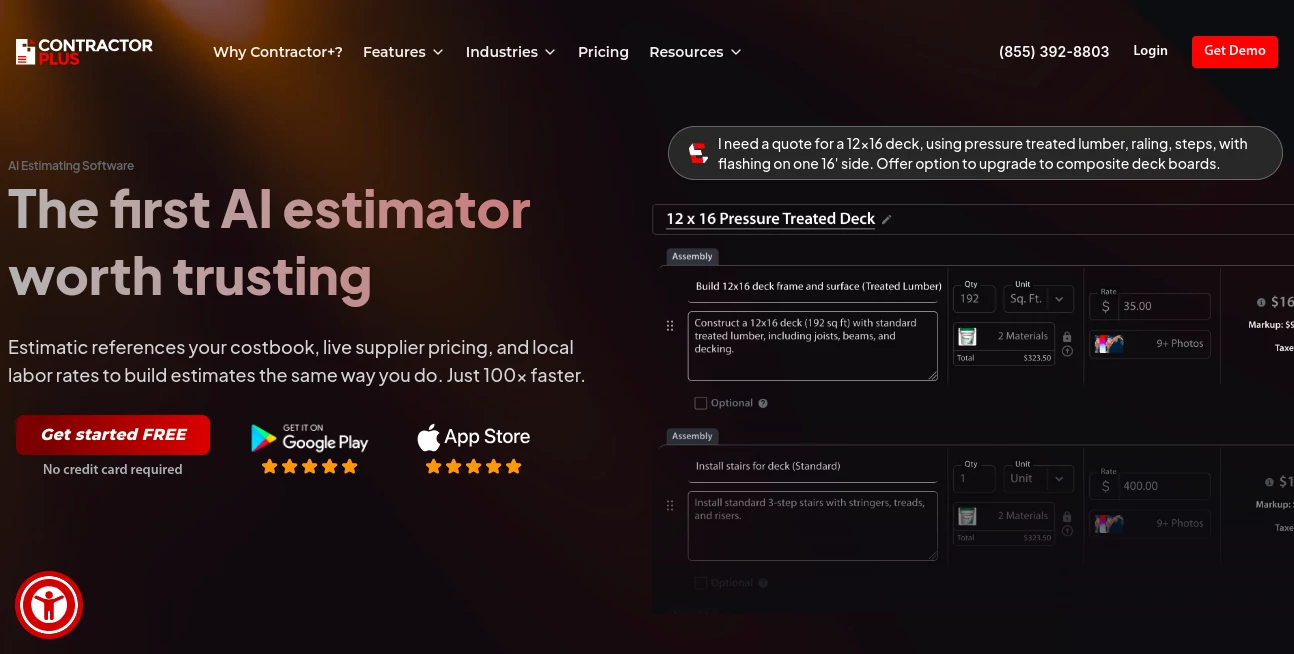
ContractorPlus AI Estimator steps in as a trusty sidekick for builders and remodelers, crunching numbers on jobs to spit out bids that hit the mark without the headache. This handy add-on takes the chaos out of quoting, pulling in material costs and labor hours to craft proposals that clients snap up. Folks in the trade rave about how it trims days off the desk grind, letting crews get back to the site with plans that pay off.
Introduction
ContractorPlus AI Estimator grew out of the daily battles contractors face with shaky spreadsheets and last-minute math mishaps that eat profits. It kicked off as a bolt-on for the main app, fine-tuned by input from field hands who'd botched bids one too many times. Quick to catch on, it's now a staple for small outfits to mid-sized firms, with users swapping yarns about snagging dream gigs thanks to spot-on figures. What draws them in is the way it folds real-world wrinkles—like fluctuating lumber prices—into straightforward sheets, turning what-if worries into walk-away wins that keep the toolbox full.
Key Features
User Interface
The dashboard greets you with a clean slate of project cards, each one expandable to reveal line items that you can drag or tap to adjust on the fly. A sidebar holds your template library, popping suggestions based on past jobs, while the main pane previews the full quote in client-friendly layouts. It's built mobile-first, so site visits turn into instant updates without fumbling for laptops, feeling more like a digital clipboard than a clunky calculator.
Accuracy & Performance
It draws from up-to-date feeds on supplies and rates, nailing totals that hold up under scrutiny, often within a buck or two of final tabs. Runs smooth even on beefy blueprints, churning through hundreds of lines in seconds to keep your rhythm rolling. Contractors point to how it flags outliers—like a spike in steel—that could sink margins, giving you the edge to tweak before sending.
Capabilities
From auto-filling takeoffs based on sketches to layering in overheads and contingencies, it covers the full bid build with options for custom markups or phased payouts. Syncs with your contacts and calendars for seamless handoffs, and even generates addendums if scopes shift mid-chat. The real flex comes in scenario spins, letting you play what-if on delays or deals to find the sweet spot that seals the handshake.
Security & Privacy
Your job sheets stay locked with role-based peeks, so subs see only their slice while you hold the reins. It follows tight standards for data handling, encrypting bids end-to-end and wiping temps after closeout. Teams trust the setup for that no-nonsense shield, knowing client deets and cost secrets won't slip during the shuffle.
Use Cases
Roofers whip up storm repair quotes on the spot, factoring weather holds and warranty wraps to win insurance claims. Kitchen flippers batch bids for cookie-cutter renos, tweaking tiles or taps to match buyer budgets. General crews tackle commercial overhauls, breaking down HVAC hauls and wiring webs for multi-month maps. Even solo handymen use it for quick fixes, turning garage gigs into growth without the guesswork.
Pros and Cons
Pros:
- Cuts quote time from hours to minutes, freeing up field focus.
- Pulls in live costs to dodge outdated dollar dances.
- Templates tame repeat jobs, keeping bids buttoned and bright.
- Mobile magic means updates anywhere, anytime.
Cons:
- Shines on standard scopes; wild custom calls for extra elbow.
- Add-on fee stacks on the base app for light users.
- Learning the full flow takes a project or two.
Pricing Plans
It nests under the main app's tiers, starting around fifty bucks monthly for core access with a handful of AI runs. Step to pro for unlimited estimates and team shares at about a hundred, with enterprise bends for big crews. Trials give a full month to test the tally without tab, and yearly locks lop off a chunk, easing the entry for steady shops.
How to Use ContractorPlus AI Estimator
Link it to your project hub, then snap or upload a blueprint to kick off the takeoff. Let it scan and suggest lines, tweak quantities or rates as needed, and watch totals update live. Polish the presentation with your logo and terms, hit send for e-signs, and track accepts in the feed. Follow up with changes via quick edits, keeping the conversation current without fresh sheets.
Comparison with Similar Tools
Where standalone calculators crunch cold numbers, ContractorPlus AI Estimator weaves in your workflow, though those might edge on raw speed for one-offs. Against full-suite rivals, it lightens the load as an add-on, skipping the sprawl but perhaps pinching on plugin plays. It hits home for app loyalists, blending bid brains with broader business beats.
Conclusion
ContractorPlus AI Estimator turns the bid battle into a breeze, arming trades with tools that tally true and tempt takedowns. It bridges the gap from gut-check guesses to grounded gains, proving smarts can steady the scales in a swingy field. As builds keep booming, this one's primed to pave more paths to profitable handshakes.
Frequently Asked Questions (FAQ)
Does it work offline?
Core calcs sync later, but live feeds need a signal for fresh figures.
Can I import from other apps?
Yes, CSV or PDF pulls slot right in for seamless starts.
How accurate are the cost pulls?
Tied to trusted sources, they track daily dances within a hair's breadth.
Supports team bids?
Pro plans pool powers for shared scopes and sign-offs.
What if a job overruns?
Change orders update the base, keeping change logs crystal.
AI Business Ideas Generator , AI Workflow Management , AI Project Management .
These classifications represent its core capabilities and areas of application. For related tools, explore the linked categories above.
Estimatic AI - Winning Estimates For Contractors details
This tool is no longer available on submitaitools.org; find alternatives on Alternative to Estimatic AI - Winning Estimates For Contractors.
Pricing
- Free
Apps
- Web Tools
Categories

Estimatic AI - Winning Estimates For Contractors Alternatives Product

Miro

LaunchBoard

Jujutsu Zero…

Hirescope.te…

PineBill

onuml

ClearWork

Motion

ModelsLab
