
🧠 AI Quiz
Think you really understand Artificial Intelligence?
Test yourself and see how well you know the world of AI.
Answer AI-related questions, compete with other users, and prove that
you’re among the best when it comes to AI knowledge.
Reach the top of our leaderboard.


















CreateNew.ai

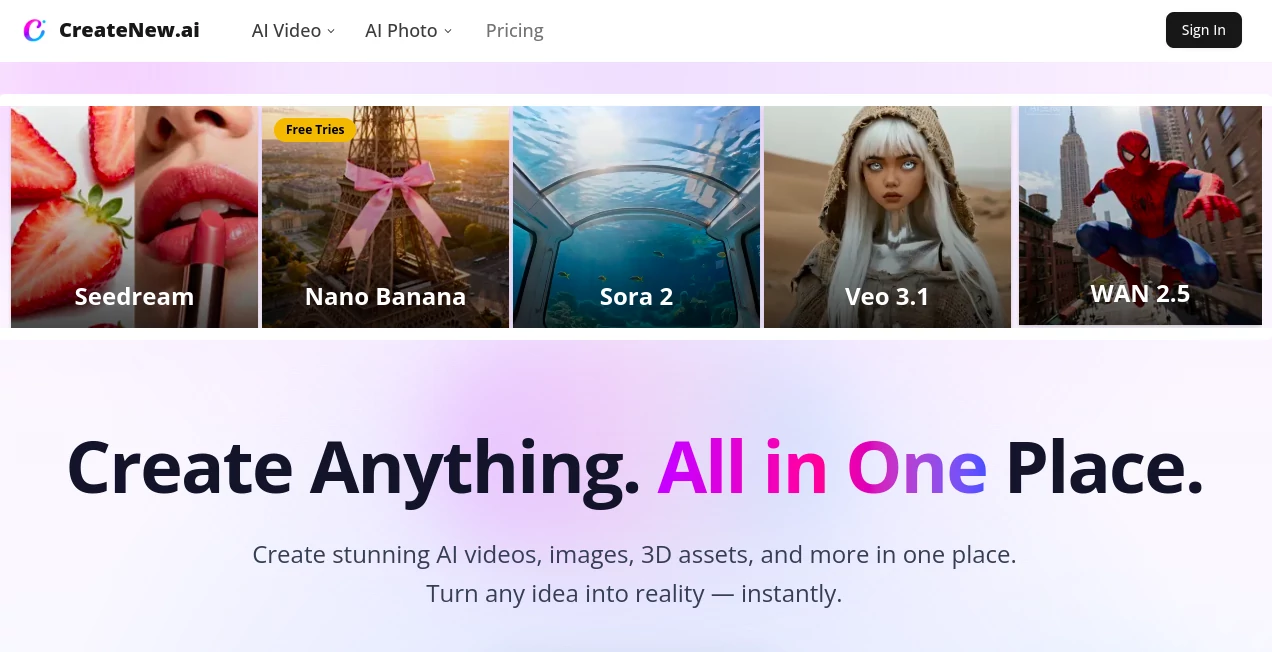
What is CreateNew.ai?
CreateNew opens up a playground where everyday thoughts morph into eye-catching videos, crisp images, and clever 3D pieces, all powered by the latest tech tricks. It's the spot for anyone itching to bring a wild notion to life without wrestling with complicated setups or endless tutorials. Folks who've dipped in often come back raving about how it turns a simple scribble or snapshot into something shareable that turns heads, making the whole process feel less like work and more like a lucky find.
Introduction
CreateNew showed up on the scene a short while back, cooked up by a team that knew the drill of juggling multiple apps just to nail one decent clip or picture. They wanted a single hangout where the heavy lifting happens behind the curtain, and it caught on quick with creators swapping tips on how it shaved days off their routines. From a quiet launch that hooked a handful of tinkerers to a bustling hub for marketers and dreamers alike, it's all about that seamless shift from 'what if' to 'wow, look at this.' Users keep sharing those aha moments, like watching a quick description bloom into a full scene that fits just right, proving it's got that knack for keeping the creative fire stoked without fizzling out.
Key Features
User Interface
The dashboard hits you with a welcoming vibe, kicking off with easy slots to jot ideas or drag in pics, no maze of menus to muddle through. Pick a vibe or model from a tidy lineup, and things kick into gear right away, with previews popping up to let you spin or swap on the spot. It's built to play nice on whatever screen you're on, feeling smooth whether you're brainstorming on a phone during commute or dialing in details at a desk, all without the usual tech hiccups that kill the mood.
Accuracy & Performance
When you feed it a detailed rundown, it latches on tight, layering in the little touches like lighting shifts or motion flows that make things feel spot-on rather than stiff. Stuff renders quick, often in under a minute for starters, holding steady even when you're stacking extras like angles or effects. Those who've run it through the paces mention how it rarely veers off course, delivering outputs that hold up under close looks, with just a nudge here and there to polish the edges.
Capabilities
It covers the gamut from whipping up short clips that tell a story to crafting images that pop with depth, even tossing in 3D twists or fun filters that add that extra flair. You can start with words alone or mix in uploads for personal spins, like turning a selfie into an animated avatar or a product shot into a lively demo. The real charm lies in how it pulls from a bunch of top-notch engines, letting you switch gears mid-stream to chase the perfect fit without starting over.
Security & Privacy
Your uploads and brainstorms get treated with care, zipping through secure channels and vanishing once the job's wrapped, so nothing sticks around uninvited. It skips using your stuff to tweak its own smarts, keeping things fair and focused on your output. Creators nod at the setup, especially when handling client bits or personal snaps, knowing they call the shots on what stays locked or gets shared down the line.
Use Cases
Marketers dash off promo reels that showcase gear in action, pulling in views without shelling out for shoots. Designers mock up concepts for client pitches, blending quick gens with their sketches to speed up approvals. Content folks craft social snippets that hook scrolls, turning quiet ideas into buzzworthy bites. Even small biz owners play with virtual try-ons, letting customers see fits before the buy, all without the hassle of extra gear.
Pros and Cons
Pros:
- Pulls together a ton of engines in one easy spot, skipping app swaps.
- Yields pro-level stuff fast, great for tight turnarounds.
- Hands full reins on outputs for paid users, no strings attached.
- Beginner-friendly without skimping on depth for old hands.
Cons:
- Free spins run short for heavy hitters, nudging toward upgrades.
- Best with clear inputs—fuzzy ones might need a redo.
- No offline mode, so spotty connections can stall the show.
Pricing Plans
You can jump in with some free trials to test the waters, perfect for casual curios or quick peeks. From there, plans kick up to handle more runs and unlocks like full rights to sell your makes, starting around the low teens monthly. Higher tiers toss in extras like batch processing or priority queues, with yearly options trimming the tab a bit. It's set up to match your groove, whether you're dipping toes or diving deep.
How to Use CreateNew
Pick your playground—video, image, or beyond—and spill your vision in words or with a snap. Choose a model that matches your mood, hit generate, and watch the magic unfold with options to tweak or retry. Grab the gems that click, download in your go-to format, and weave them into whatever's next. Swing back often to refine, building a rhythm that feels second nature after a few rounds.
Comparison with Similar Tools
Unlike single-model spots that lock you into one flavor, CreateNew mixes a bunch for that just-right fit, though those might dive deeper on specialized tweaks. Against bulky suites, it keeps things light and focused, trading some bells for breezy builds but perhaps missing niche plugins. It shines for all-rounders who want variety without the vendor vaulting, edging out the rest on that unified ease.
Conclusion
CreateNew wraps the wild world of making into something approachable and alive, turning sparks into spectacles that stick. It hands creators the keys to a bigger toolbox, proving that blending brains with bytes can birth beauties worth the buzz. As more folks chase that next big visual, this platform stands ready, whispering possibilities into every prompt you dare to drop.
Frequently Asked Questions (FAQ)
What's the best way to start a project?
Keep descriptions vivid and uploads clear—front views with bright light work wonders.
Can I sell what I make?
Paid plans give you full ownership and commercial green lights, no caveats.
How many models are there?
A solid lineup from big names, letting you pick the one that vibes best.
What if the first output's off?
Regen, swap styles, or sharpen the prompt—iteration's the name of the game.
Works on my phone?
Yep, tuned for all devices, so create on the go without missing a beat.
AI Photo & Image Generator , AI Text to Video , AI Video Generator , AI Art Generator .
These classifications represent its core capabilities and areas of application. For related tools, explore the linked categories above.
CreateNew.ai details
This tool is no longer available on submitaitools.org; find alternatives on Alternative to CreateNew.ai.
Pricing
- Free
Apps
- Web Tools
Categories

CreateNew.ai Alternatives Product

Wan AI

Picnana

hailuo03

Seedance 2.0

kling 4.0

Action Figur…

KKV AI

ai seedance …

Leonardo.ai
