
🧠 AI Quiz
Think you really understand Artificial Intelligence?
Test yourself and see how well you know the world of AI.
Answer AI-related questions, compete with other users, and prove that
you’re among the best when it comes to AI knowledge.
Reach the top of our leaderboard.


















VeriIA

What is VeriIA?
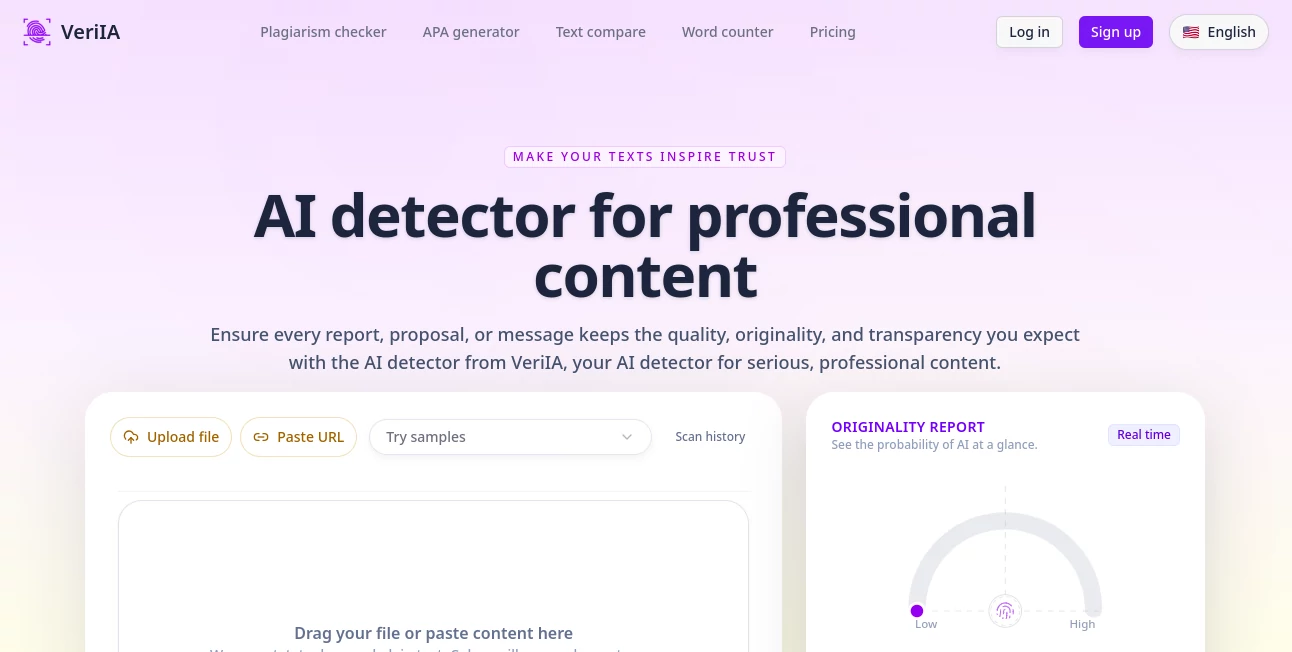
VeriIA slips into the workflow of anyone juggling words and worries about where they came from, offering a straightforward way to check if a piece feels human-crafted or machine-spun. This handy checker lights up reports, emails, and drafts with color-coded flags that point out the likely spots, helping keep things authentic without the deep dive. Writers and teams who've given it a whirl often mention how it cuts through the doubt, letting them tweak on the fly and move forward with confidence.
Introduction
VeriIA came along when the line between hand-typed thoughts and auto-generated lines started blurring more than folks liked, especially in spots like offices and classrooms where trust matters. A small team put it together after noticing how often good work got flagged wrong, aiming for something that catches the real patterns without the false alarms. It picked up steam quietly, with users sharing stories of saved hours on revisions or dodged mishaps in submissions. Over time, it's become that reliable side check for keeping content grounded, evolving with tweaks that make it sharper at spotting the subtle tells of tech assistance.
Key Features
User Interface
The setup keeps it dead simple: a big box waits for your text paste, or you can drag in a file or drop a link, all without menus that bury the point. Once you hit go, colors wash over the lines—green for clear, red for suspect—right there on screen, with a quick summary up top that spells out the odds. It's the kind of clean that lets you scan and scroll like flipping through a marked-up page, no extra tabs or waits to slow the rhythm.
Accuracy & Performance
It picks up on those telltale rhythms without much fuss, giving back a score that lines up well with what you'd suspect, though it waves the flag that nothing's foolproof. Runs come back in a blink, even on chunkier uploads, keeping the flow going for folks who need to check a stack before deadline. Users point out how it shines on straight shots but nudges a second look for the mixed bags, making it a solid first pass rather than the final word.
Capabilities
Beyond the basic flag, it pulls in extras like side-by-side views for version diffs or quick counts on words and read times, all tied to plain files or web pulls. It handles the everyday formats without a hitch, spotting blends of old and new, and even layers on checks against wider sources for that fuller picture. The real draw is how it folds into routines, turning a lone scan into a toolkit for polishing pieces that need to ring true.
Security & Privacy
What you drop in stays locked down, shuffled through secure paths and wiped clean after the job, with no bits fed back into the system for later lessons. You hold the keys on what lingers in your log, and shares only go where you point them. It's built with that quiet nod to keeping things yours, so you can toss in sensitive drafts without the second-guess about where they might show up next.
Use Cases
Researchers run proposals through it to sidestep those awkward flags in reviews, ensuring the core stays credited right. Bloggers balance speed with sincerity, tweaking machine drafts till they pass muster for the post. Teachers glance at assignments to gauge the help level without the full hunt, sparking chats on craft over catches. Marketing crews vet campaign copy to guard the brand's voice, catching slips before they slip out to the world.
Pros and Cons
Pros:
- Lights up suspects line by line, making tweaks a targeted task.
- Grabs languages on the fly, no setup swaps needed.
- Bundles in handy sides like counts and compares for one-stop checks.
- Keeps logs handy but light, easy to revisit without the bloat.
Cons:
- Short pieces might dodge the full read, needing a bit more bulk.
- Paid tiers gate the bigger runs for heavy hitters.
- Blends can blur the lines, calling for a human eye now and then.
Pricing Plans
A quick trial opens the door for a couple weeks at a low one-time dip, packing full access to test the waters deep. From there, the easy monthly at nine bucks suits solo spins with a solid credit pool, while the step-up at nineteen handles team paces with quicker queues and more room to roam. It resets fresh each cycle, with no sneaky overages, keeping the math straightforward as you scale.
How to Use VeriIA
Drop your words in the slot or link up the source, give it a nudge to start, and watch the highlights roll in with a top-line tally. Poke at the reds to rewrite or recheck, then snag the cleaned version or the report for your files. It's a loop that fits quick peeks or deeper digs, building better habits with each pass through.
Comparison with Similar Tools
Where some chasers chase broad sweeps that snag too much, VeriIA tunes for the tight spots in pro work, though those might cover more ground for casual casts. Against the free floats, it adds the extras like diffs and depths that pay off in polish, but could trail in sheer volume for the always-on. It settles in sweet for those who want a nudge toward natural without the noise.
Conclusion
VeriIA stands as a steady hand in the shift toward smarter writing aids, helping bridge the gap between ease and earnestness in every line. It turns the what-if of detection into a when-and-how, empowering creators to claim their voice amid the machines. As more words flood the feeds, this one's poised to keep the human hum alive, one clear scan at a time.
Frequently Asked Questions (FAQ)
What counts as a good chunk to check?
A handful of sentences usually does the trick, but fuller flows give sharper reads.
Does it trip on mixed sources?
It flags the likely bits, but a close look helps sort the true from the tuned.
Any language limits?
It picks up on the fly, handling the usual suspects without a hitch.
What if it flags wrong?
Tweak the phrasing and run it back—small shifts often clear the air.
Keeps my stuff safe?
Locked and cleared, with no loops back into the works.
AI Checker Essay , AI Plagiarism Checker , AI Grammar Checker , AI Content Detector .
These classifications represent its core capabilities and areas of application. For related tools, explore the linked categories above.
VeriIA details
This tool is no longer available on submitaitools.org; find alternatives on Alternative to VeriIA.
Pricing
- Free
Apps
- Web Tools
Categories

VeriIA Alternatives Product

AHelp

GPTZero

AI ATS Check…

Rephrazy
Spell Checki…
Copyleaks

TranslateAI …

Grammarly

SeoWebChecker
