
🧠 AI Quiz
Think you really understand Artificial Intelligence?
Test yourself and see how well you know the world of AI.
Answer AI-related questions, compete with other users, and prove that
you’re among the best when it comes to AI knowledge.
Reach the top of our leaderboard.


















Diagram Generator

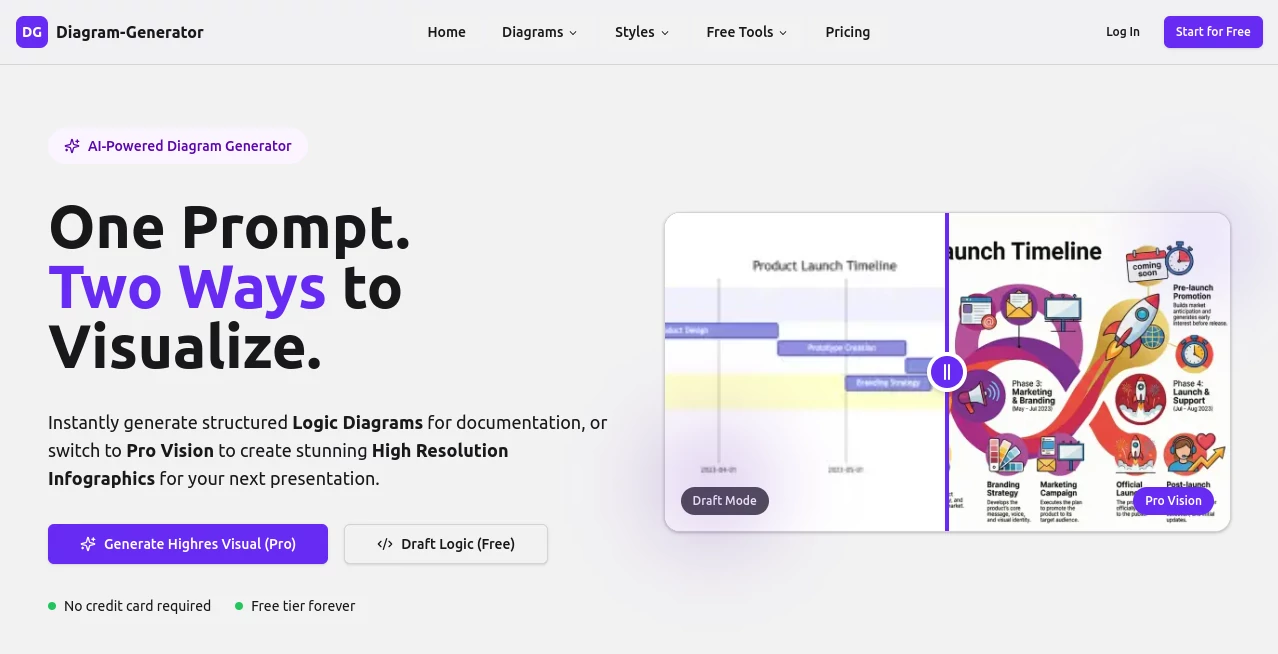
What is Diagram Generator?
Imagine typing out a quick description of a tangled process, and seconds later, you've got a clean, logical sketch laying it all out—or better yet, a glossy, high-res infographic that looks like it came from a design studio. That's the quiet thrill this tool delivers, bridging the gap between rough ideas and sharp visuals without the usual headaches. I've watched friends in tech and marketing light up when they first tried it, turning what used to be hours of dragging boxes into a matter of minutes, with results that actually impress clients.
Introduction
In the rush of putting together docs or pitches, who hasn't stared at a blank canvas wishing for a shortcut that just gets it right? This platform nails that wish, starting with a lightweight draft mode that's forever free and unlimited, perfect for hashing out logic flows on the fly. Then, when you're ready to wow, flip to pro renders that pull in fresh web data, apply real design smarts, and spit out stunning pieces up to 4K. It's caught on fast among folks juggling documentation and presentations, with stories floating around of supply chain maps that nailed current realities or emotional journey charts that captured nuances no manual tool could touch. What hooks people deepest is that smart draft-to-render flow—you tinker for free, pay only when you commit to the polish, keeping creativity flowing without the constant wallet watch.
Key Features
User Interface
It greets you with a straightforward prompt box that feels like jotting notes to a helpful colleague, backed by a chat window for tweaks that respond in real time. Styles scroll by invitingly, clickable cards kick off new projects, and the whole thing stays uncluttered whether you're refining logic or previewing pro visions. My favorite bit? That seamless shift from text edits to visual updates—no lag, no fuss, just pure momentum that keeps ideas pouring out.
Accuracy & Performance
The draft engine sketches structures with a reliability that saves endless back-and-forth, while pro mode digs into live web sources for details that stay current, handling everything from concrete architectures to subtle sentiment shifts. Generations fly—drafts in a blink, renders in minutes even for complex asks—and the outputs hold their polish across resolutions. One pal mapped a fast-changing industry trend, and it pulled accurate nodes without a single outdated link, proving it's built for real-world rushes.
Capabilities
Over a dozen diagram flavors cover the bases, from flowcharts and mind maps to specialized ones like AWS setups or funnel breakdowns in pro tiers, all spiced with styles ranging from corporate crisp to cyberpunk flair. It excels at grounding in facts via search or reasoning through abstracts, turning vague prompts into layered visuals with thoughtful layouts and lighting. Add editable code exports and a private stash for paid users, and you've got a versatile powerhouse that adapts to docs or decks alike.
Security & Privacy
Drafts stay yours to refine privately, with pro galleries locked down for paid plans and clear ownership handed over on commercial tiers. It routes through trusted partners with straightforward policies, keeping inputs contained and outputs deletable at your whim. In a space full of vague assurances, this one's transparent approach lets you focus on creating without that nagging background worry.
Use Cases
Tech leads draft sequence flows for team reviews, refining via chat before rendering board-ready UMLs that clarify debates in minutes. Marketers visualize customer paths with emotional twists, pulling web-grounded data for pitches that resonate deeper. Educators build mind maps from lesson outlines, sharing high-res versions that engage classes visually. Even strategy sessions benefit from quick Sankey charts tracing resource flows, turning abstract talks into tangible plans that stick.
Pros and Cons
Pros:
- Unlimited free drafting keeps experimentation endless and cost-free.
- Pro renders deliver presentation polish that rivals hired designers.
- Web-aware research ensures visuals stay fresh and factual.
- Style variety adds that custom flair without extra effort.
Cons:
- Top resolutions and some types lock behind credits.
- Free outputs carry a subtle mark, nudging toward paid for clean shares.
Pricing Plans
The free tier shines with unlimited drafts and a starter handful of pro credits, ideal for regular logic work without a dime. Starter packs roll in at a modest monthly rate for steady credits, watermark-free renders, and commercial rights, while pro bumps it up for 4K glory and priority perks. Credits never expire, top-ups flex as needed, and it's all pay-for-polish—you only spend when you're sold on the final shine.
How to Use Diagram Generator
Jot your concept into the prompt—something like a project timeline or supply chain overview—and watch a draft sketch appear instantly. Chat tweaks to adjust nodes or flows, adding details till it clicks, all without spending a thing. Ready for the glow-up? Select a style, hit pro render (drawing a few credits), and let it craft a high-fidelity version grounded in fresh insights. Download, drop into your slides, and bask in the compliments—it's that satisfying loop from rough to refined.
Comparison with Similar Tools
Plenty of options churn basic charts from text, but few match this one's thoughtful draft-then-render split, where you perfect for free before committing cash to beauty. Others might overload with manual drags or lack the web-savvy depth for real-time accuracy, leaving visuals dated or dull. Here, the blend of unlimited play and pro punch sets it apart, especially for anyone who values smart research and aesthetic edge without the endless subscription grind.
Conclusion
This tool quietly revolutionizes how we turn thoughts into visuals, making complex ideas accessible and beautiful without the barrier of expertise or expense. It's the kind of helper that fits right into daily hustles, sparking clearer communication and bolder presentations along the way. If you've ever wished for a faster path from brain to boardroom graphic, this one's worth the leap—pure creative fuel in a clean, clever package.
Frequently Asked Questions (FAQ)
What's the catch with the free tier?
No catch—unlimited drafts forever, with a taste of pro credits to start.
How does it handle up-to-date info?
Pro mode taps web sources for current details, keeping maps and charts relevant.
Can I use outputs commercially?
Paid plans grant full rights, perfect for client work or sales materials.
What styles are on tap?
Over ten, from clean corporate to quirky hand-drawn or futuristic cyberpunk.
Do credits roll over?
They never expire, stacking up for whenever inspiration strikes big.
These classifications represent its core capabilities and areas of application. For related tools, explore the linked categories above.
Diagram Generator details
This tool is no longer available on submitaitools.org; find alternatives on Alternative to Diagram Generator.
Pricing
- Free
Apps
- Web Tools
Categories

Diagram Generator Alternatives Product

MyMap.AI

VisualGPT
AI Diagram M…

Sourcetable

ShinePhoto

volume shader
