
🧠 AI Quiz
Think you really understand Artificial Intelligence?
Test yourself and see how well you know the world of AI.
Answer AI-related questions, compete with other users, and prove that
you’re among the best when it comes to AI knowledge.
Reach the top of our leaderboard.

















FitHairAI
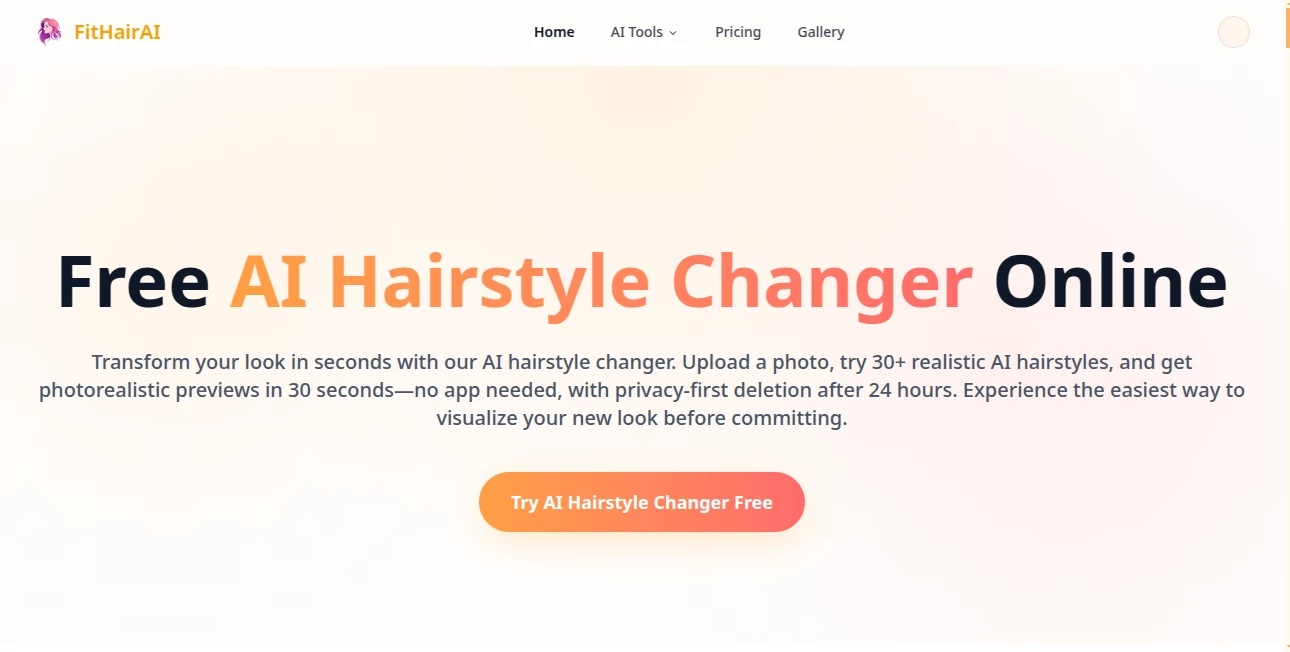
What is FitHairAI?
There's something exciting about imagining a new look without the commitment — no awkward salon regret, no waiting months for hair to grow back. This tool makes that possible in the most effortless way. You upload a selfie, choose from dozens of realistic styles, and see yourself with a fresh cut or color in seconds. I’ve watched friends spend hours debating hair changes suddenly settle on “this one” after a quick try-on session. The results look natural, not cartoonish, which is why it feels like a real mirror into what could be.
Introduction
Changing your hairstyle is a big decision. What looks good in a magazine doesn’t always suit your face shape, hair texture, or lifestyle. FitHairAI removes the guesswork by letting you preview dozens of professional hairstyles on your own photo before you ever pick up the scissors. It’s fast, private, and surprisingly accurate. No apps to download, no salon appointments needed to test ideas. Whether you’re thinking about a bold chop, soft layers, a new color, or something completely different, it gives you confidence to move forward — or happily stick with what you have. For anyone who’s ever left a salon disappointed, this feels like a quiet revolution.
Key Features
User Interface
The experience is delightfully simple. You upload a clear photo of your face, the tool quickly detects it, and then presents a gallery of hairstyle options. Click any style and see an instant preview on your face. You can switch between short, medium, long, curly, straight, bangs, updos, and more with almost no waiting. The interface stays clean so you can focus on the looks instead of figuring out buttons. Even on mobile it feels smooth and natural.
Accuracy & Performance
What stands out is how well it understands lighting, face shape, and hair texture. The generated styles blend realistically with your features instead of looking pasted on. Skin tones stay consistent, shadows match, and the hair falls naturally around your face. Processing is quick — usually under 30 seconds — and the quality holds up even on everyday phone photos. It’s one of those rare tools where the result actually looks like you with a new haircut, not an obvious filter.
Capabilities
It offers 30+ realistic hairstyles for men and women, including bobs, pixies, long layers, curls, fades, braids, and color variations. You can try different lengths, textures, and bangs. The tool works on selfies, professional photos, and even group shots (though single clear faces give the best results). Outputs are high-resolution and ready to save or share. It’s perfect for testing before a salon visit, planning a color change, or just having fun exploring new looks.
Security & Privacy
Your photos are processed securely and automatically deleted after 24 hours. No account is required to try it, so you can experiment privately without creating a profile. That thoughtful approach makes it feel safe to upload personal selfies, especially when testing bolder styles you might not be ready to show the world yet.
Use Cases
A woman nervous about cutting her long hair tries a shoulder-length lob and finally books the appointment with confidence. A guy considering a fade uploads his photo and sees exactly how different lengths would look before talking to his barber. Someone planning a dramatic color change previews platinum blonde, rose gold, and deep burgundy to decide what suits their skin tone best. Couples try matching styles for weddings or photoshoots. It’s useful for anyone who wants to see the “after” before making a change that takes months to undo.
Pros and Cons
Pros:
- Realistic results that actually look like you with the new style.
- Extremely fast previews — no long waiting times.
- Wide variety of modern and classic hairstyles for all genders.
- Completely free to try with no signup required.
- Privacy-focused with automatic photo deletion.
Cons:
- Best results come from clear, well-lit front-facing photos.
- Very complex or highly stylized looks may need salon expertise to achieve exactly.
- Unlimited daily use and extra features are behind paid plans.
Pricing Plans
The core experience is free — you can try multiple hairstyles without spending anything. Paid plans unlock higher resolution downloads, more daily generations, and priority processing during busy times. The pricing is reasonable for anyone who finds themselves using it regularly for important style decisions.
How to Use FitHairAI
Go to the main page and upload a clear selfie (front-facing with good lighting works best). Wait a moment while it processes your face. Browse the hairstyle gallery and tap any option to see an instant preview. Try different lengths, colors, and styles until you find one you love. Download the result in high quality to show your hairstylist or share with friends. The whole process usually takes less than a minute per look.
Comparison with Similar Tools
Many hairstyle try-on apps feel cartoonish or limited in options. This one stands out for its realistic blending and natural-looking results on real faces. Where others give generic filters, the previews here respect your actual features and lighting. It’s simpler and more private than apps that require accounts and constant permissions, making it the preferred choice for quick, trustworthy virtual try-ons.
Conclusion
Changing your hair is exciting but nerve-wracking. FitHairAI takes away the uncertainty and replaces it with confidence and fun. It lets you explore new looks safely, quickly, and realistically — turning “what if” into “this is me.” Whether you’re planning a big change or just curious about different styles, it’s the kind of tool that makes you wonder how you ever decided without it. Your next great hairstyle might be just one upload away.
Frequently Asked Questions (FAQ)
How realistic are the results?
Very realistic — the AI blends hair naturally with your face, lighting, and skin tone.
Do I need to create an account?
No — you can start trying styles immediately without signing up.
Are my photos saved?
Photos are automatically deleted after 24 hours for privacy.
Can I try hairstyles for men and women?
Yes — there are styles for all genders and hair types.
What if I don’t like any of the styles?
Keep trying — there are many options, and small prompt tweaks can give fresh results.
AI Fun Tools , Photo & Image Editor , AI Design Generator , AI Image to Image .
These classifications represent its core capabilities and areas of application. For related tools, explore the linked categories above.
FitHairAI details
Pricing
- Free
Apps
- Web Tools
Categories

FitHairAI Alternatives Product

Retro Image …
ao3dle
Free AI Kiss…

FLUX 2
Nano Banana 2

Meet in the …

ChatGPT Imag…

lovetype16

Reztune
