
🧠 AI Quiz
Think you really understand Artificial Intelligence?
Test yourself and see how well you know the world of AI.
Answer AI-related questions, compete with other users, and prove that
you’re among the best when it comes to AI knowledge.
Reach the top of our leaderboard.

















Flux 2 AI

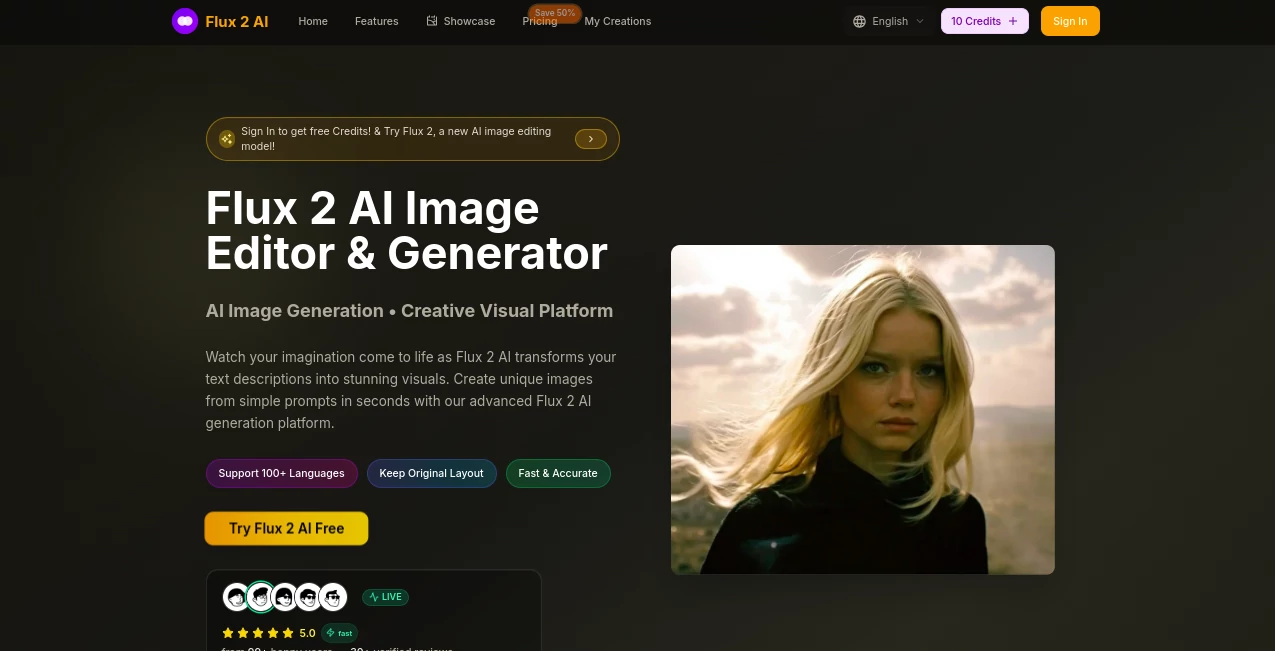
What is Flux 2 AI?
Flux 2 AI slips into your creative routine like a trusted sketchbook that draws itself, turning everyday words into eye-catching scenes that capture the imagination. This web-based wonder makes it easy for anyone to whip up polished pictures without picking up a pencil, perfect for those moments when an idea hits but the tools don't. Folks who've dabbled in it often share how it saved them from staring at blank canvases, delivering results that feel personal yet pro-level right from the start.
Introduction
Flux 2 AI came along a short while back, sparked by a team keen on breaking down the walls between big dreams and quick sketches. They wanted something that grabbed the full flavor of your thoughts—be it a misty mountain or a bustling market—and handed back a visual that nailed it, no fuss. It didn't take long for word to spread in online circles, where creators swapped screenshots of sun-drenched portraits or whimsical worlds born from a few lines. What hooks people is that sense of instant magic, where your rambling description blooms into something shareable, turning idle evenings into galleries of what-ifs that actually worked out.
Key Features
User Interface
The setup greets you with a welcoming blank space, just a spot to jot your ideas and a button to set it loose, all wrapped in a clean look that doesn't crowd the screen. Drag in a photo if you're tweaking an old one, or let the words do the talking—either way, it flows like a casual chat, with previews popping up smooth and easy to flip through. Even if you're glancing at it on your phone during a break, it shrinks just right, keeping the fun front and center without any confusing corners.
Accuracy & Performance
When you describe a scene with all its little twists—like golden hour glow on a quiet street—it picks up on those hints and layers them in without missing a beat, often landing so close to what you pictured that tweaks feel optional. Things spin to life in a couple seconds flat, even on beefier requests, and the sharpness holds up when you zoom in or print it out. Users keep coming back because it rarely wanders off script, turning those 'almost but not quite' frustrations into rare 'spot on' smiles.
Capabilities
It dives into all sorts of styles, from lifelike snapshots to dreamy animations or classic brush strokes, letting you mix moods and details like a seasoned painter experimenting on the fly. Upload a base image to refine it, or start from scratch with a prompt that spans languages and vibes, and it handles the heavy lifting to spit out ready-to-use files. The real charm shows in how it juggles complex setups, weaving elements together so your cyberpunk skyline or cozy cafe corner feels lived-in and layered.
Security & Privacy
Your uploads and brainstorms stay under wraps during the process, with the system wiping the slate clean once you've grabbed your goods, giving you peace to play without peeks from outsiders. It keeps things straightforward on the data front, focusing on your creations rather than collecting extras, so you can dive in knowing your rough ideas won't echo anywhere you didn't send them.
Use Cases
Social media whizzes craft eye-grabbers for posts that stop the scroll, like a vibrant festival shot from a quick note on colors and crowds. Designers mock up client visions overnight, blending uploaded sketches with fresh twists to spark feedback sessions. Teachers pull in custom illustrations for lessons, turning abstract concepts into visuals that stick with students long after class. Even casual dreamers jot evening thoughts into bedtime stories with matching scenes, making family read-alongs feel like mini adventures.
Pros and Cons
Pros:
- Grabs the heart of your words for outputs that feel tailor-made.
- Blazing quick turns keep the inspiration flowing without waits.
- Versatile enough for pros and beginners to jump in together.
- High-clarity results skip the cleanup, straight to showcase.
Cons:
- Credit counts can add up for heavy daily dives.
- Best with vivid details; skimpy sketches might need a nudge.
- No app yet, though the web side shines on mobiles.
Pricing Plans
You can ease in with a handful of free tries to feel the spark, no strings attached. From there, the basic yearly deal runs about ten bucks a month on sale, packing thousands of credits for steady use, unlimited saves, and rights to repurpose for work. Step up to pro for double the fuel at around twenty-four, or go big with enterprise at sixty-four for massive batches. They keep it flexible with anytime exits and a flash cut that makes dipping deeper tempting without the pinch.
How to Use Flux 2 AI
Start by heading to the generator spot and either typing a lively description or hauling in a photo to build on. Add notes on style or feel if you like, then tap to set it spinning—watch the previews roll in, swipe to favorites, and snag the one that clicks in your choice of formats. Loop back to refine or remix, turning a single spark into a whole set that evolves with your tweaks.
Comparison with Similar Tools
Unlike broader suites that spread thin across extras, Flux 2 AI hones in on that crisp visual punch, trading bells for focused brilliance, though those might suit multi-taskers better. Against free-for-alls with watermarks and waits, it delivers clean, swift hits that feel premium without the polish time. It stands out for creators who want depth in descriptions over surface skims, making it a cozy pick in a crowded canvas.
Conclusion
Flux 2 AI wraps up the hunt for hassle-free visuals by blending smart guesses with genuine glow, turning 'tell me a picture' into treasures you can touch. It empowers the everyday imaginer to craft without the craft, proving that a few well-placed words can light up worlds worth wandering. As more minds lean on digital drafts, this one's poised to keep the palette fresh, one vivid vision at a time.
Frequently Asked Questions (FAQ)
What's the sweet spot for prompts?
Pack in colors, lights, and moods for results that pop just right.
Can I tweak after it's made?
Upload the output as a base and remix with new ideas for endless spins.
How many languages does it get?
Over a hundred, so global vibes flow without a hitch.
Downloads in what flavors?
PNG or JPEG, crisp and ready for wherever you take them.
Mobile-friendly or stuck on desktop?
Web magic works smooth on phones, no app needed yet.
AI Text to Image , AI Photo & Image Generator , Photo & Image Editor , AI Art Generator .
These classifications represent its core capabilities and areas of application. For related tools, explore the linked categories above.
Flux 2 AI details
This tool is no longer available on submitaitools.org; find alternatives on Alternative to Flux 2 AI.
Pricing
- Free
Apps
- Web Tools
Categories

Flux 2 AI Alternatives Product
Nano Banana …

OCMaker AI

Picsart

Seedream 4.0…

Nano Banana …

Nanosora

Consistent C…

NanoAI

PixAI - AI A…
