
🧠 AI Quiz
Think you really understand Artificial Intelligence?
Test yourself and see how well you know the world of AI.
Answer AI-related questions, compete with other users, and prove that
you’re among the best when it comes to AI knowledge.
Reach the top of our leaderboard.


















Free Image Generator

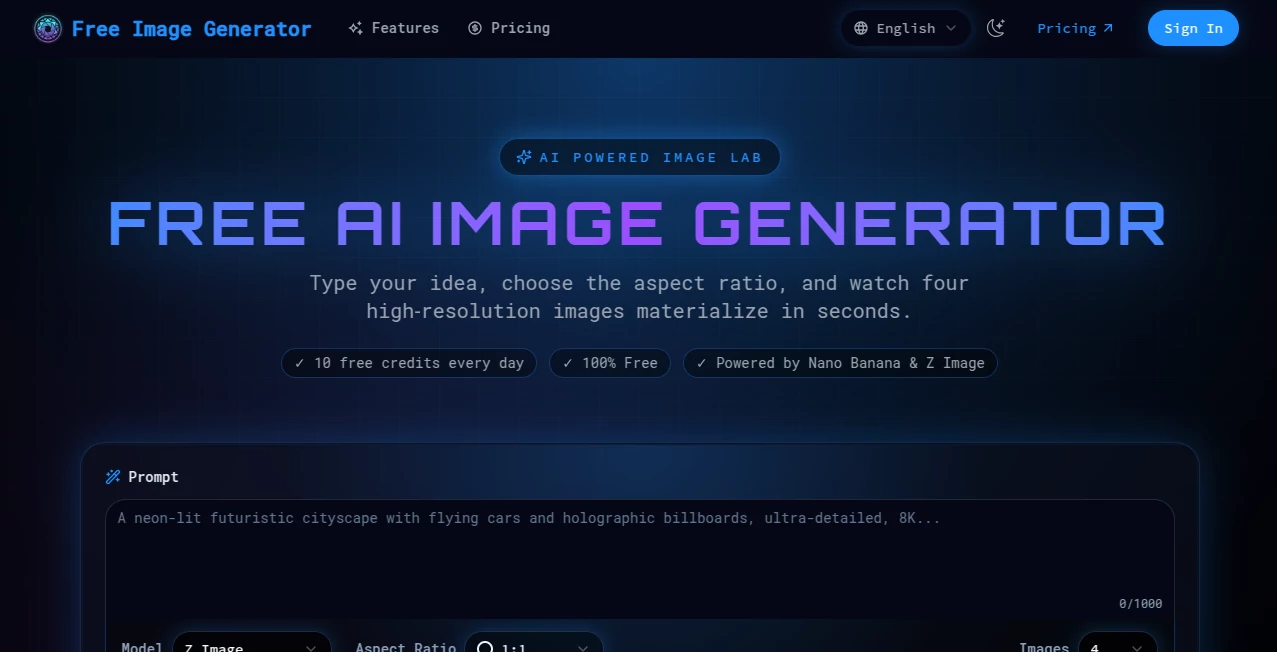
What is Free Image Generator?
I still remember the first time I tried this tool: typed a simple prompt about a quiet mountain cabin at dawn, hit generate, and suddenly there it was—a beautiful, atmospheric image that looked like it belonged on a book cover. What struck me most wasn’t just the quality, but that it was completely free, no credit card, no waiting list. In a world where so many AI image tools hide their best features behind paywalls, this one stands out by giving everyone access to high-quality results right away. It’s become my go-to whenever I need visuals for blog posts, social media, or just a bit of creative fun.
Introduction
Getting a professional-looking image used to mean hiring a designer or spending hours in editing software. Now, with this platform, you can type a description and have something beautiful in seconds. It’s built for people who want great visuals without the hassle—bloggers, small business owners, social media managers, students, or anyone who likes to play with ideas. The real magic is how approachable it feels: no complicated settings, no login required for basic use, just you and your imagination. I’ve watched friends who swore they had zero artistic talent create posters and social graphics that looked polished and intentional. It’s the kind of tool that quietly removes barriers and lets creativity flow freely.
Key Features
User Interface
The interface is refreshingly straightforward. You land on a clean page with a big text box for your prompt and a simple “Generate” button. Below that, options for aspect ratio and style appear without overwhelming you. Results show up in a neat grid, and you can download instantly or regenerate with a single click. It feels modern yet uncluttered—exactly what you want when you’re focused on creating, not navigating menus.
Accuracy & Performance
The images it produces are surprisingly consistent and detailed. Describe a cozy bookstore at night, and you’ll get warm lighting, realistic bookshelves, and that inviting atmosphere you pictured. It handles complex prompts well—multiple subjects, specific moods, artistic styles—and rarely disappoints with random artifacts. Generation times are fast, usually under 20 seconds even for detailed scenes. It’s reliable enough that I’ve used it for client work without hesitation.
Capabilities
You can create anything from realistic photos to painterly illustrations, cartoons, or abstract art. Supports portrait, landscape, square, and custom aspect ratios. Style options range from photorealistic to oil painting, digital art, pixel art, and more. It understands artistic references (“in the style of Studio Ghibli”) and can generate multiple variations at once. Perfect for everything from social media posts to blog headers, book covers, or even NFT concepts.
Security & Privacy
Since it’s a no-signup tool for basic use, there’s no personal data stored unless you choose to create an account for saving favorites. Images are generated on the fly and not kept on servers after download. It’s reassuring to know your prompts and creations stay private—especially when you’re experimenting with personal or sensitive ideas.
Use Cases
Bloggers create eye-catching headers and featured images in minutes. Small business owners design product mockups, social posts, and promotional banners without hiring a designer. Teachers illustrate lessons with custom visuals that engage students. Content creators generate thumbnails and cover art that stand out. Writers visualize book covers or scene descriptions. Even casual users have fun making profile pictures, memes, or digital art for personal use.
Pros and Cons
Pros:
- Truly free with generous daily limits—no hidden catches.
- High-quality, consistent results that rival paid tools.
- Super simple interface—anyone can use it in seconds.
- No account required for basic generation.
- Fast generation times and multiple variations.
Cons:
- Free tier has daily limits (though generous).
- Occasional wait times during peak hours.
- Advanced features like upscaling require premium.
Pricing Plans
Free plan gives you a solid number of generations per day with no watermarks—enough for most casual and semi-pro use. Premium starts at a very reasonable monthly fee for unlimited generations, faster priority, higher resolution, and extras like image upscaling and editing tools. It’s one of the most fairly priced options out there—great value if you use it regularly.
How to Use Free Image Generator
Go to the homepage, type your description in the prompt box (be specific for best results), choose aspect ratio or style if you want, then click Generate. Results appear in seconds—download your favorite or click “Try Again” for variations. For even better control, add details like “highly detailed, cinematic lighting” or “in the style of [artist].” It’s that simple, and the more you experiment, the better it gets.
Comparison with Similar Tools
Unlike many competitors that lock the best quality behind expensive subscriptions or require accounts, this one gives you real value for free. It delivers comparable or better image quality than some paid tools, especially for natural scenes and artistic styles. While others might offer more advanced editing features, the combination of ease, speed, and truly free access makes this one hard to beat for most users.
Conclusion
This tool quietly raises the bar for what “free AI image generation” can mean. It removes barriers, delivers impressive results, and keeps things simple enough that anyone can create something beautiful. Whether you need visuals for work, school, or just for fun, it’s a reliable companion that consistently exceeds expectations. Give it a try—you’ll likely find yourself coming back again and again.
Frequently Asked Questions (FAQ)
How many images can I generate for free?
Generous daily limit—enough for regular use without feeling restricted.
Do free images have watermarks?
No watermarks on free generations—clean and ready to use.
Can I use the images commercially?
Yes, all generated images are yours to use however you like.
What if I need more generations?
Premium plan offers unlimited access and priority queue.
Does it support specific styles or artists?
Absolutely—just mention them in the prompt.
AI Photo & Image Generator , AI Art Generator , AI Design Generator , AI Text to Image .
These classifications represent its core capabilities and areas of application. For related tools, explore the linked categories above.
Free Image Generator details
This tool is no longer available on submitaitools.org; find alternatives on Alternative to Free Image Generator.
Pricing
- Free
Apps
- Web Tools
Categories

Free Image Generator Alternatives Product

ChatGPT Imag…

chibi genera…

Gpt Image 1.5

Seedream Ima…

SeeDream 4.5

Z-Image
Z-Image Free

Nano Banana …

Image Descri…
