
🧠 AI Quiz
Think you really understand Artificial Intelligence?
Test yourself and see how well you know the world of AI.
Answer AI-related questions, compete with other users, and prove that
you’re among the best when it comes to AI knowledge.
Reach the top of our leaderboard.


















Gavel

What is Gavel?
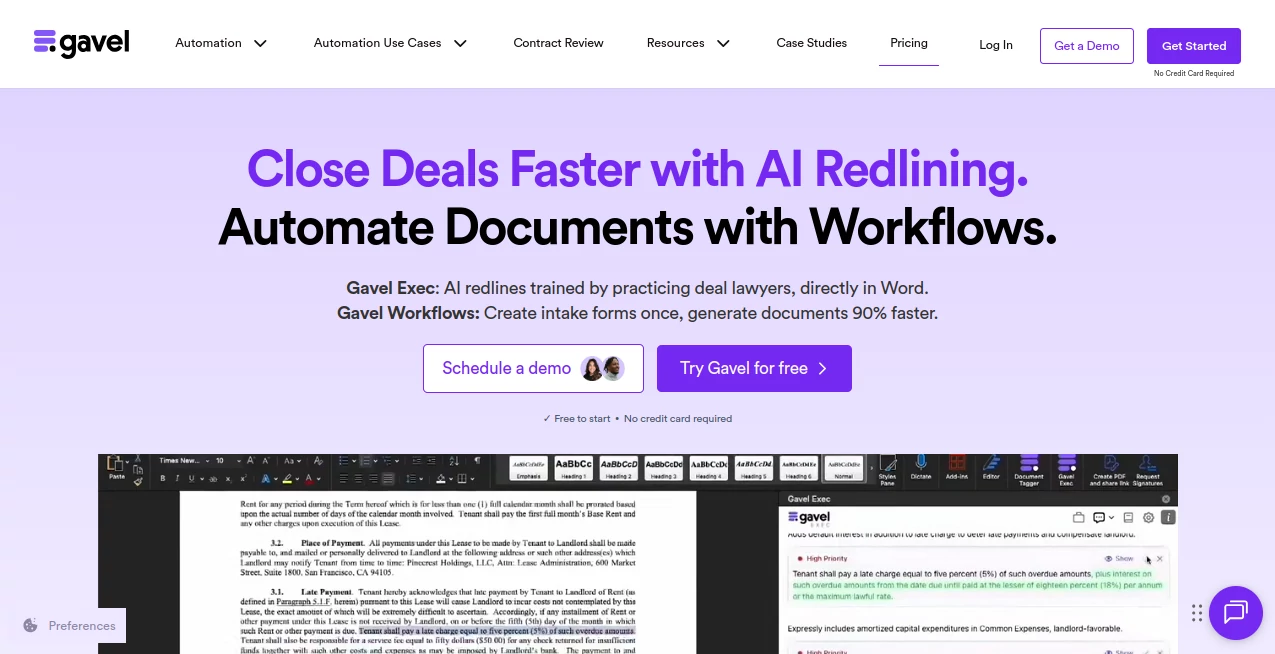
Imagine wrapping up a complex deal not in days, but in a fraction of the time, with every clause scrutinized and suggestions that feel like they came from your sharpest colleague. That's the quiet revolution this platform sparks for legal pros—blending seamless automation with spot-on AI that learns your style and safeguards your workflow. I once watched a solo practitioner turn a messy intake form into a polished estate plan in under 30 minutes, grinning like she'd just aced a deposition. It's tools like this that remind us why we got into law: to focus on the strategy, not the shuffle.
Introduction
Legal work often feels like a marathon of minutiae—drafting, redlining, aligning terms across a dozen docs—until something like this comes along and flips the script. Born from the real-world gripes of practicing attorneys, it pairs intuitive document workflows with an AI sidekick trained by deal lawyers to handle the heavy lifting right in your familiar Word setup. No more starting from scratch or sifting through inconsistencies; instead, you get a system that adapts to your firm's playbook, speeds up client intakes, and even benchmarks against market standards. Thousands of firms worldwide have ditched the drudgery, raving about how it frees them to chase bigger wins. Picture a family law office where intake data flows straight into customized agreements, or a corporate team redlining NDAs with AI that mirrors their negotiation flair—it's that kind of practical magic that keeps users hooked, turning "good enough" into genuinely game-changing.
Key Features
User Interface
Slipping into your daily routine feels effortless, thanks to a setup that lives right inside Word—no clunky logins or app switches to break your concentration. The client portal? It's white-labeled and encrypted, gathering data like a pro receptionist without the hassle. I love how the workflows unfold with simple conditional logic, letting you build forms that calculate fees or flag risks on the fly. It's polished yet unobtrusive, the sort of interface that earns quiet loyalty because it just... works, whether you're on a laptop in the office or wrapping up from a coffee shop.
Accuracy & Performance
What sets it apart is that razor-sharp precision, drawing from a vast repository of lawyer-vetted clauses to rewrite or redline with uncanny insight—adapting to your risk tolerance and style without a single off-note suggestion. Performance-wise, it's a speed demon: generating full docs 90% faster, spotting term sheet mismatches in seconds, and handling complex calculations like a seasoned paralegal. One partner I know swears it caught a sneaky indemnity clause variation that could've cost her client big; that's the reliability that turns skeptics into evangelists overnight.
Capabilities
From automating estate plans with smart logic that branches based on client answers, to instant redlining that pulls from your firm's past deals or built-in benchmarks, the versatility here is a breath of fresh air. Craft custom playbooks for everything from real estate closings to probate filings, or let it quiz you for tailored summaries that prep you for the next call. It even aligns scattered docs like LOIs and final agreements, flagging gaps before they bite. For family law folks, it's a client-friendly portal that streamlines consents; for corporates, a clause library that evolves with your practice—endless ways to weave it into the fabric of your work.
Security & Privacy
In a field where one leak can unravel everything, this platform stands as a fortress: SOC II and HIPAA compliant, with AES-256 encryption wrapping every upload and a zero-retention policy that's contractually ironclad. PCI-compliant portals mean secure payments without the worry, and a dedicated 24/7 security crew plus third-party audits keep threats at bay. It's the kind of behind-the-scenes armor that lets you breathe easy—I've heard from a compliance officer who called it "the only tool that sleeps as soundly as I do now."
Use Cases
Take a real estate attorney buried in closing checklists: upload the purchase agreement, and it auto-generates disclosures with calculated prorations, ready for e-sign in minutes. Or picture a startup lawyer redlining seed docs—AI flags deviations from standard terms, rewrites for founder-friendly language, and benchmarks against recent VC deals, all while learning your firm's voice. Estate planners craft full plans from a quick intake, complete with revocable trusts that adapt to asset changes. Even in probate, it streamlines executor notices with personalized summaries that cut emotional legwork. These aren't hypotheticals; they're the stories pouring in from users who've reclaimed weekends and wowed clients with turnaround times that feel downright magical.
Pros and Cons
Pros:
- Tailors to your exact style, making every output feel like an extension of your expertise.
- Drastically cuts grunt time—90% faster docs mean more billable hours for what matters.
- Bulletproof security that complies with the toughest regs, no compromises.
- Free onboarding turns setup into a breeze, with support that actually listens.
Cons:
- Shines in structured workflows; super-custom niches might need initial playbook tweaks.
- While free to start, scaling to heavy use calls for thoughtful credit management.
Pricing Plans
Jumping in is as painless as it gets—no credit card upfront, just dive into unlimited support and free training for your whole crew right from the hello. It's built for growth: start light with basics that cover everyday automations, then layer on premium for advanced AI redlining and custom integrations as your caseload climbs. Teams love the collaborative tiers that sync playbooks across users, all at rates that feel fair—like investing in a junior associate who never sleeps. The beauty? It scales with you, without those surprise gotchas that sour the deal.
How to Use Gavel
Kick things off by signing up—takes seconds, no barriers—and head to the dashboard to pick a template, whether it's a pre-built NDA or your firm's go-to lease. Feed in client data via the secure portal (it handles everything from addresses to asset lists with zero fuss), then watch the workflow spin up the draft, complete with conditional skips for "if married, then..." logic. For redlining, open in Word, highlight a section, and let the AI suggest rewrites grounded in your playbook—accept, tweak, or chat for alternatives. Export as PDF for signing, or align with prior docs to catch drifts. Last week, a buddy used it to harmonize a term sheet with the final SPA; what took her hours before? Done in a coffee break. Rinse, repeat, and suddenly your practice hums.
Comparison with Similar Tools
Plenty of platforms promise automation, but few embed AI as deeply into the redlining dance like this one does—where others spit generic clauses, it personalizes with your firm's nuance and benchmarks against live market data for that edge. Desktop-bound rivals feel dated next to this browser-friendly flow, and while some boast templates, none match the adaptive learning that turns one-off uses into a growing brain trust. It's the thoughtful lawyer-engineer collab that tips the scales, delivering not just speed, but smarts that feel custom-forged for the front lines.
Conclusion
This isn't about replacing the craft of law; it's about elevating it, stripping away the tedium so you can pour your fire into the fights that count. From the solo practioner streamlining solos to firms scaling symphonies of docs, it whispers possibility into every workflow—faster closes, happier clients, and that rare glow of a practice firing on all cylinders. If you've ever wished for a co-pilot who anticipates your moves and backs them with brilliance, look no further. It's the upgrade your desk deserves, and honestly, the one you've earned.
Frequently Asked Questions (FAQ)
Does it work with my existing Word templates?
Seamlessly—upload them as proprietary bases, and it'll weave in your logic without a glitch, keeping your branding intact.
How does the AI learn my style?
From your playbooks, past redlines, or even a quick chat session—it evolves with use, mirroring your voice like a star associate.
Is it safe for client-sensitive data?
Rock-solid: HIPAA/SOC II compliant, encrypted end-to-end, with zero retention on your terms—peace of mind baked in.
What if I'm new to automation?
Free onboarding walks your team through it, step by whimsical step—no prior tech wizardry required.
Can it handle calculations in docs?
Like a charm—prorations, fees, or contingencies flow through conditional branches, error-free and client-ready.
AI Legal Assistant , AI Workflow Management , AI Contract Management , AI Documents Assistant .
These classifications represent its core capabilities and areas of application. For related tools, explore the linked categories above.
Gavel details
This tool is no longer available on submitaitools.org; find alternatives on Alternative to Gavel.
Pricing
- Free
Apps
- Web Tools
Categories

Gavel Alternatives Product

David One

jpg to excel

Yorph AI

VisualGPT

Harvey

Sourcetable

GLM-OCR Onli…

Nifty

Jujutsu Zero…
